

AAII Website Log In and Browser Help
Frequently Asked Questions
- How do I login?
- How do I customize my login information?
- How do I unsubscribe from the e-newsletters I receive?
- How do I reset my login information?
- The site is not recognizing my login credentials
- What is a cookie?
- How do I enable cookies on my browser?
- What is JavaScript?
- How do I enable JavaScript on my browser?
- Troubleshoot browser issues
How do I login?
Click on the "Login" link at the top right-hand corner of the webpage.

How do I customize my login information?
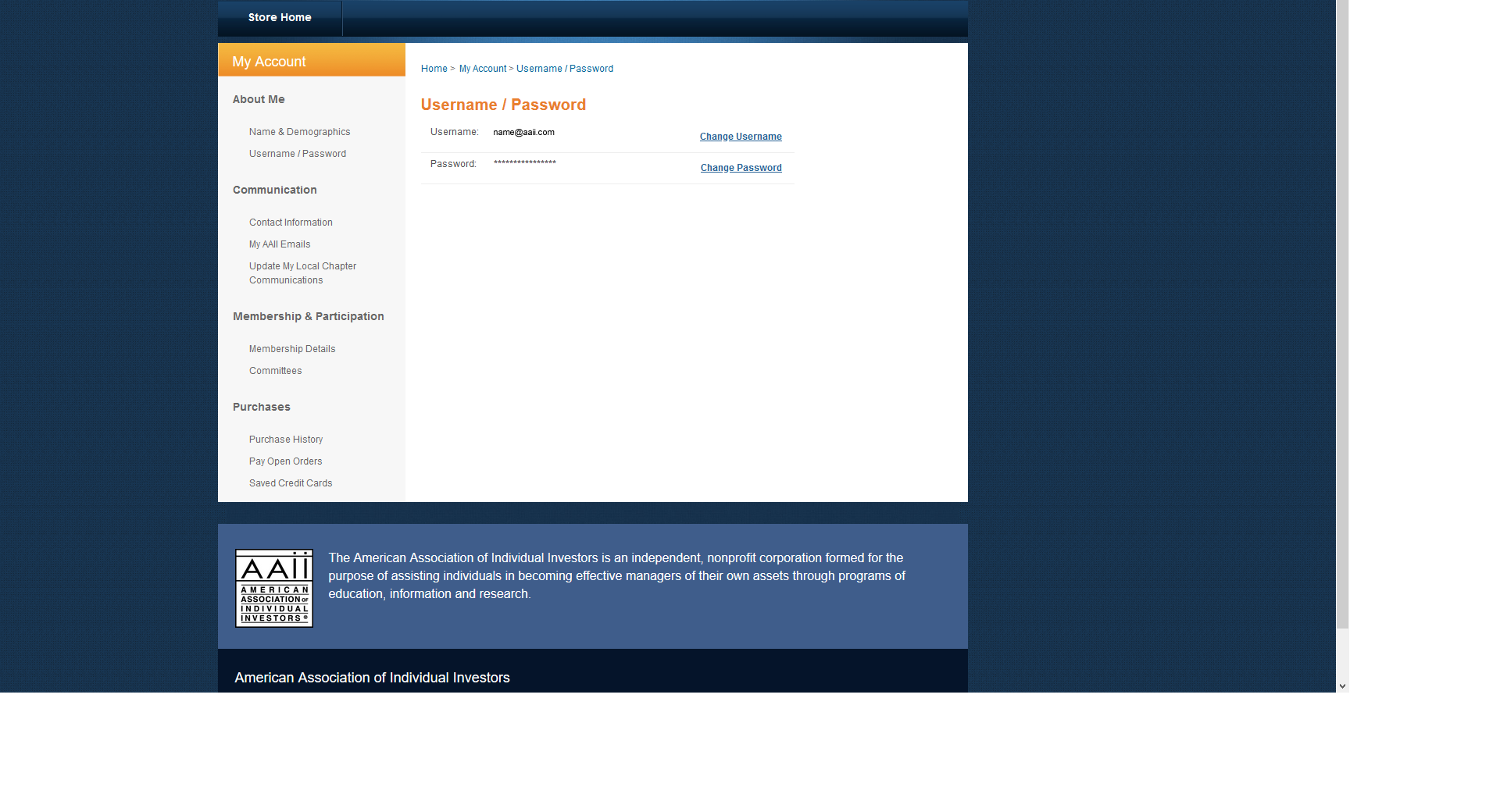
After you have logged into the AAII website you can customize your login by following these steps.
- Click on your name at the top right-hand corner of the webpage and select My Account link from the drop-down menu.
- Select Username/Password link from the left-hand column of page to customize your login information. Please do not use any special characters for your password (i.e., &%$@#!)
How do I unsubscribe from the e-newsletters I receive?
After you have logged into the AAII website you can unsubscribe from e-newsletters by following these steps.
- Click on your name at the top right-hand corner of the webpage and select the My Account link from the drop-down menu.
- Select My AAII emails link from the left-hand column of page to customize your Email Preferences.
How do I reset my login information?
You can reset your login information by going to the following link: https://user.aaii.com/sso/ForgotPassword.aspx.
If you do not think you have an email address on file or if the password reset is not recognizing your email address, please contact Member Services at members@aaii.com.
The site is not recognizing my login credentials
- Make sure you are entering your email address as your username
- Be aware that your username and password are case sensitive.
- Check your keyboard and make sure CapsLock is not on.
- If you are copying your password, make sure additional spaces or "white space" has not been unintentionally added when you paste.
- Try resetting your cache and clearing your cookies on your browser.
- Be sure to enter your complete email address as the username.
- If all else fails, try resetting your password.
- If you do not think you have an email address on file or if the password reset is not recognizing your email address, please contact Member Services at members@aaii.com.
What is a cookie?
A cookie, also known as a web cookie, browser cookie and HTTP cookie, is a piece of text stored on a user's computer by their web browser. A cookie can be used for authentication, storing site preferences, shopping cart contents, the identifier for a server-based session or anything else that can be accomplished through storing text data.
How do I enable cookies on my browser?
Note: You must enable cookies in your web browser. [ AAII Cookie Policy ]
Enabling Cookies on Chrome versions - Version 80.0 and newer
- Open Chrome browser.
- At the top-right-hand corner, click on the 3 vertical dots icon and select Settings from the drop-down menu.
- Click Privacy and Security from the menu on the left column.
- Click Site Settings on right-hand column. Under Permissions click on Cookies and site data.
- Turn on cookies: Allow sites to save and read cookie data.
Enabling Cookies on Firefox versions - Version 70.0 and newer
- Open Firefox browser.
- At the top-right-hand corner, click on the 3 vertical bars icon and select Options from the drop-down menu.
- Click Privacy and Security from the menu on the left column
- Set Content Blocking to Standard on the right-hand column.
Enabling Cookies on Safari versions - Version 12.0 and newer
- Open Safari browser.
- Choose Safari > Preferences, click Privacy.
- Make sure Block all cookies is unchecked.
Enabling Cookies on Edge versions - Version 80.0 and newer
- Open Edge browser.
- At the top-right-hand corner, click on the 3 horizontal dots icon and select Settings from the drop-down menu.
- Click Site permissions from the menu on the left column
- Under Cookies and site data: Turn on Allow sites to save and read cookie data (recommended)
We Do Not support IE 11 and older versions
How do I enable JavaScript on my browser?Note: You must enable JavaScript in your web browser. Enabling JavaScript on Chrome versions - Version 80.0 and newer
Enabling JavaScript on Firefox versions - Version 70.0 and newer
Enabling JavaScript on Safari versions - Version 12.0 and newer
Enabling JavaScript on Edge versions - Version 80.0 and newer
We Do Not support IE 11 and older versions Troubleshoot browser issues
If your web browser is showing 500, 404 or 403 errors or blank pages on AAII website. Please do the following steps: Note: Clearing all cookies and site data stored on your browser may sign you out of websites and remove offline web content. Clearing cache data will or will not affect your logins depending on the browser you are using. Clear your browser's cache and cookies from All Time. 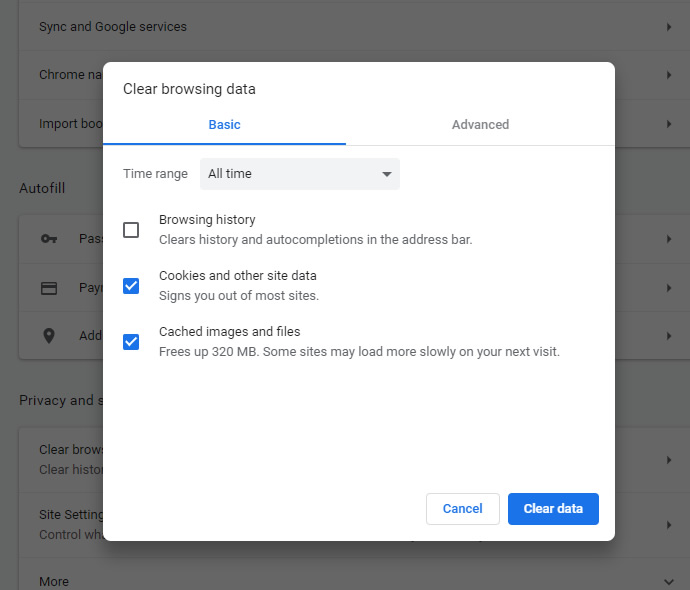
My question is not answered by the information on this page. Please follow the button below to fill out a form detailing your membership issue. We will respond as soon as possible, but please allow a few days. Click here for the AAII Support Knowledge Base |