


In the rapidly evolving world of investing, individual investors are constantly seeking ways to optimize their strategies and make informed decisions. With so much information at your fingertips, it’s essential to be able to cut through the noise to focus on what truly matters to you.
That’s where personalization and customization come into play. By tailoring your AAII.com experience to your personal preferences, you can have the resources that are most relevant and valuable to you right at your fingertips. Customization enables you to align our content with your unique investment objectives and streamline your investment journey.
Enabling My Portfolio Price Alerts
One of the most popular personalization benefits on AAII.com is the My Portfolio price alerts. When custom alerts are enabled, you receive notifications for tickers you’ve added to any portfolio in the My Portfolio section.
To ensure your alerts are enabled to your preferences, select the My Portfolio button located at the top left of most AAII.com pages. Once in the My Portfolio area, select the heading that reads Manage Alerts.
There are a few options that you can enable or disable at your discretion:
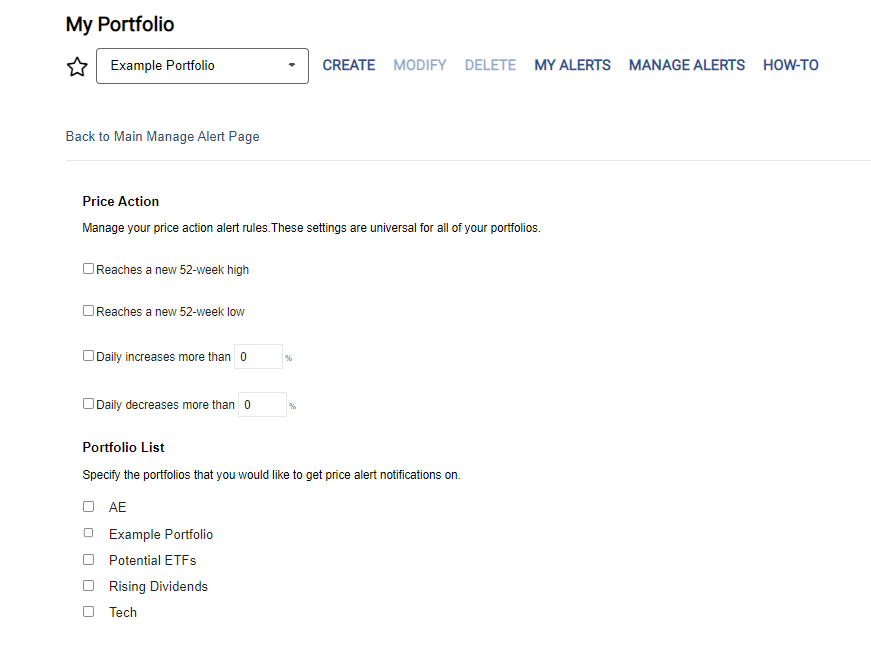
- Daily My Portfolio Price Alerts: Available for all AAII members, you can receive intraday alerts for any stock, mutual fund or exchange-traded fund (ETF) you follow exhibiting a price action that passes your configurable alert rules. You can opt to receive an email notification when a stock or fund reaches a new 52-week high or low price as well as set an alert to be triggered when a stock or fund price increases or decreases by a certain percentage (Figure 1). You can also select which of your portfolios you would like to receive alerts on.
- Daily A+ Stock Grades Alerts: A+ Investor subscribers can receive daily alerts when there are grade changes for any stocks in their portfolios. Rules can be set to trigger the daily grade alert for stocks that meet user-defined grade change movements up or down for the five factors: value, growth, momentum, earnings estimate revisions and quality. For each factor, you can select to view grade changes (up or down) for one grade change, two grade changes, three grade changes and four grade changes. There are also settings for stocks with newly initiated grades and dropped grades. You can choose to receive grade alerts for all of the portfolios set up in My Portfolio or for select portfolios.
- Weekly A+ Investor Portfolio Insights: Weekly email notifications to A+ Investor subscribers show notable metrics from your portfolios, such as best- and worst-performing investments, grade insights, screens that your stocks are currently passing and an asset allocation comparison.
Subscribers to VMQ Stocks have two additional alert options built into My Portfolio for convenience:
- Daily VMQ Stocks Grade Changes: Daily email alerts, reflecting changes from the previous trading day, that inform you of any VMQ Stocks grade changes for stocks in your portfolios.
- Weekly VMQ Stocks Portfolio Summary: Weekly email that compiles grade changes on your VMQ Stocks portfolio.
Customizing AAII Stock Screens
We’ve made it easier for all members to follow specific AAII stock screens of interest with the AAII website’s My Screens feature (Figure 2). Simply click on the star next to the screen’s name. By marking stock screens as favorites, you can efficiently access and organize your top picks in the My Screens area, streamlining your stock research and decision-making process.
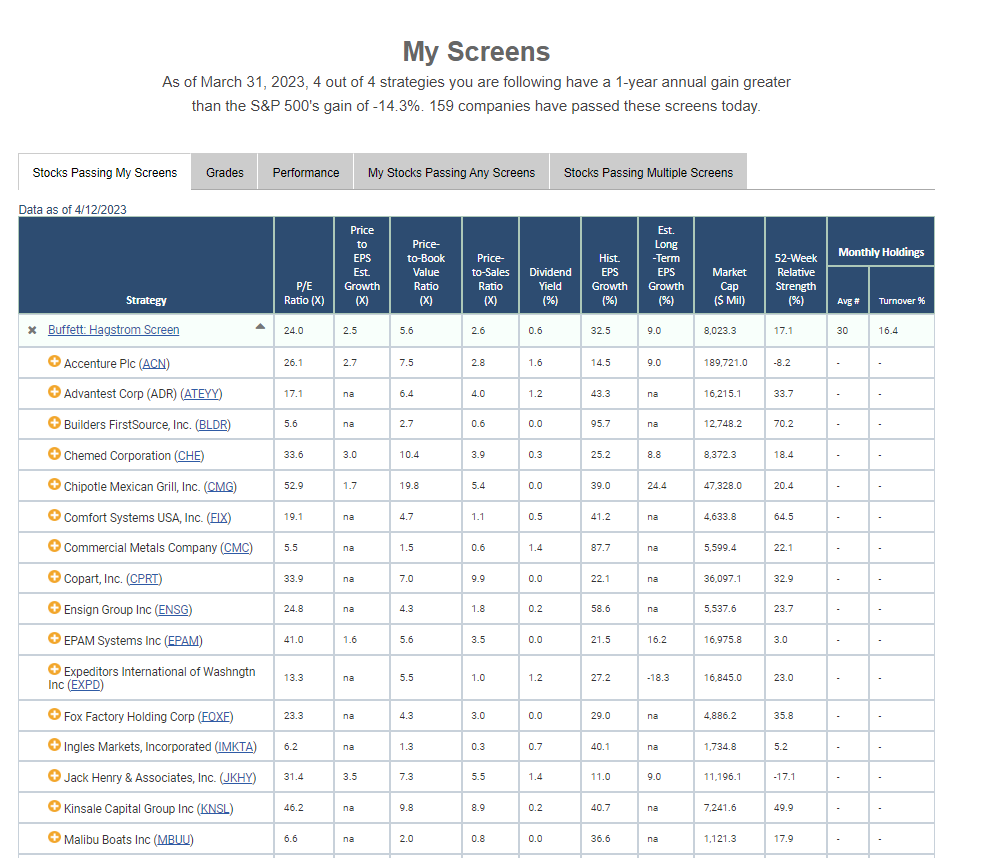
Here you can find pertinent data and performance on the stock screens you follow, including a complete list of the stocks that are currently passing each screen. Two unique tables are included for all members in My Screens: a list of stocks you follow that pass any screens and a list of stocks that pass multiple screens. An additional grade table is available for A+ Investor subscribers that shows A+ Stock Grades for the stocks currently passing screens that you follow.
Your Very Own AAII Journal Article Archive
Stay informed and inspired by creating your personal archive of AAII Journal articles. The AAII website has a My Library feature where you can save and curate your favorite pieces from the website, granting you easy access to knowledge tailored to your investing interests (Figure 3).
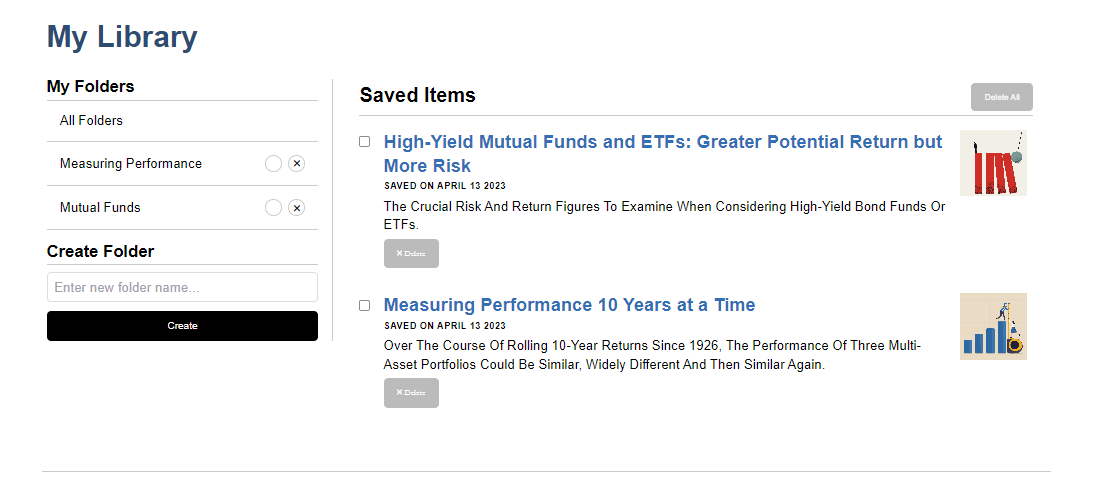
To add an article to My Library, simply choose the Save icon on the left side of the article. When you want to retrieve a saved article, go to www.aaii.com/mylibrary.
You can sort saved items into custom folders. Organizing your favorite AAII Journal articles into topic folders creates a well-structured knowledge hub for quick and effortless access to the information you need.
Take Control of Your Email Notifications
By tailoring your AAII email preferences, you can ensure that you receive only the most valuable and pertinent insights, keeping your focus sharp and your inbox clutter-free. To adjust your email notifications, navigate to the upper-right-hand corner of the website, click on your name and select Email Preferences from the drop-down menu.
Within the AAII email area, you can opt in or out of any of our emails, including weekly emails, surveys, portfolio updates, premium subscription alerts and promotional emails. Interested in sharing your insights on AAII surveys or reading the weekly Investor Update but tired of being bombarded by promotional emails? No problem! You can customize your email preferences and change them as often as you like.
Choosing the Chapters That Interest You
AAII’s Local Chapters foster a sense of community and provide additional opportunities for learning and networking. Many chapters turned to webinars during the pandemic and are enjoying a wider audience.
Whether you’re an active participant in one of AAII’s many chapters or are interested in the topics covered at chapter meetings, you can customize your Local Chapter correspondence under the My Account section, also on the drop-down menu revealed by clicking on your name in the upper-right-hand corner on AAII.com. Under the Communication heading on the left side, choose Update My Local Chapter Communications. There you can select which chapters you want to receive emails from.
You are welcome to join any number of chapters. By personalizing Local Chapter communications, members can receive updates about events from groups of interest. For a list of all upcoming chapter events, go to https://community.aaii.com/events/calendar.
Once you are signed up, visit the AAII Community, where members stay informed on chapter activities and share thoughts about meeting topics.

Related

AAII Community
Finally, a Community Focused on the Individual Investor
Related

Discussion
FREE REPORT

No comments have been added yet. Add your thoughts to the discussion!
You need to log in as a registered AAII user before commenting.
Log InCreate an account