


Each year we review tax preparation services. This year, before preparing our review, we surveyed a select group of CI subscribers on which service they use and asked for their input on its benefits and downsides. The responses were valuable in helping to focus our write-up, and we refer to their comments throughout.
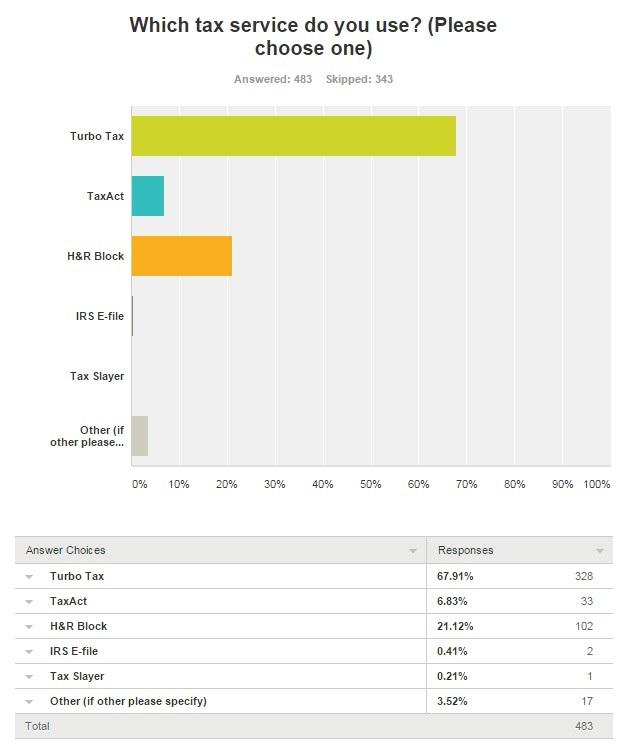
According to the survey, roughly 59% of respondents use a tax preparation service to file their taxes. A majority of respondents (68%) use TurboTax, while 21% use H&R Block, 7% use TaxAct and 4% use a different service (Figure 1).
In this article we talk about the three major tax preparation services: TurboTax, TaxAct and H&R Block. For each, we give a brief overview, summarize the good and bad features as reported by survey respondents, and discuss the tools available, costs and security.
Each company offers multiple versions of its service. Since investors must purchase TurboTax Premier, H&R Block Deluxe or TaxAct Plus in order to be able to properly account for their investments, we confine our review to these versions.
According to our survey of users, subscribers look for the following features in a tax preparation service:
- Downloads tax information from brokerages
- Handles both federal and state taxes
- Easy to use
- Covers different tax situations and complex tax issues
- Clear instructions
- Imports all data needed
- Ability to record investment transactions, including options
- Accuracy
- Offers guidance
- Integrates with Quicken
- Offers good exemption coverage
- Handles all forms associated with MLPs (master limited partnerships) and capital gains
- Good reputation
- Carries data over from previous tax year
TurboTax
TurboTax is the most widely used tax preparation service today. While many customers swear by TurboTax’s services, there were disruptions last year when the company did not properly communicate an important change in pricing to customers. Without notice, the TurboTax Deluxe edition required users to upgrade to the more expensive Premier or Home and Business services to prepare certain forms, including Schedule C and D, which were available in previous Deluxe versions of the software.
In response, Intuit issued an apology to customers affected by the change and offered a $25 rebate. It’s worth noting, however, that the rebate was less than the fees to upgrade to TurboTax’s Premier or Home and Business products.

This year, as last year, in order to input stock or mutual fund sales, a tax filer has to purchase TurboTax Premier or Home and Business.
I found that the online process was easy to use and the prompted questions were understandable. TurboTax does a great job of asking you questions up front that will shape the way the rest of the questionnaire unfolds.
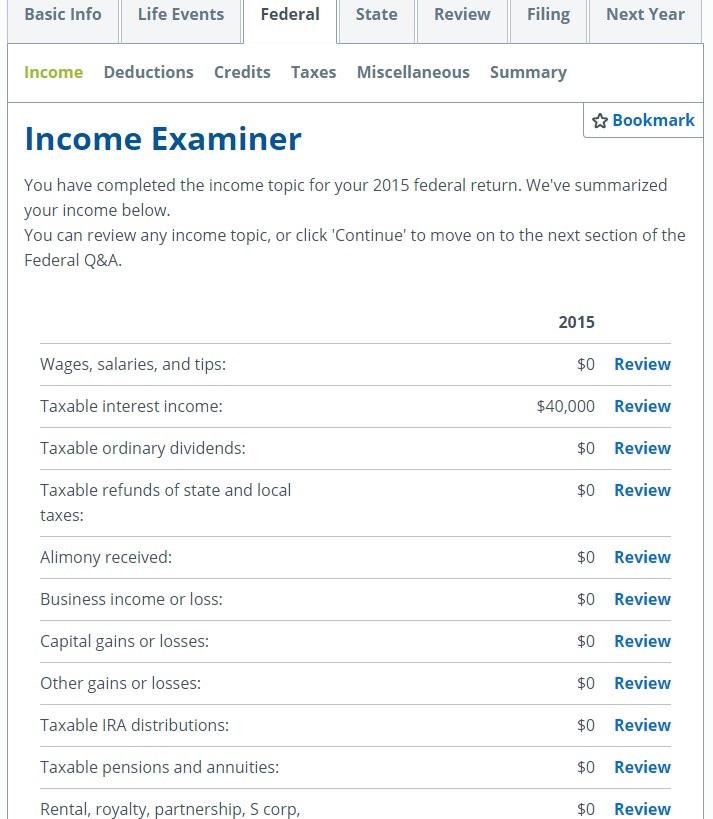
What I really liked within TurboTax (Premier Online) is the way things are broken down when you’re going through the prompts. If you want to view all categories of “income,” TurboTax gives you that option. It lists every type of income available, along with what documents you need to properly file tax information for that particular income method (Figure 2).
Income forms and schedules initially available that may be applicable to investors include:
- 1099-MISC and other common income: tax refunds, 1099-G, 1099-MISC and 1099-K
- Interest and dividends: Forms 1099-INT, 1099-DIV, 1099-OID
- Investment income: 1099-B or broker statements.
- Retirement plan and Social Security: 1099-R, IRAs, 401(k), early withdrawals
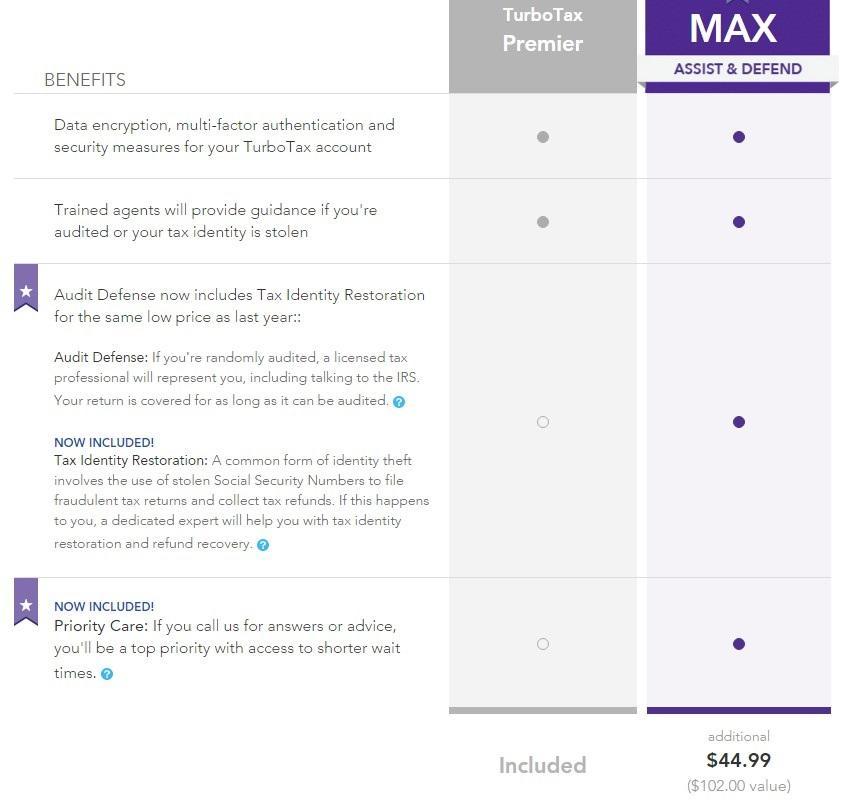
Regarding option straddles and contracts, TurboTax stated, “The program does not support the import of Form 1099-B Boxes 8, 9, 10 and 11. If values are reported in boxes 8, 9, 10, and 11 on Form 1099-B, or similar statement, manual entry is required.” This seemed to be a relatively standard practice between TurboTax, H&R Block and TaxAct.I noticed the “add-on fees” as I went through the process. It was interesting that for a user to receive “MAX assist and defend” benefits, they would have to pay an additional $44.99. “MAX” includes audit defense, tax identity restoration and priority care (Figure 3).
Overall, TurboTax was easy to get through and offers recommendations based on the information you input. The software lets you go ahead in the tax filing process without completing everything on one page, which is a useful feature for users who need to jump back and forth as they work through the forms.
A notable benefit of TurboTax’s services is its online tools. Most of these tools are available to all taxpayers, not just those who use TurboTax to file their taxes.
TurboTax Tools include:
- TaxCaster calculator–estimate your tax refund
- Benefit Assistant–get money beyond taxes
- Affordable Care Act exemption check
- W-4 withholding calculator
- Dependents credit and deduction finder
- ItsDeductible
- Refund Tracker
- Documents checklist
- Education credit and deduction finder
- Income estimator
- Health insurance subsidy calculator
- Health care penalty calculator
- App for phone (iOS and Android) and tablet
- Tax tips and videos page
- TurboTax blog
Cost
Table 1 lists the costs and requirements of TurboTax’s online and downloadable services, along with their major features. More information about TurboTax’s system and Internet browser requirements can be found here.
Table 1. TurboTax Features and Cost
|
Federal Free Edition (Online)
|
Deluxe (Online)
|
Premier (Online)
|
Home and Business (Online)
|
|
| Federal cost |
Free
|
$34.99
|
$54.99
|
$79.99
|
| State cost |
Free
|
$36.99/state
|
$36.99/state
|
$36.99/state
|
| Easy prep, print and e-file with 100% accurate calcuations |
x
|
x
|
x
|
x
|
| Jumpstart your refund by automatically importing your W-2 tax forms |
x
|
x
|
x
|
x
|
| Searches 350+ tax deductions and credits (Schedule A) |
|
x
|
x
|
x
|
| Maximize mortgage/property tax deductions (Schedule A) |
|
x
|
x
|
x
|
| Turns chartiable donations into big deductions with ItsDeductible |
|
x
|
x
|
x
|
| Covers freelance and independent contractor income with simple expenses (1099-MISC) |
|
x
|
x
|
x
|
| Get a head start by transferring last year’s info from your TurboTax return |
|
x
|
x
|
x
|
| Know more "whys" behind your refund with ExplainWhy |
|
x
|
x
|
x
|
| Understand your tax history and maximize next year’s refund with My Analysis and Advice |
|
x
|
x
|
x
|
| 24/7 secure access to all of your TurboTax returns and tax related documents |
|
x
|
x
|
x
|
| Covers stocks, bonds, ESPPs, and other investment income (Schedule D) |
|
|
x
|
x
|
| Automatically imports investment income including cost basis (Schedule D) |
|
|
x
|
x
|
| Covers rental property income and tax deductions (Schedule E) |
|
|
x
|
x
|
| Covers self-employment and small business income and expense reporting (Schedule C) |
|
|
|
x
|
| Maximizes business tax deductions and asset depreciation (Schedule C) |
|
|
|
x
|
| Talk to credentialed tax experts, all CPAs and Eas, for tax advice if you need it |
|
|
|
x
|
| TurboTax Download/CD Tax Preparation Services | ||||
|
Basic (Download/CD)
|
Deluxe (Download/CD)
|
Premier (Download/CD)
|
Home and Business (Download/CD)
|
|
| Federal cost |
$29.99
|
$59.99
|
$89.99
|
$99.99
|
| State cost |
$39.99/state
|
|
|
|
| Other |
Federal e-file included
|
5 federal e-files included
|
5 federal e-files included
|
5 federal e-files included
|
| Maximum refund guaranteed |
x
|
x
|
x
|
x
|
| Easy prep, print and efile |
x
|
x
|
x
|
x
|
| Walks you through your return, double-checks as you go |
x
|
x
|
x
|
x
|
| Save time by importing financial data including W-2’s, investment and mortgage information, plus import from Quicken and QuickBooks |
x
|
x
|
x
|
x
|
| Guides you through the latest tax and health care laws with ease |
x
|
x
|
x
|
x
|
| Import’s last year’s data from TurboTax and other software |
x
|
x
|
x
|
x
|
| 1 state download* |
|
x
|
x
|
x
|
| Get additional help on 350+ deductions and credits, including mortgage interest, property taxes and energy-efficient improvements |
|
x
|
x
|
x
|
| ItsDeductible helps you accurately value donated items |
|
x
|
x
|
x
|
| Answers to your tax questions by phone from CPAs and EAs ($19.99 value) |
|
|
x
|
x
|
| Additional help for investment sales such as stocks, bonds, royalties, mutual funds and employee stock plans |
|
|
x
|
x
|
| Extra guidance for rental property income, expenses, and refinancing |
|
|
x
|
x
|
| New: Retirement tax help and our IRA tool helps you get more money back this year and when you retire |
|
|
x
|
x
|
| Designed for your small business taxes including sole proprietors, consultants, and the self-employed |
|
|
|
x
|
| Extra coaching to maximize small business or self-employment income and deductions |
|
|
|
x
|
| Creates W-2 and 1099 forms for employees and contractors |
|
|
|
x
|
| Walks you through start-up costs new businesses can deduct |
|
|
|
x
|
Security
Since concerns have surfaced over the last couple years regarding the security of tax preparation services, many have added a “security” section onto their website.
TurboTax lists the following items in the security section of their website:
- Sign-in safeguards
- Multi-factor authentication
- Touch ID
- Data encryption: SSL encryption that exceeds IRS standards
- Login and device history
- Auto email notifications
- Dedicated security staff
On February 5, 2015, Intuit (the maker of TurboTax) announced it would be acquiring Porticor, a leader in cloud-based security. The very next day, Intuit announced that it is working with state agencies to address growing concerns over state tax fraud. The press release stated, “After working with third-party security expert Palantir on a preliminary examination of recent fraud activities, Intuit believes that these instances of fraud did not result from a security breach of its systems and that the information used to file fraudulent returns was obtained from other sources outside the tax preparation process. The examination is ongoing.”
Allegations by two former employees took issue with TurboTax’s denial of responsibility. On February 13, 2015, Intuit responded to the comments in a statement, and said, “Allegations by two former employees are flat out wrong, and are based on their complete misunderstanding of the facts and total mischaracterization of our business.” Any suggestion that Intuit or any of its leaders made decisions to sacrifice customer security for financial gain is untrue and without merit.”
On November 19, 2015, Intuit announced additional security features in TurboTax software. The new enhancements included expanded multi-factor authentication, Touch ID (with select iOS devices), soft token technology, login and device history and real-time notifications.
CI Survey Comments
CI survey respondents who use TurboTax commented that it is the most efficient and easy to use out of all the services discussed in this article. Aside from its efficiency, they feel that it is accurate and stable enough to handle complex tax situations.
Some of the caveats that respondents mentioned had to do with TurboTax’s cost as well as its sudden change in pricing last year. Subscribers commented that TurboTax “isn’t great” at handling master limited partnerships (MLPs), royalty trusts, foreign taxes or K-1 forms.
TaxAct
When signing up for TaxAct Plus (Online version), the security seemed to be more rigorous than when I started filing information with TurboTax. With TaxAct, I had to create three security questions and answers and I also had a verification code sent to my email before I could proceed with filing my taxes. While TurboTax also sent a verification email, I didn’t need to verify my email to proceed through the tax filing process and I didn’t have to create security questions.

TaxAct began with asking me if I wanted to import PDF data from last year’s tax return from H&R Block or TurboTax, which is definitely a competitive feature. TaxAct generally asked the same basic questions as TurboTax: name, birthday, Social Security number. Whereas TurboTax asks you right away if you’re married, TaxAct provides an input page for information regarding your spouse and says “if you are not married, leave the fields blank and click continue.” There were a couple instances where TaxAct required that I skip pages if they didn’t apply to me, as opposed to asking questions ahead of time that could rule out specific filing information.
Some users might find it slightly confusing that not all of the questions TaxAct asks are directly defined. For example, “Did you make any federal estimated tax payments for 2015?” TaxAct explains what clicking yes or no entails, but I could see why it may seem not as helpful or straightforward as TurboTax.
I liked TaxAct’s Life Events section, which displays different selection options for users who are interested in understanding the tax implications of each event (Figure 4).
TaxAct shows credits and deductions in a table-like format that allows users to easily edit any information they’ve input throughout the process. I found this display rather helpful for reviewing input information. Next to each credit and deduction, the software shows the monetary implications of your inputs (Figure 5).
Additionally, it has an easy-to-understand Federal Quick Q&A Topics page. Users choose between selecting topics themselves and taking step-by-step guidance.
Along the right-hand side of the page are always help links to popular help topics and TaxTutor Guidance. There is a link to “form instructions” that would define parts of the particular form you were using box-by-box.
TaxAct Tools include:
- Tax Credit Calculator
- Tax Penalty Calculator
- ConnectedHealth: Guidance for the Affordable Care Act (ACA)
- Donation Assistant
- Stock Assistant
- Tax Calculator
- Loan Calculator
- Savings Calculator
- Tax Dictionary
- College Tax Whiz
From what I could tell, access to the Donation Assistant and Stock Assistant are available once you begin filing your taxes with TaxAct. All the other calculators can be assessed without signing up to use TaxAct. Users can also access these tools by clicking “tools” along the right-hand side of the page while filing taxes.
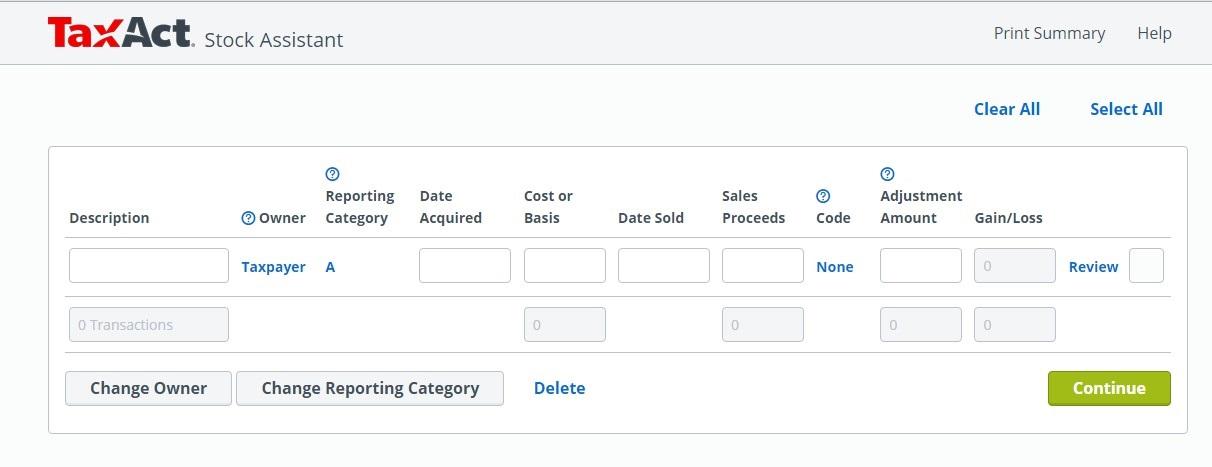
The Stock Assistant is a useful tool for investors who want to record their stock transactions in a spreadsheet-like format in order to figure out applicable figures for tax filings (Figure 6). It was definitely a unique tool in comparison to other tax preparation services.
Cost
Table 2 lists the costs and requirements of TaxAct’s multiple versions, along with the major features of each. More information on TaxAct’s system and Internet browser requirements can be found here.
Table 2. TaxAct Features and Cost
| Free (Online) | Basic (Online) | Plus (Online) | Premier (Online) |
Free (Download /CD) |
Basic (Download /CD) |
Plus (Download /CD) |
Premier (Download /CD) |
|
| Federal cost | $0 | $14.00 | $19.99 | $29.99 | $0 | $19.99 | $29.99 | $39.99 |
| State cost | $0 (1040 EZ/A) |
$14.99 /state |
$19.99 /state |
$19.99 /state |
$14.99 /state |
Includes 5 federal* | Includes 5 federal* | Includes 5 federal* |
| Prepare, print and e-file your return with 100% accuracy | x | x | x | x | x | x | x | x |
| Save time by importing your W-2 | x | x | x | x | x | x | x | x |
| Get on demand help with TaxTutor Guidance | x | x | x | x | x | x | x | x |
| Receive your guaranteed maximum refund | x | x | x | x | x | x | x | x |
| Access unlimited tax and technical support | x | x | x | x | x | x | x | x |
| Receive the best deal in tax with our Price Lock Guarantee | x | x | x | x | ||||
| Full Identity Recovery, including free, powered by InfoArmor | x | x | x | |||||
| Import last year’s TaxAct Return for a head start | x | x | x | x | x | x | ||
| Optimize your savings through hundreds of potential deductions and credits (1040) | x | x | x | x | ||||
| Easily report on stocks and other investments with time-saving tools and expert guidance (Schedule D) | x | x | x | x | ||||
| Maximize your itemized deductions (Schedule A) | x | x | x | x | ||||
| Answer easy questions to report rental property income (Schedule E) | x | x | x | x | ||||
| Easily import or enter your chartiable donations with Donation Assistant | x | x | x | x | ||||
| Utilize step-by-step guidance to report business and farming income (Schedule C and F) | x | x | ||||||
| Maximize your business deductions and depreciation | x | x | ||||||
| *Includes 5 federal e-files and 1 state return. State e-file additional. | ||||||||
Security
TaxAct has a page dedicated to explaining how it handles security. Below are some of the bullet points featured on its security page.
- State-of-the-art technology and monitoring processes
- Comprehensive identity verification
- Enhanced protection: partners with the IRS and state authorities to prevent unauthorized access
- Users can set their own security rules
- Sign-in history
- SSN notifications if another user has already entered the same SSN
- Data encryption every time your data is sent to TaxAct or the IRS using industry-standard Secure Socket Layers (SSL) protocol
- Free identity recovery powered by InfoArmor
- Recently implemented security features that include more complex password requirements, new security questions, authentication by email or mobile phone, trusted device verification
TaxAct even provided a separate page with additional security information.
Security features aside, TaxAct had some problems in January regarding personal data of customers. Apparently hackers “gamed” TaxAct’s identity verification controls and may have copied personal and tax return information from hundreds of customers. TaxAct identified suspicious activity within 9,000 accounts; these accounts were frozen shortly after.
TaxAct said that it had no evidence of its systems being hacked; rather, it believes thieves obtained the information elsewhere, then used the personal information to crack open individual accounts.
“We recently suspended a small number of accounts—less than 0.25%—after identifying instances of suspicious activity. As a result of our existing processes, we identified the issue early and prevented any further data from being compromised,” a TaxAct spokeswoman told the security professional’s SCMagazine.com.
CI Survey Comments
Of the CI subscribers that took the tax preparation survey, only a handful of them use TaxAct. Those that do use TaxAct said they like the ability to access it online anywhere and pick up where they left off, that it’s easy to use, and that navigation between forms and topics is easy. Several subscribers mentioned the beneficial “error checking” feature that prompts you to correct mistakes throughout the filing process. Many subscribers moved to TaxAct after TurboTax’s pricing debacle last year, which is primarily why they like TaxAct’s “price lock guarantee.” The price lock guarantee (for online users only) ensures that users will pay the product price listed at the time that he or she started filing their return.
Subscribers did note, however, that sometimes TaxAct can be difficult to navigate, especially if you are not familiar with the tax filing process. They also mentioned that there is no “save” button because the program saves automatically, which can sometimes get confusing.
H&R Block
When setting up my H&R Block account, I was also prompted to input three security questions, much like TaxAct.
I didn’t have to verify my email to continue filing my taxes; however, I wasn’t able to get past the first page without inputting a valid Social Security number (a feature the other services didn’t have). This somewhat limits the ability for individuals to review the software before deciding to use H&R Block to file their taxes (unless they’re comfortable entering their actual Social Security number). You can select “continue without creating an account,” meaning you don’t have to create an email account that lets you log in and out, but you still have to input your personal information from page to page to move to the next section.
After entering your personal information, including your name, age, address and Social Security number, you move onto the income section. I liked that H&R Block had a section that displayed “what you might need next” for each new section.
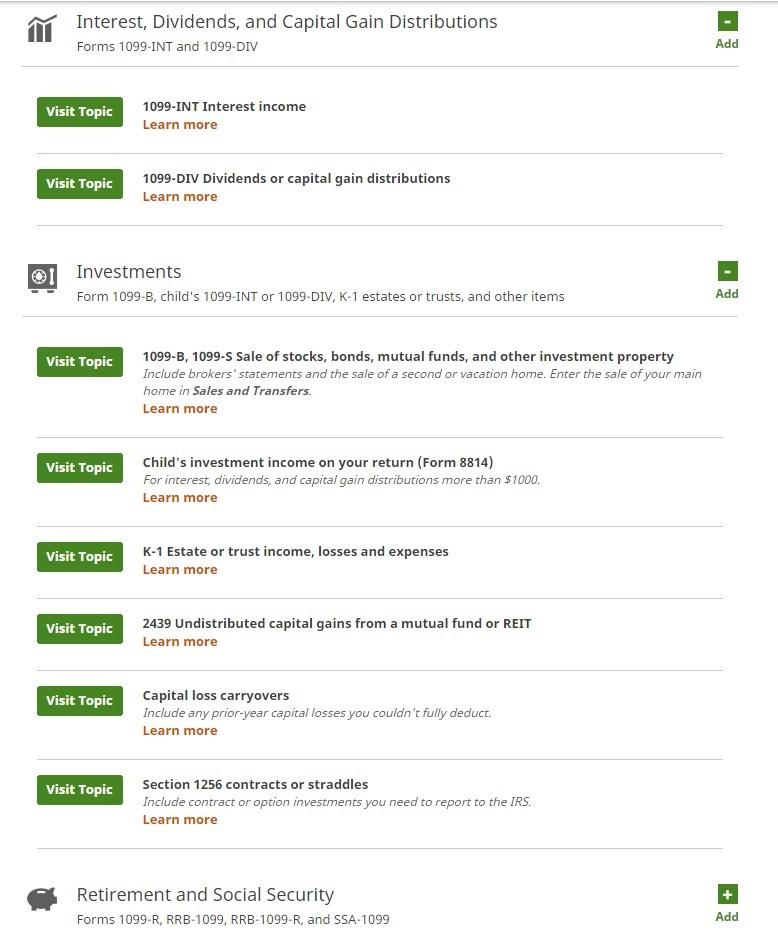
In the income section, H&R Block displayed the categories of income in list form, similar to TurboTax (Figure 7).
Income forms and schedules initially available that may be applicable to investors include:
- Interest, dividends and capital gain distributions: Forms 1099-INT, 1099-DIV
- Investments: Form 1099-B, child’s 1099-INT or 1099-DIV, K-1 estates or trusts, and other income
- Retirement and Social Security: Forms 1099-R, RRB-1099, RRB-1099-R, and SSA-1099
Each sub-category has a link where users can “learn more” and also a “visit topic” option.
When clicking “visit topic” next to “Section 1256 contracts or straddles,” I was brought to a page that prompted me to upgrade to Best of Both, which adds the help of an H&R Block expert for an extra $45 fee. The page explained, “Because an Interview for section 1256 contract or straddle isn’t supported in our online program, you’ll need to upgrade to Best of Both. Continue your return online today, then work with a tax professional to complete this form and find any deductions you might have missed.”
When I scrolled through the list of tax forms available on the H&R Block website, it seemed shorter than what TurboTax offered. Nonetheless, H&R Block’s tax preparation online service was easy-to-use and rather intuitive.
H&R Block Tools include:
- W-4 Calculator
- ACA Tax Impact calculators
- Wide variety of tax-related articles
- In-person audit support
- Phone application available (iOS and Android)
- Brick and mortar offices
Cost
Table 3 lists the costs of H&R Block’s online and downloadable services, along with their major features.More information about H&R Block’s system and Internet browser requirements can be found here. Click on the heading View Requirements and Supported Forms halfway down the page.
Table 3. H&R Block Features and Cost
| H&R Block Online Tax Preparation Services | ||||
| Free (Online) | Basic (Online) | Deluxe (Online) | Premium (Online) | |
| Federal cost | Free | $24.99 | $34.99 | $49.99 |
| State cost | $9.99/state | $36.99/state | $36.99/state | $36.99/state |
| Extra bonus on top of your federal tax refund | x | x | x | x |
| Automatic import of your W-2 and 1095-A | x | x | x | x |
| Free in-person audit support | x | x | x | x |
| step-by-step guidance makes it easy | x | x | x | x |
| Free import of your last year’s return from TurboTax or TaxAct | x | x | x | x |
| Free unlimited advice from a tax expert | x | x | x | x |
| Free technical support - real-time chat or phone | x | x | x | |
| Store and access your tax return for 6 years | x | x | x | |
| Automatic import of your 1099 and last year’s tax return from H&R Block - FREE | x | x | x | |
| Guidance on home mortgage interest deductions and real estate taxes | x | x | ||
| Optimize tax savings from charitable donations | x | x | ||
| Help for reporting investments, dividends, and retirement income | x | x | ||
| Guidance for rental property income and expenses (Schedule E) | x | |||
| Maximize deductions for self-employment income (Schedule C) | x | |||
| Help to determine the cost basis of home sale, dividend, gift and inheritance assets | x | |||
| all online products include: | ||||
| Maximum refund guarantee | ||||
| Free federal e-file | ||||
| Free unlimited expert tax advice | ||||
| Data security | ||||
| 100% accuracy guarantee | ||||
| H&R Block Download/CD Tax Preparation Services | ||||
| Basic (Download/CD) | Deluxe (Download/CD) | Premium (Download/CD) | Premium and Business (Download/CD) | |
| Federal cost | $19.95 | $44.95 | $64.95 | $79.95 |
| State e-file cost | $19.95/state | $19.95/state | $19.95/state | $19.95/state |
| State cost | $39.95/state | $39.95/state | $39.95/state * | $39.95/state ** |
| Import your 1099 and last year’s tax return from H&R Block and TurboTax software - FREE | x | x | x | x |
| Free in-person audit support | x | x | x | x |
| Step-by-step guidance makes it easy | x | x | x | x |
| Double checks your return for issues | x | x | x | x |
| Free unlimited advice from tax expert | x | x | x | x |
| Free technical support - real-time chat or phone | x | x | x | x |
| Itemize your deductions with Schedule A | x | x | x | x |
| 1 personal state program -FREE ($39.95 value) | x | x | x | |
| Maximize mortgage and real estate deductions | x | x | x | |
| Automatically value and optimize your chartible donations | x | x | x | |
| Assistance on investment income and stock options | x | x | x | |
| Help to determine the cost basis of home sale, dividend, gift and inheritance assets | x | x | ||
| Maximize deductions for self-employment income (Schedule C) | x | x | ||
| Guidance for rental property income and expenses (Schedule E) | x | x | ||
| Corporate, S corporation, partnership and LLC, estate and trust, non-profit tax returns | x | |||
| Produces payroll and employer forms | x | |||
| Maximizes vehicle tax deductions, deprecation and business expenses | x | |||
| *Additional state programs are $39.95/each | ||||
| **First personal state program included. Unlimited business state returns included. | ||||
Security
H&R Block has a separate section dedicated to security. It lists the following items in terms of the security it provides:
- Web browsing encryption technology
- Multi-layer authentication
- Bank-level encryption technology
- Security protection team
- Secure facilities
- Inspections by top security firms
I didn’t see any recent news articles reporting recent issues with hackers, but there were forums where users were commenting that their personal data was stolen after using H&R Block.
CI Survey Comments
CI survey respondents commented that H&R Block is easy to use and intuitive. Other comments mentioned its audit defense feature, jargon-free interview questions and its ability to handle “relatively complex” tax returns. Interest in H&R Block was attributed to its comparatively favorable price, especially for those who need Schedule D.
Caveats mentioned included the software’s warning that it can’t handle “some publicly traded partnerships,” the lack of K-1 tax form support in the Deluxe version and difficulty updating the software. One respondent commented that when downloading brokerage forms, the software doesn’t allow you to pick and choose which forms to download; they all come at once. Since some brokerage forms are ready at different times, you have to upload a couple times, which may lead to duplicate uploads. However, with comments like this, it’s hard to distinguish whether this is a recurring problem or if it only happened in just one case.
Conclusion
Overall, these three tax preparation services are very similar. While the user interface differs between the three, the overall processes mirror one another. Based on what survey respondents said they looked for in a tax preparation service, it seems that these three services fit the description. Why one service is chosen over another seems to come down to individual taste.
The survey was very helpful in terms of understanding which services our subscribers use and why. It was interesting to see that many respondents switched to either TaxAct or H&R Block following TurboTax’s “secret” change in price last year.
While each of these websites had a dedicated section on security features, these additions didn’t come out of the blue. The Internal Revenue Service (IRS) has recently taken a stand against cybercriminals due to recent data-breach issues. The IRS now has a minimum level of encryption that it recommends for any entity handling federal tax information. New initiatives have been taken in 2016 to strengthen protect consumer protection and reduce the risk of identity theft.
The desire to protect consumers increased after the IRS released an announcement last year that roughly 100,000 tax accounts were breached. Then just recently (February 9, 2016) the IRS announced that it again had issues with authorized users:
“The IRS recently identified and halted an automated attack upon its Electronic Filing PIN application on IRS.gov. Using personal data stolen elsewhere outside the IRS, identity thieves used malware in an attempt to generate E-file PINs for stolen social security numbers. An E-file pin is used in some instances to electronically file a tax return.
No personal taxpayer data was compromised or disclosed by IRS systems. The IRS also is taking immediate steps to notify affected taxpayers by mail that their personal information was used in an attempt to access the IRS application. The IRS is also protecting their accounts by marking them to protect against tax-related identity theft.”
The IRS issued a consumer alert on February 18, 2016, to taxpayers, notifying them of the 400% surge in phishing and malware incidents so far this tax season.
With each of these data breaches, I can’t help but notice many tax preparation services saying phrases similar to “it wasn’t our servers that were hacked.” Instead of properly identifying the issue, all they will say is that it wasn’t them; the hackers just “got the data” from somewhere else.
Only three popular tax services were analyzed in this article, but there are many more options listed below. If you decide to check out one of these, you can use the discussion here as a basis for judging whether it has the features and tools you need.
Other Tax Services:
- 1040.com
- 1040Now.net
- E-file
- ExpressTaxRefund
- EFileTaxReturns
- ESmartTax
- EzTaxReturn
- FreeTaxUSA
- Fileyourtaxes.com
- Jackson Hewitt
- OnePriceTaxes
- Online Taxes (OLT)
- TaxSimple
- TaxSlayer
- TaxHawk
- Taxbrain — Liberty Tax Service
- 1040Now.net
Each tax service has its benefits and caveats; depending on your specific tax situation, one product may be right for you, while another product better suits someone else.
Discussion
FREE REPORT

Stephen Schuster from MD posted over 10 years ago:
Dennis Fisher from OH posted over 10 years ago:
Scott from WI posted over 10 years ago:
Barry Tolle from WA posted over 10 years ago:
Jeff from NY posted over 10 years ago:
Jonathan Brown from CA posted over 10 years ago:
Edward Gehringer from NC posted over 10 years ago:
James Greenebaum from IL posted over 10 years ago:
Richard Garth from NY posted over 10 years ago:
John Rhodes from CA posted over 10 years ago:
Richard Fitzgerald from CT posted over 10 years ago:
Larry Roles from WA posted over 10 years ago:
John Rhodes from CA posted over 10 years ago:
John from NY posted over 10 years ago:
Richard Garth from NY posted over 10 years ago:
Maria from New York posted over 10 years ago:
Bob from PA posted over 10 years ago:
Joel Maynard from CT posted over 10 years ago:
John Roling from IA posted over 10 years ago:
Neill Patrick from NC posted over 10 years ago:
Steve Arneson from Washington posted over 10 years ago:
Michael Armstrong from FL posted over 10 years ago:
Earl from CA posted over 10 years ago:
Tom from VA posted over 10 years ago:
Tom from VA posted over 10 years ago:
Jay Lagree from DE posted over 10 years ago:
J V Jones from TX posted over 10 years ago:
Stephen Schuster from MD posted over 10 years ago:
You need to log in as a registered AAII user before commenting.
Log InCreate an account