


Free for app; $1/mo. plus management fees for service
Automatically route the rounded-up change from your credit and debit purchases into a portfolio of ETFs.
Acorns, a micro investment app, has recently launched in the iTunes store after operating in stealth/beta mode for a few months with about 10,000 users. Acorns has raised over $8 million from two rounds of funding, indicating they have believers willing to put sizable amounts of money behind it. Acorns is similar to another app that we reviewed back in June called SavedPlus, although it may be even simpler to use with no percentage allocation to think about.
How Does It Work?
Link your debit or credit card(s) to the application and it will take it from there, rounding any purchase up to the next whole dollar. The difference between your actual purchase amount and the amount charged is deposited into your Acorns account to be used for investing. You are required to select a portfolio type, from conservative to aggressive, and you can change your preference at any time. Portfolios are created using six low-cost exchange-traded funds (ETFs). The low-cost ETFs in each Acorn portfolio are purchased based on a user’s risk profile. The ETFs come from some of the world’s largest asset managers such as Blackrock, PIMCO and Vanguard. You can see how your investments are performing at any time, and withdraw money from your Acorns account whenever you wish.
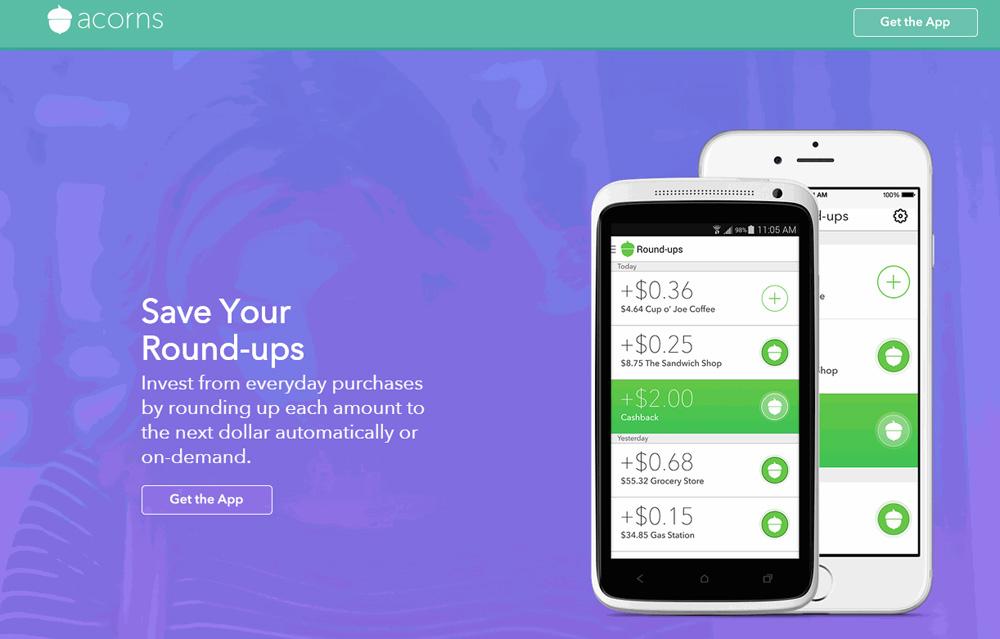
Acorns is also smart enough to look for cash rebates from your bank(s) and can also link to loyalty programs. You can choose to manually add every round-up amount to your investment portfolio, although most users would probably prefer to have that done automatically by the app. For example, if you go to Home Depot and buy some screws for $3.37 with a debit or credit card linked to your Acorns account, it will automatically add $0.63 to the Acorns account. The difference between the next whole number and your actual charge is the amount that is deposited in your investment account. The more transactions, the more money gets transferred into your Acorns account.
By connecting your checking account, you can move any amount of money in and out of the Acorns account. Buying into or selling out of a portfolio does not cost anything to users.
Who Is It For?
The original thinking was that this app would most appeal to millennials, but its ease of use and usefulness will likely draw in people from all age groups.
Is It Secure?
Acorns says it has “bank-level security,” which is appropriate since the app requires you to link to your bank account. Nobody is hack-proof, but Acorns seems to have taken reasonable precautions. Still, the app requires personal information to verify your identity and meet legal requirements, and some users may not feel comfortable with that.
What About Returns?
So far, returns are estimated to be in the range of 4% to 9% per year, depending on the portfolio type selected. Of course, returns can vary wildly depending on the broader markets, no matter how well-constructed a portfolio is. Thus, until actual returns are produced, take these numbers with a big grain of salt.
How Are the Portfolios Constructed?
Acorns claims to have a team of investment analysts, economists and math guys building these portfolios, and the projected returns seem reasonable. From their website: “Acorns seeks to maximize expected returns for a given amount of risk by carefully diversifying across multiple asset classes. The mathematical framework used for this diversification is called modern portfolio theory.” This may or may not mean anything; ultimately, only the returns matter, and we won’t have actual numbers for quite some time. Additionally, we will need a number of years of performance returns in different economic environments before making any decision about what a reasonable return for this app is. Acorns says on its website that it automatically rebalances portfolios so that it maintains your risk preferences.
What Is the Cost?
While the app is free, the service is not. Once you begin investing, a $1 monthly fee is charged for every month you are enrolled in the investment program. Management fees are 0.25% to 0.50% per year, depending on how much you are investing with them. Keep in mind this does not include the fees that the ETFs charge. There is no minimum amount to get started. Since its beta launch, Acorns estimates that users are investing about $3 per day in “round-up” money.
Overall
New investment apps are always exciting, particularly ones that serve typically ignored or underserved groups. In this case, the target audience is people (of all ages) who need to be investing but are too intimidated to get started. This app does an excellent job of filling this need. Once you are set up, it is essentially painless to ensure you are contributing to your investment account. Just keep spending! That’s a plan that most Americans can sign up for. The pluses are that it is quite simple to use and once you set up an account, it is basically autopilot investing, which is good for people who view investment tasks as drudgery. On the potential negative side, it is unknown what returns will actually be over the course of years. Additionally, since the app is so new, it remains to be seen how its security holds up in the real world. Paying monthly fees and an annual management fee (plus the ETF fees) could quickly eat up your returns.
Still, for investors who aren’t investing much or at all because it seems intimidating, any savings would be a good thing and Acorns offers a painless way to get started. Think of it as investing with training wheels.
Acorns: Investing With Spare Change (iOS and Android)
Free for app; $1/mo. plus management fees for service
Discussion
FREE REPORT

No comments have been added yet. Add your thoughts to the discussion!
You need to log in as a registered AAII user before commenting.
Log InCreate an account