


Each year we review tax preparation services. This year, before preparing our review, we surveyed a group of CI subscribers and AAII members on which service they use and asked for their input on its benefits and downsides. The responses were valuable in helping to focus our write-up, and we refer to their comments throughout.
In this article, we talk about the three major tax preparation services: TurboTax, TaxAct and H&R Block. For each, we give a brief overview, summarize the good and bad features as reported by survey respondents, and discuss the tools available, costs and security. Online versions are used to highlight the features of each service.
Thankfully, this year there are fewer “hacks” to report on compared to last year’s article. Last year, some TaxAct customers’ accounts were illegally accessed, and the IRS released an announcement that over 100,000 accounts were breached. In 2015, TurboTax also saw many fraudulent tax returns filed, which led to an FBI investigation.
Many of the tax survey respondents this year indicated that they’ve been using their current tax software for over five years and that they are relatively happy with the service. Even if you aren’t looking to switch to a different service, this article can be of interest to illustrate the cost differentials between the different versions of the services, as well as the tax forms included with each level of the services. As many of you may have heard, “if it’s not broke, don’t fix it.” If you like your tax service and you’re happy using it, then don’t switch. If you would like to get an idea of the benefits and caveats of the available options, perhaps trying another service would be of use to you. TurboTax, TaxAct and H&R Block let you fill in your information before paying for the service (if you use the online version), so that could be another way to try out a different service (for those who are comfortable inputting their information).
Everybody will experience their own benefits and caveats to preparing their taxes, whether online or using software, with an accountant or by hand. It is impossible to cover every pro and con of each software service here. However, please comment below if you have anything to share about the service you use or your methodology. Many members may benefit from your insight.
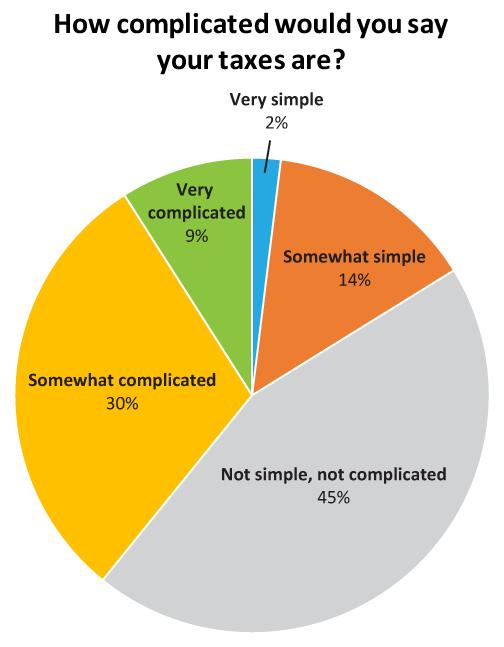
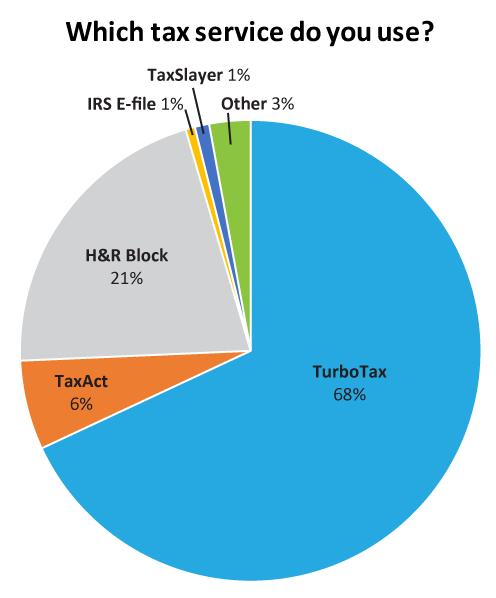
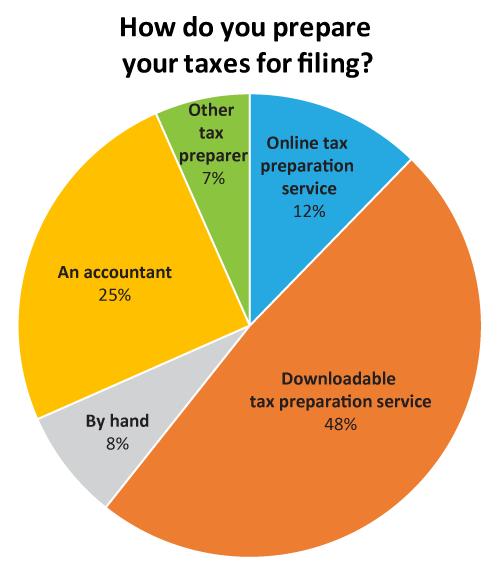
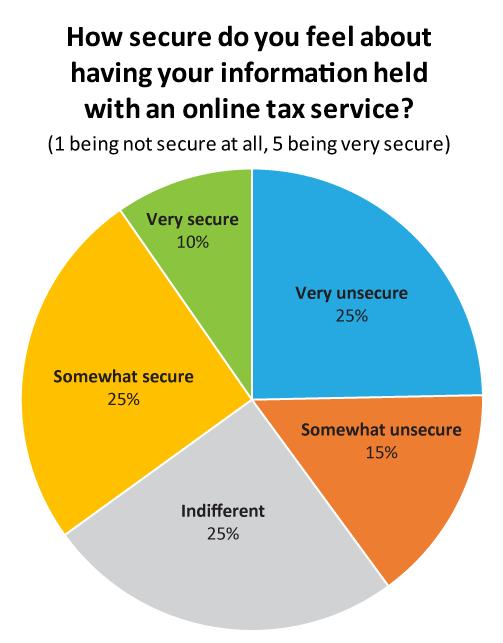
Below is some of the data collected from individuals who answered the CI Tax Preparation survey. In general, most respondents reported having a somewhat complicated tax situation, using downloadable tax software, using TurboTax and being relatively uncomfortable having their tax information stored online. The percentage breakdowns in responses for these four questions are shown in the pie charts below.
We further broke those questions down for each of the individual services.
| H&R Block | Percentage |
Number of Responses |
| Free (online) | 0.83% | 4 |
| Deluxe (online) | 5.59% | 27 |
| Premium (online) | 3.73% | 18 |
| Basic (Download product) | 5.38% | 26 |
| Deluxe (Download product) | 60.87% | 294 |
| Premium (Download product) | 16.36% | 79 |
| Premium and Business (Download product) | 6.42% | 31 |
| Not sure | 0.83% | 4 |
| TaxAct | Percentage | Number of Responses |
| Free (online) | 4.93% | 7 |
| Plus (online) | 19.01% | 27 |
| Premium (online) | 18.31% | 26 |
| Free (Download product) | 2.11% | 3 |
| Plus (Download product) | 20.42% | 29 |
| Premium (Download product) | 20.42% | 29 |
| TaxAct Plus | 12.68% | 18 |
| Not sure | 2.11% | 3 |
| TurboTax | Percentage | Number of Responses |
| Federal Free Edition (online) | 0.52% | 8 |
| Deluxe (online) | 8.48% | 131 |
| Premier (online) | 13.92% | 215 |
| Self-Employed (online) | 0.91% | 14 |
| Basic (CD/download) | 1.23% | 19 |
| Deluxe (CD/download) | 21.88% | 338 |
| Premier (CD/download) | 38.83% | 600 |
| Home & Business (CD/download) | 13.66% | 211 |
| Not sure | 0.58% | 9 |
How long have you used this service?
| H&R Block | Percentage | Number of Responses |
| One year or less | 3.11% | 15 |
| Two to three years | 23.44% | 113 |
| Four to five years | 11.20% | 54 |
| Over five years | 62.24% | 300 |
| TaxAct | Percentage | Number of Responses |
| One year or less | 2.82% | 4 |
| Two to three years | 22.54% | 32 |
| Four to five years | 21.13% | 30 |
| Over five years | 53.52% | 76 |
| TurboTax | Percentage | Number of Responses |
| One year or less | 1.94% | 30 |
| Two to three years | 5.63% | 87 |
| Four to five years | 8.16% | 126 |
| Over five years | 84.26% | 1301 |
Most individuals that took the survey use the “Premier” comparable version for either TurboTax, H&R Block and TaxAct, and have been using the particular service for over five years. Included in the “downloadable software” selection, many members said that they didn’t download the software; instead, they bought the CD, prepared and stored returns on their hard drive, and then mailed in their returns to the IRS. Storing data online and protection of tax information was very important to the individuals surveyed.
AAII members and CI subscribers who were asked about what they look for most in a tax preparation service said:
- Ease of use and a reasonable price
- Comprehensiveness/completeness
- Accuracy
- Clearly stated instructions and easy lookup of additional information through available links and resources
- Easy download of last year’s tax information
- Explanation and interconnection between input and forms
- Ability to reach support in the case of problems or questions
- Ability to handle relatively complex tax situations without significant time and effort
This article includes information that is easily located on each of the company’s websites, and much of the data is subject to change without notice. The tables below compare the features for the different version of the services. The difficulty was trying to combine each company’s individual services/cost table.
Comparison of Online Free Editions
| Feature | TurboTax | TaxAct | H&R Block |
| Import W-2 | X | X | X |
| Self-help tools | X | X | X |
| Access to technical support | X | X* | |
| Import last year’s return from any other tax company | X | ||
| Import 1099-INT | X | X | X |
| Import 1099-DIV | X | X | X |
| Import 1099-R | X | X | X |
| Schedule B | X | X | X |
| Schedule A | X | ||
| Import of last year’s return | $5 | ||
| Store and access returns | X | ||
| * - chat only | |||
Comparison of Online Deluxe Editions
| Feature | TurboTax Deluxe | TaxAct Plus | H&R Block Deluxe |
| Import W2 | X | X | X |
| Import last year’s tax return from other tax prep companies | NM | NM | X |
| Self-help support | X | X | X |
| Access to technical support | X | X | X |
| Import 1099-INT, 1099-R, and 1099- DIV | X | X | X |
| Import of last year’s returns | X | X | X |
| Schedule C-EZ | X | X | X |
| Store and access tax returns | X | X | X |
| Schedule D | X | ||
| Schedule A | X | X | X |
| Schedule B | X | X | X |
| Schedule E | X | ||
| Import or enter charitable donations | X | X | X |
| Schedule SE | X | ||
| Schedule K-1 | X | ||
|
All forms in this table are available on downloadable/CD version of software NM - not mentioned |
|||
Comparison of Online Premium Editions
| Feature | TurboTax Premier | TaxAct Premium | H&R Block Premium |
| Import W2 | x | x | x |
| Import last year’s tax return from other tax prep companies | NM | NM | x |
| Self-help support | x | x | x |
| Access to technical support | x | x | x |
| Import 1099-INT, 1099-R, and 1099- DIV | x | x | x |
| Import of last year’s returns | x | x | x |
| Schedule C-EZ | x | x | x |
| Store and access returns | x | x | x |
| Schedule D | x | x | x |
| Schedule A | x | x | x |
| Schedule B | x | x | x |
| Schedule E | x | x | x |
| Import or enter charitable donations | x | x | x |
| Schedule C | x | x | x |
| Schedule F | x | x | x |
| Schedule SE | x | x | x |
| Import 1099-B investment income including cost basis | x | x | x |
| Schedule K-1 | x | x | x |
|
NM - not mentioned |
|||
TurboTax
TurboTax is the most popular tax preparation software in the market today. On March 10, TurboTax announced that it would be increasing its price for online filing after March 16, 2017. The company notified customers via email and posted a message to their website. The company didn’t explain why or give the new costs, but it may have something to do with Intuit Inc. (maker of TurboTax) reporting that through February 18, sales of TurboTax units declined 5% versus the comparable prior-year period. The company reported that tax season is off to a slow start and many consumers are delaying doing their taxes compared to last year.
The IRS also reported data through February 17 showing that total e-filed returns are down 13%, with self-prepared e-filings down approximately 11% and assisted e-filings down 16%.
Using TurboTax online was easy to start. The system just began by asking me a couple questions regarding where I live, my filing status, or if certain situations apply to me such as owning a home, paying rent, paying student loans, receiving dividends or interest, or whether I was self-employed.

After answering a couple more questions, TurboTax displayed a “personal info summary” page, which made it easy to review the information I had input so far. There was an edit button in case I needed to change anything.
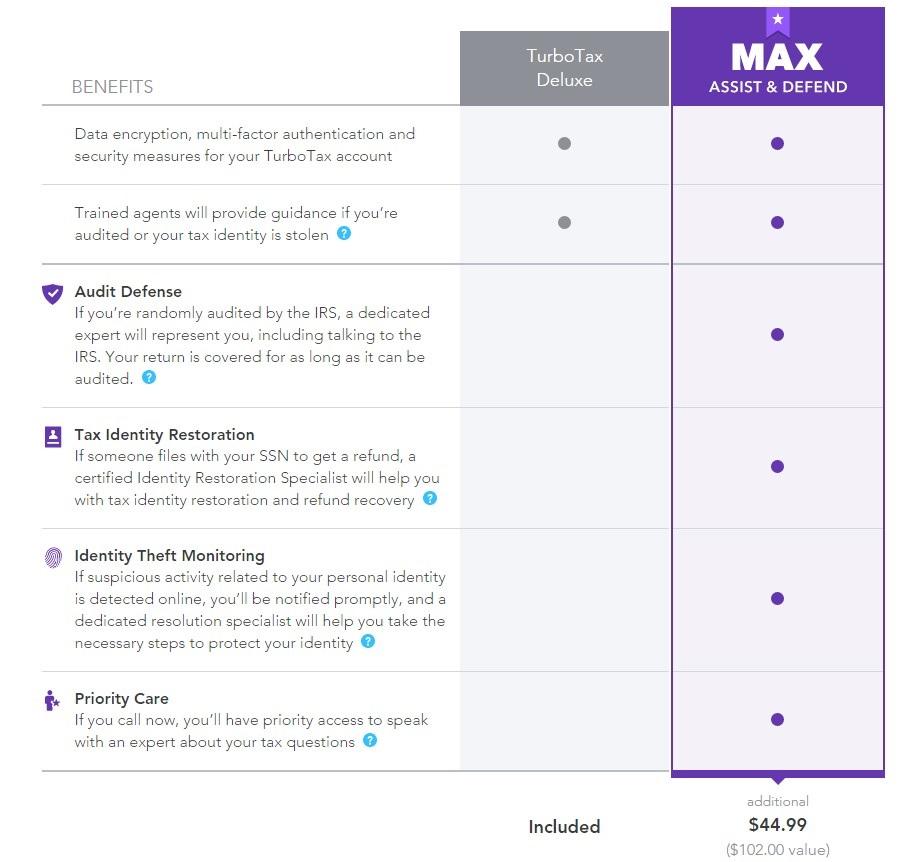
Then I was asked if I wanted to purchase “max assist and defend.” It showed many benefits that seem useful, but for an additional $44.99, one can question the true value. Several AAII and CI members said that they’ve used TurboTax’s Audit Defense and it was effortless and extremely helpful.
I was then asked if I sold any investments in 2016, including stocks, bonds, mutual funds, a second home, collectibles or personal items. TurboTax reminded me that the forms that are covered in this section are 1099-B and 1099-S. I chose “yes” and was quickly prompted to purchase “TurboTax Premier” because “Deluxe” wouldn’t handle my situation.
There was a list of brokers that I could import my information from, but there was also a search bar. Much to my surprise, they had an option to import documents from Acorns—an application I use that rounds up my expenses to the whole dollar and invests my change into ETFs (definitely a cool tool if you haven’t checked it out). All I had to do was enter the account number and document ID, both of which were displayed prominently on the documents I got from Acorns.
Click here to see a link of TurboTax import partners. Unfortunately, I could not find a similar list for TaxAct or H&R Block.
Overall, TurboTax was relatively easy for my tax situation and I understand why many people choose to use it.
To see tax forms included with TurboTax CD/downloadable products, click here. However, the page doesn’t specify that all forms are fully supported in the various downloadable/CD versions, so be sure to check on the forms you need when choosing a version.
Here is a list of all the tax forms and schedules included within TurboTax Premier online version. (click the “Tax Forms” tab on the page.)
The TurboTax website offers many tools and features, including:
- TaxCaster Calculator
- W4 Withholding Calculator
- Self-Employed Expense Estimator
- Dependents Credit and Deduction Finder
- ItsDeductible
- Documents Checklist
- Education Credit and Deduction Finder
- Health care and taxes assistance
- Tax tips and videos
- TurboTax blog
Cost
The costs of the online and downloadable versions are shown in the table below. Online version fees can also be found on this page, while the costs of the downloadable products can be found on this page. Remember, TurboTax announced that these prices will increase if you file after March 16.
| Online | Download | |||||||
| Free | Deluxe | Premier |
Self- Employed |
Basic | Deluxe | Premier | Home and Business | |
| Federal | $0.00 | $34.99 | $54.99 | $89.99 | $29.99 | $59.99 | $89.99 | $99.99 |
| State e-file | na | na | na | na | $19.99 | $19.99 | $19.99 | $19.99 |
| State | $0.00 | $36.99 per state | $36.99 per state | $36.99 per state | $39.99 | One included, otherwise $39.99 for unlimited | One included, otherwise $39.99 for unlimited | One included, otherwise $39.99 for unlimited |
|
Data as of 3/14/2017. Company announced costs will increase 3/16/17 but didn’t specify pricing changes |
||||||||
Security
TurboTax mentions several different security features on their website, including “sign-in safeguards” like multi-factor authentication and Touch ID. Multi-factor authentication allows you to access your account by entering your password and a unique single-use-code that TurboTax sends to your trusted device or email address, or by answering a series of questions. Touch ID allows users to use their fingerprint as a password when accessing TurboTax on their smartphone.
TurboTax states that it uses data encryption: “We safeguard your information by encrypting it when it’s stored in our systems. And, when we electronically send your return to the IRS or state agencies, we use SSL encryption that exceeds IRS standards.”
TurboTax will immediately notify users whenever certain changes are made to their accounts, such as updating the payment method, changing a password, or signing in for the first time on a new device. Users can check login and device activity as well.
TurboTax has a list of tips that it provides to users:
- Create strong passwords and choose a good User ID
- Use safety measures and good practices to protect their computers
- How to spot and avoid phishing, pharming, vishing and smishing
- Tax tips if your identity has been stolen
- Keeping yourself safe from tax scams today
TurboTax refers users to its Online Security Center for more information.
Survey Responses
Of the members who answered the CI Tax Survey, 68% of them use TurboTax. Of the members that use TurboTax, 81% use the downloadable version, while 19% use the online version. A majority of individuals who took the survey—53% of respondents— use the Premier version of TurboTax, while 30% use the Deluxe version.
Some of the benefits that TurboTax users mentioned included:
- “Ability to auto fill prior year’s information and download from many firms that send 1099s and W2s”
- “Ability to download third-party investment records”
- “Ability to e-file easily and store PDF versions”
- “Audit Defense, although it’s an extra fee, I’ve used it twice and it made the process painless”
- “The software brings over capital losses from previous year’s return”
- “Easy to use”
- “Able to handle many K-1s”
- “A wide selection of forms”
- “Tracks basis of IRAs”
- “Calculations seem accurate”
- “Simple and attractive interface”
- “Interfaces with Quicken software, allows downloads directly from employers and financial institutions, and it allows one to go through the full interview process or go into each section on your own.”
- “Quickly receive my federal return and state refund check”
Some of caveats users mentioned included:
- “TurboTax makes it hard to review how bond interest accrual goes from one’s input to final forms”
- “TurboTax can’t important information from all trading accounts, and it can’t import information from forex trading accounts”
- “All of my income is investment related and sometimes it is difficult to determine the proper entry”
- “They’re always trying to upsell you a more expensive product”
- “Be careful of unique situations and multi-state returns. The software often misses issues involved in filing multi-state returns”
- “Business income requires a lot of data entry, and it can be difficult to make changes to business property as years go by, such as accounting for a new vehicle used for business purposes”
- “It can’t handle irrevocable trusts”
- “It is more expensive than other services”
- “Dealing with MLPs leaves something to be desired. Not intuitive.”
- “Difficult to get expert support for some difficult questions”
- “Difficulty with foreign tax credit data entry”
- “K-1 forms are not easy to complete”
- “Importing specific lot stock/mutual fund information is not straightforward, at least for the Deluxe version. But the price is good”
- “Download process of data from Quicken can create tax items that need to be deleted. Also there is no way to match a particular item (e.g., donation) with one created for last year. This requires you to manually enter dollar amounts or re-enter names/other details”
- “If you need to file in multiple states it gets expensive as you have to buy the state editions as only one state is included with the federal program”
- “It does not handle net operating loss carryover, instead telling the user to see a tax specialist. I do the calculations by hand (not hard).”
TaxAct
This year I chose to try out TaxAct with my actual tax return (with the other services I merely went through the steps but didn’t file). Admittedly, I usually have an accountant do my taxes; however, this year I figured I’d give it a go myself. I found TaxAct’s interface to be slightly confusing, and I wasn’t sure where to find some of the information it was asking me for. It had the ability to import forms directly from a brokerage account, but only seemed to have a couple brokers that were compatible with the import technology. It also wouldn’t let me delete certain things, even though I clicked delete several times. It was really difficult and irritating to go back and edit a mistake.
I will say that the security seemed to be on point when I was setting up my account. Not only did it ask me to input my information, but it also required a somewhat complex password, three security questions and email verification. Every time you sign in on a new device you must enter a verification code that is emailed to you.
TaxAct’s interface seems somewhat intuitive when you begin (I went through it using the online Premium version). It asks basic questions about your tax situation including your name, Social Security number, dependents and filing status. Next is a page called “life events” where you can click on different events and TaxAct will explain the implication of each event on your life. However, after going through TurboTax and H&R Block, this wasn’t nearly as “user friendly” or “clean.”
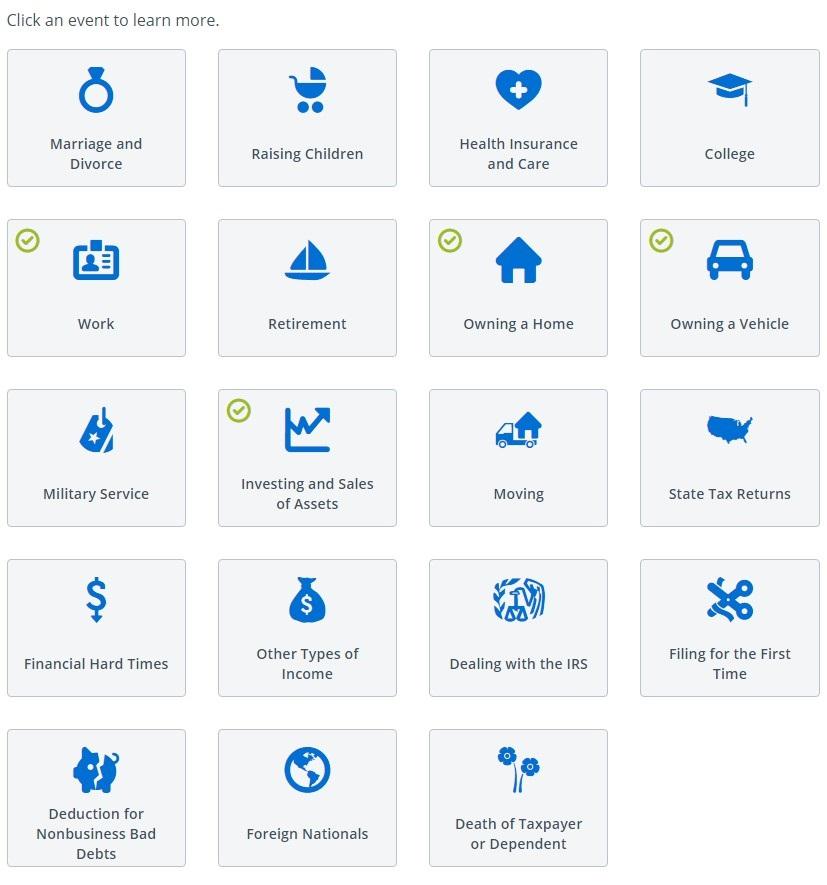
Next, users go through their Federal and State taxes. Below is a picture of the “federal” home page.
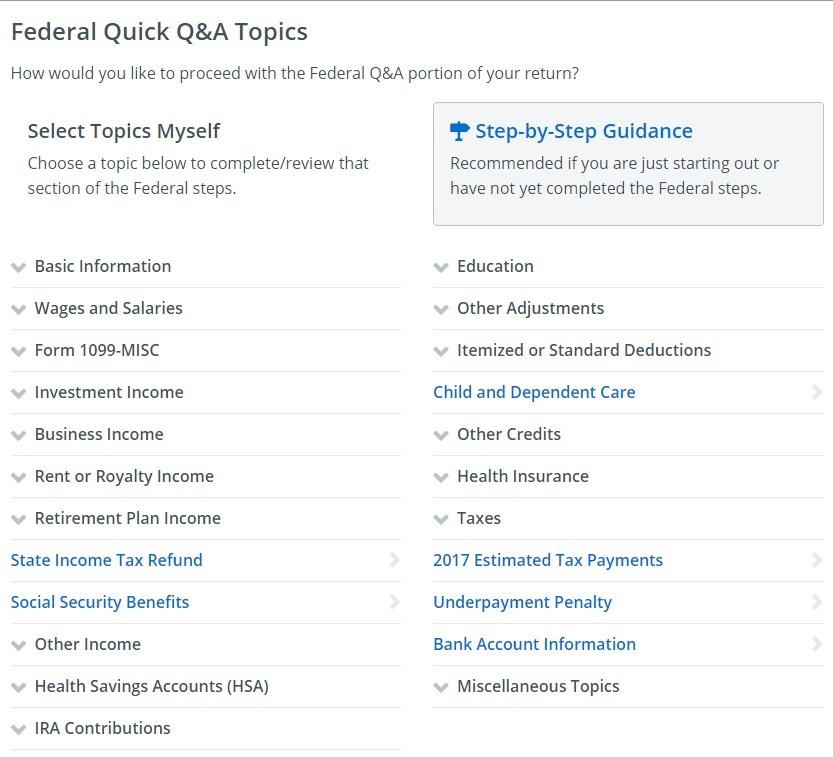
For the respective “categories” of income, deductions, credits, taxes, miscellaneous and summary, each page has everything itemized out so you can see what amounts have been input into what categories. This is definitely a helpful feature; however, I found it rather difficult to go back and change a particular item without having to go through the whole questionnaire again. Then I found that two items would appear under a particular category, and I could not delete one of them, which was very irritating.
Overall, TaxAct seemed comprehensive, but was just a little confusing for me. Additionally, as I mentioned before, this was my first year filing my taxes myself, so I’m sure I would have found whichever product I used slightly confusing.
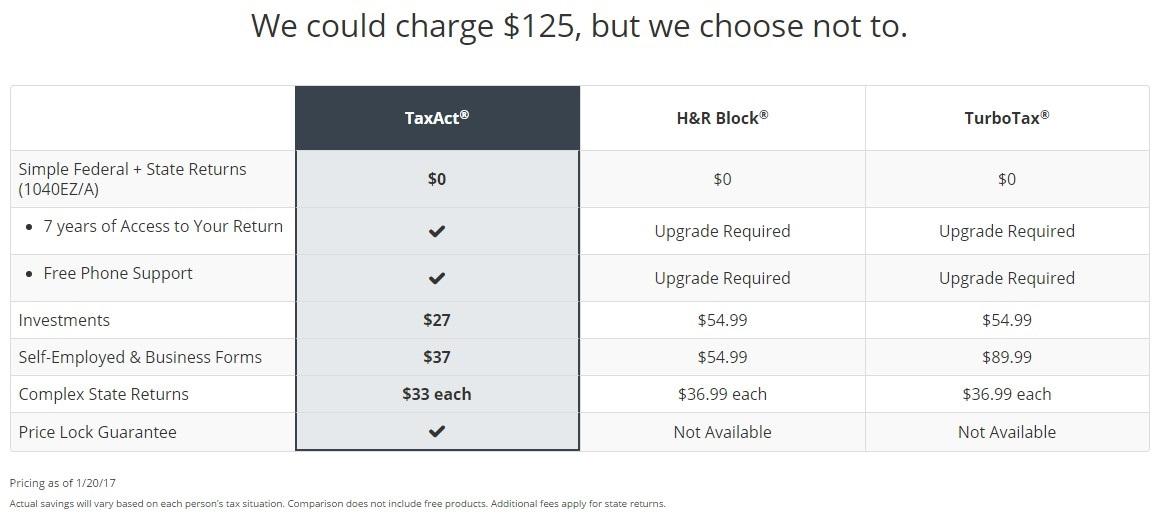
The company does display a table showing the difference in cost between their service and that of H&R Block and TurboTax.
CIick here to see the forms and schedules included with the Free version of TaxAct. Click here to see the forms and schedules included with the Plus edition of TaxAct. Click here to see the forms and schedules included with the Premium version of TaxAct.
Click the “Forms and Schedules” tab on the respective pages. The pages also let you toggle between the online versions and the downloadable versions at the top of the page.
Some of the tools included with TaxAct are:
- Tax Calculator
- Tax Bracket Calculator
- College Tax Wiz
- Tax Dictionary
- Health Care Tax Penalty Calculator
- Health Care Tax Credit Calculator
- Savings Calculator
- Loan Calculator
- Tax Calendar
- Different “What do I need?” lists for several tax forms
- A list of tax law changes
- A list of IRS and state tax resources
- TaxAct blog
It seems like TaxAct has gotten rid of its tool “Stock Assistant,” which let users input their stock transactions into a spreadsheet-like format in order to figure out applicable figures for tax filings.
Cost
The table below shows the prices for all versions of TaxAct. The costs of the online versions are also found on this page, while the cost of the downloadable products are also found on this page.
|
|
Online | Download | ||||
|
|
Free | Plus | Premium | Free | Plus | Premium |
| Federal | $0 | $27 | $37 | $0 | $60 | $70 |
| State e-file | na | na | na | $9.99 | $9.99 | $9.99 |
| State | $0 | $33 | $33 | $33 | One included, otherwise $33 each | One included, otherwise $33 each |
|
Data as of 3/14/2017. |
||||||
Security
On TaxAct’s website it states “Security is a top priority for us at TaxAct.” The company has implemented several features in the sign-in process to help make sure that it is really you who is accessing your account, including more complex password requirements, security questions, authentication by email or mobile phone and trusted device verification.
Users can set their own security rules to tailor how they authenticate their identity, update security questions and more. Users can view a list of all sign-in events and applicable devices, and they are also notified if another user has already entered the same Social Security number.
The website also says, “In addition to identity authentication, vigorous monitoring, and other security processes, TaxAct encrypts your data every time it’s sent to us or the IRS. We use industry-standard Secure Sockets Layer (SSL) protocol, which provides data encryption, message integrity, and server authentication. In addition, we take pride in being Payment Card Industry compliant, ensuring that your payment information is safe. For more information, see our Security Information page.”
TaxAct recommends that users read the “Taxpayer Guide to Identify Theft“ on the IRS website.
Survey Responses
Of the members who answered the CI Tax Survey, 6% of them use TaxAct. Of the members that use TaxAct, 55% use the downloadable version, while 45% use the online version. Thirty-nine percent of respondents use the Plus version, while another 39% use the Premium version.
Some of the benefits that respondents mentioned included:
- “Auto-downloading of W2s and other forms”
- “Catches most mistakes”
- “Ease of use. Anybody with just a W-2 and some basic deductions like mortgage interest and child care can easily complete their taxes.”
- “Keeps track of real estate basis”
- “Lowest cost and reliable”
Some caveats mentioned included:
- “Handling K-1s is not plain and easy”
- “Hard to find form for particular entry, ex. real estate tax”
- “I have been a TaxAct customer since 2003, but their 2016 software was a total train wreck. Stock imports didn’t work, and their ‘donation assistant’ was also broken.”
- “Sometimes the forms’ complexities make it hard to follow online instructions, but in almost all cases careful reading overcomes that problem”
- “TaxAct could make it easier to enter capital gains information by giving me a spreadsheet to complete, rather than a multi-page form process for each and every capital gain/loss.”
- “You sort of have to already know a lot about your own tax situation to use TaxAct, you have to know what questions to ask to find the info you need.”
H&R Block
When going through H&R Block’s online tax preparation service, the beginning questionnaire was easy to use. I didn’t have to create an account to start my tax return, which is somewhat concerning considering they’re asking for personal information like my Social Security number. In some cases, it would not let me go to the next page without inputting what it was asking. It also would notify me if I missed a required field. The look and feel was very similar to the TurboTax interface.
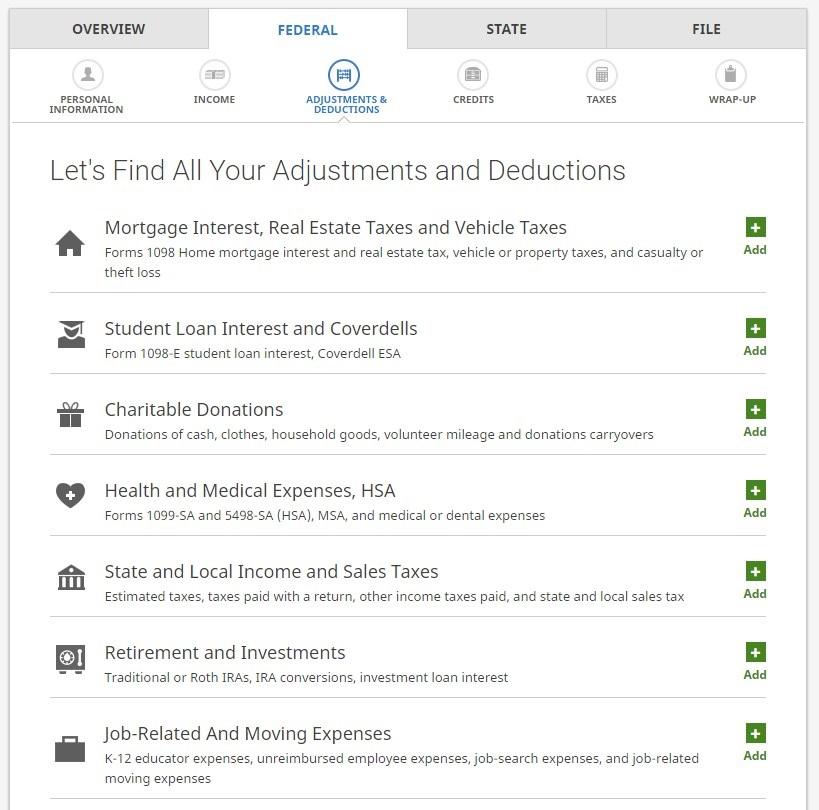
H&R Block has an attractive home page for personal information, income, adjustments and deductions, credits, taxes and wrap-up. I liked having the option on the income page to tell them about any additional income.
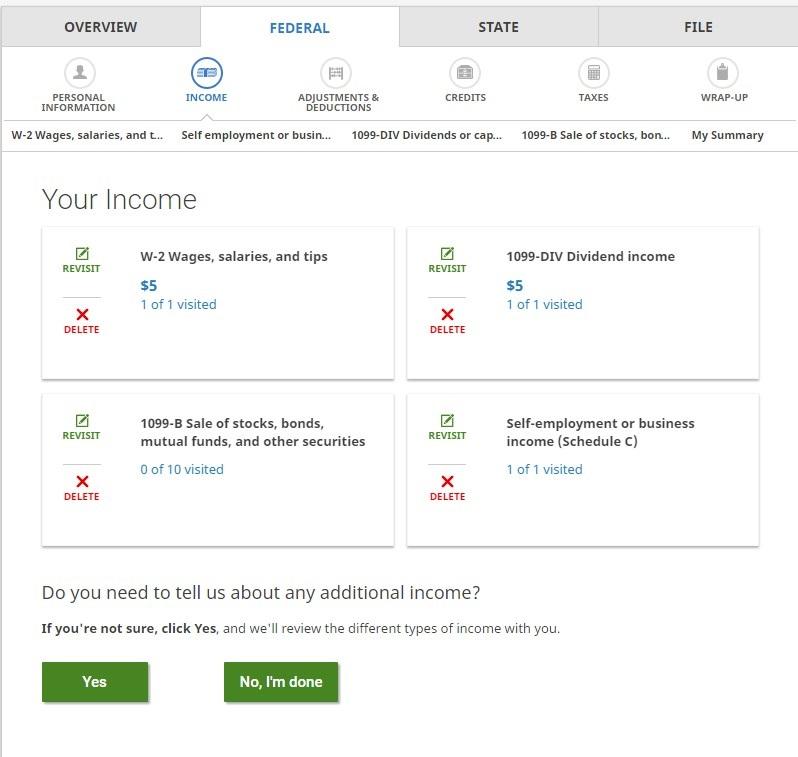
Answering the questionnaire seemed more intuitive than with TaxAct. When it asked questions I might not know the answer to, there were usually pop-up boxes that I could click on to find out more information. On the federal questionnaire, however, it did not ask me about any investment accounts. I couldn’t find an area to input my income from investments.
This was cleared up quickly when I got to the next page. The system displayed the income I had input and then asked, “Do you need to tell us about any additional income?” After clicking investment income, it reminded me that I need to use H&R Block Premium to input “Form 1099-B, Form 1099-S, Form 8949, and Schedule D.” H&R Block also had an option to import documents from Acorns (just like TurboTax). This import function from Acorns was not available with TaxAct. All I had to do was enter the account number and document ID, both of which were displayed prominently on the documents I got from Acorns. It was pretty much identical to the process I went through on TurboTax.
Overall I was impressed with the ease of use of H&R Block, but again, I didn’t attempt anything overly complicated.
For more information on the supported forms for the free version of H&R Block’s tax service click here; for Deluxe click here; for Premium click here.
After selecting one of these links, then select “view requirements and supported forms” at the bottom of the page, then click either “federal tax forms” or “state tax forms” and the applicable PDF will download.
Tools included with H&R Block are:
- Tax Calculator
- W-4 Calculator
- ACA Calculator
- Q&A sections on personal information, credits, filing, adjustments and deductions, refunds and payments, income, taxes and penalties, audits, health care and IRS information.
- H&R Block blog, “Block Talk“
- H&R Block community
- The Tax Institute
- Tax prep checklist
- W2 early access
- Income tax course
Cost
The table below shows the prices for all versions of the H&R Block tax preparation service. The costs of the online products are also found on this page, while the cost of the downloadable products are also described on this page.
Interestingly, at some computers at AAII, H&R Block showed the prices that are in the table below. On other computers, the prices were higher. We weren’t entirely sure what was causing the discrepancy.
|
|
Online | Download | |||||
|
|
Free | Deluxe | Premium | Basic | Deluxe | Premium | Premium & Business |
| Federal | $0 | $34.99 | $54.99 | $19.95 | $44.95* | $64.95 | $79.95 |
| State e-file | na | na | na | $19.95 each | $19.95 each** | $19.95 each | $19.95 each |
| State | $0 | $36.99 each | $36.99 each | $39.95 each | One included, otherwise $39.95 each | One included, otherwise $39.95 each | One included, otherwise $39.95 each *** |
|
Data as of 3/14/2017. |
|||||||
Security
H&R Block’s data security page details the many ways the company protects its users.
This includes web browsing encryption technology, which establishes a secure connection between your browser and H&R Block’s servers, encrypting any data that is passed between them to protect the privacy of the data.
H&R Block also mentions multi-layer authentication, which requires several layers of authentication when users log in to protect the account from unauthorized access.
H&R Block states that it also has:
- Bank-level encryption,
- A security protection team,
- Secure facilities and
- Inspections by top security firms.
Survey Responses
Of the members who answered the CI Tax Survey, 21% of them use H&R Block. Of the members that use H&R Block, 93% use a downloadable version, while only 7% use an online version. Sixty-six percent of the respondents use the Deluxe version, while 20% use the Premium version.
Some of the benefits that respondents mentioned included:
- “Accuracy and time savings for calculations”
- “Audit support”
- “Deluxe comes with non-cash donation software”
- “Clarity of instructions, ease of data entry, appropriate and immediate entry error feedback”
- “For investing and bank accounts, the H&R Block 2016 Deluxe edition did an excellent job of downloading 1099 form information on interest, dividends and selling of stocks that would have taken hours if I had to do it by hand.”
- “H&R Block Deluxe handles most tax forms, while the other services require you to upgrade”
- “Cheaper than TurboTax”
- “Runs well on a Mac computer”
- “Early availability, easy download, easy update, timely notices of updates, reasonable cost”
Some caveats mentioned included:
- “Backdoor Roth IRA not well explained”
- “Can’t make entries directly on form as data input”
- “Costs of additional state programs and e-filing charges. They can add up quickly”
- “Couldn’t download tax info from JP Morgan Chase”
- “Doesn’t import all W-2s and 1099s”
- “For capital gains the identity of holder is not listed on the state form, you must hand enter on state as separate activity”
- “Difficulty dealing with partially taxable IRA distributions”
- “It does not handle K-1 partnerships very well at all. It is slightly confusing.”
- “It has never handled allocation of accrued interest or amortization of bond premium across taxable and tax-exempt bonds including within the subset of muni bonds that are state exempt versus state taxable. This requires either overrides or multiple 1099-INT worksheets.”
- “Links to the IRS forms don’t work in my program”
- “The business program has lousy instructions and is not integrated with the personal product”
- “Unable to apply amortized premium and accrued interest to the same interest entry.”
- “When selling ESPP stock the program makes an assumption that the employer does not include taxable ordinary income (from the discount) on your W-2. That depends on the employer and may be incorrect.”
- “I encountered a bug related to rents and royalties loss carryovers. I reported it to them but I don’t think they ever fixed it.”
Conclusion
Overall, these three services would be easy for someone with a fairly simple tax situation. For most investors, however, that may not be the case. TurboTax and H&R Block both had an easy import from brokerage accounts. TaxAct didn’t have a wide selection of brokerages, and you couldn’t search for one if it wasn’t on their list (although maybe that feature was broken when I was using it?).
I was impressed with H&R Block this year; the software seemed improved from last year, but many members said that some of the more complex issues are still lagging.
Members seem to be most confident in TurboTax, but based on a lot of the comments for each of the services, none of the tax preparation suites are all-encompassing, particularly when you have a more complex tax situation.
How satisified are you with the service that you use?
(1 being not satisfied, 5 being very satisfied)
| H&R Block | ||
|
Rating |
Percentage |
Number of Responses |
| 1 | 0.62% | 3 |
| 2 | 2.49% | 12 |
| 3 | 13.51% | 65 |
| 4 | 43.24% | 208 |
| 5 | 40.12% | 193 |
| TaxAct | ||
| Rating | Percentage | Number of Responses |
| 1 | 0.71% | 1 |
| 2 | 1.42% | 2 |
| 3 | 21.28% | 30 |
| 4 | 42.55% | 60 |
| 5 | 34.04% | 48 |
| TurboTax | ||
| Rating | Percentage | Number of Responses |
| 1 | 0.52% | 8 |
| 2 | 3.37% | 52 |
| 3 | 12.36% | 191 |
| 4 | 44.98% | 695 |
| 5 | 38.77% | 599 |
According to the users who filled out the CI Tax Survey, a majority of them are satisfied with the product they use. On a scale of 1 (not satisfied) to 5 (very satisfied), slightly over 40% of the users of each H&R Block, TaxAct and TurboTax chose the number “4.”
As always, if you have a particular experience you’d like to share with members, please post it in the comments section here. Learning from your experience and unique situation will help all the members and subscribers who read this article.
Discussion
FREE REPORT

bob fox from PA posted over 9 years ago:
R Rubin from FL posted over 9 years ago:
James from PA posted over 9 years ago:
John Heckmueller from NC posted over 9 years ago:
Jeff from NY posted over 9 years ago:
Deskandchairs from WA posted over 9 years ago:
Scott O Connor from AZ posted over 9 years ago:
Michael Armstrong from WA posted over 9 years ago:
Charles Mc Chesney from PA posted over 9 years ago:
Claire August from NY posted over 9 years ago:
HW from WA posted over 9 years ago:
JB from CA posted over 9 years ago:
Thomas Hirsh from IL posted over 9 years ago:
Joseph Durusau from TX posted over 9 years ago:
You need to log in as a registered AAII user before commenting.
Log InCreate an account