


Price: Free-$29.99
An iPhone app designed to bring users a streamlined mobile stock market experience.
Stock tracking applications are becoming more prevalent in the mobile application arena. There are some that disappoint, some that focus on a specific section of financial analysis and some that are comprehensive. Stock Master is a comprehensive stock tracking app that has a plethora of capabilities, including real-time stock quotes, stock screening, charting, technical analysis, portfolio tracking, watchlists, an economic calendar, an earnings calendar and more.
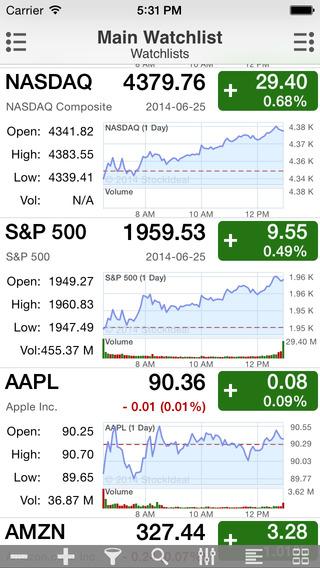
Once you open the app you will be brought to the main watchlist. The default screen displays the Dow Jones industrial average, the NASDAQ Composite and the S&P 500 index, along with several popular stocks. Each individual stock/index on the watchlist has a brief overview accompanying it. This overview displays the current price, daily performance, open, high, low, and volume as well as a price chart. On the watchlist screen, users can customize which stocks appear by pressing the plus and minus buttons at the bottom of the screen. This toolbar also lets you filter for a particular stock that may be on your watchlist, perform a quick search, sort symbols, switch to a condensed appearance or select among favorite actions. On the top right-hand side of the app is a drop-down actions toolbar, which lets users add stocks, edit stocks, import from Google Finance and Yahoo Finance, update the watchlist name as well as other customization options. To import information from Google or Yahoo you have to log in to your respective account from the application and it automatically pulls the watchlist or portfolios you have saved.
Integration with Google Finance and Yahoo Finance allows users to sync their portfolio with Stock Master and manage stocks and stock transactions. The app displays the user’s portfolio account value, cost basis, gains or losses as well as a portfolio distribution pie chart. Several different portfolios can be viewed at once as an easy one-stop shop for investors with several portfolios.
By clicking the drop-down menu located in the upper left-hand corner, you can access the wide range of tools that Stock Master has to offer. The first section of the menu is dedicated to watchlists, including creating new watchlists, editing current watchlists and viewing popular watchlists. The most popular watchlists are pre-created watchlists based on famous investors and common indexes and investment styles, such as: 401(K) Popular ETFs, Warren Buffett’s 10 Favorite Stocks, Dow Jones Components and more. By having access to these lists, users don’t necessarily have to create their own watchlists.
One of the options under the stock screen section of the menu allows users to create, backtest and optimize their own custom trading strategy using historical data and then analyze its performance for validatation. Backtesting options include time frame, action (long and short, long, short) and strategy. The backtesting results display a table as well as a chart. Stock Master provides users with a stock screener, and users can specify which exchange they want to scan and how to sort the passing companies. The app also offers a wide variety of fundamental and technical criteria. Fundamental options include price, price-earnings ratio, return year-to-date, dividend yield and more. Technical criteria includes a wide variety of candlestick patterns, moving average figures, momentum indicators and more. Specific screens can be saved and used at a later time. Users can do a quick scan of the market using predefined screeners as well as scan their own watchlists.

The app comes with an earnings report calendar that allows users to choose which exchange they want to view. Stock Master takes it a step further by allowing users to view an earnings calendar of companies that are on their watchlists. In addition to earnings calendars, the app also comes with an economic calendar.
Stock Master gives users the option to access previously viewed articles, view historical stock information, specify chart settings, set stock alerts, scan the market for news items and more. If you are concerned about keeping your information private in case your phone is stolen or accessed by someone else, the app lets you set portfolio passwords. Stock Master goes beyond U.S. stocks to include information on a wide variety of stocks around the world as well as exchange-traded funds, foreign exchange and commodities. These options can be accessed by clicking the drop-down menu on the left-hand side of the app.
Overall, Stock Master is an excellent comprehensive app for individuals who want to track the market as well as their own stocks. The app is free but offers several different upgrade options such as unlimited backtesting, unlimited chart sharing, unlimited earnings reports and more. Each upgrade costs $7.99, but you can get a package that gives you all the upgrades for a one-time fee of $29.99.
Stock Master for iPhone
Price: Free-$29.99
Discussion
FREE REPORT

No comments have been added yet. Add your thoughts to the discussion!
You need to log in as a registered AAII user before commenting.
Log InCreate an account