


Apple’s iOS app that allows users to download and listen to a wide variety of podcasts for free.
Free
Podcasts are digital audio files that you can download to a computer or media player. They are somewhat similar to radio shows, but many follow a different format and they generally offer a wider variety of content. Apple defines podcasts as “audio, video, or document content in episode format. They cover many different topics including arts, comedy, education, health, news and politics, technology and more.”
Podcasts are an excellent source of education and entertainment. They are also helpful to individuals (like myself) who have severe motion sickness when traveling on a train, bus or plane. Instead of reading, you can just download a podcast to your mobile device and pass the time listening instead.
What many don’t realize is when you purchase an iPhone, you automatically have a podcast application on your iOS device. (Apple doesn’t allow you to delete the app, even if you want to.) The application icon is shown in Figure 1.
While there are plenty of third-party podcast applications you can download, this review is of the built-in podcast application on Apple phones (also available on iPads and iPods).
When you tap the Podcast application icon on your home screen, you are brought to the Podcast home screen. Along the bottom of the screen there are five different options: My Podcasts, My Stations, Featured, Top Charts and Search.
Clicking on Search allows you to search for keywords, phrases, companies or genres. If you see a podcast that looks interesting, simply tap on it. When you’re viewing podcasts from the Featured or Search area you see the podcast details and description, a list of episodes and their length, subscriber reviews and related podcasts. To download a podcast to your device, tap the icon that looks like a cloud with a downward arrow (this appears toward the left of the podcast title). Downloading a podcast episode to your device takes up storage space (the longer the podcast the more space it takes up); however, it also allows you to listen to the podcast when you do not have an Internet connection. Users have the option to delete downloaded podcasts after they have listened to them.
As an alternative to downloading a podcast, users can stream a podcast episodes if they do not want the podcast file stored on their device. Your iOS device needs a continuous Internet connection when you choose to stream. This can be done using your cellular service carrier or Wi-Fi. Streaming, and the podcast audio or video, will stop if your lose service or disconnect from Wi-Fi. For Apple’s explanation of streaming, downloading and subscribing to podcasts, click this link.

Episodic podcasts are handled through subscription. To subscribe to a podcast, hit the “subscribe” button toward the top of the screen. When you subscribe to a podcast, your iOS device automatically checks each day for new episodes.
The “My Podcasts” screen located at the bottom of your device’s screen shows you names of all the podcasts you’ve downloaded or subscribed to and how many unplayed episodes you have within each series (Figure 2). Tap on a subscription podcast to see the list of individual episodes and choose the ones you want to download or stream.
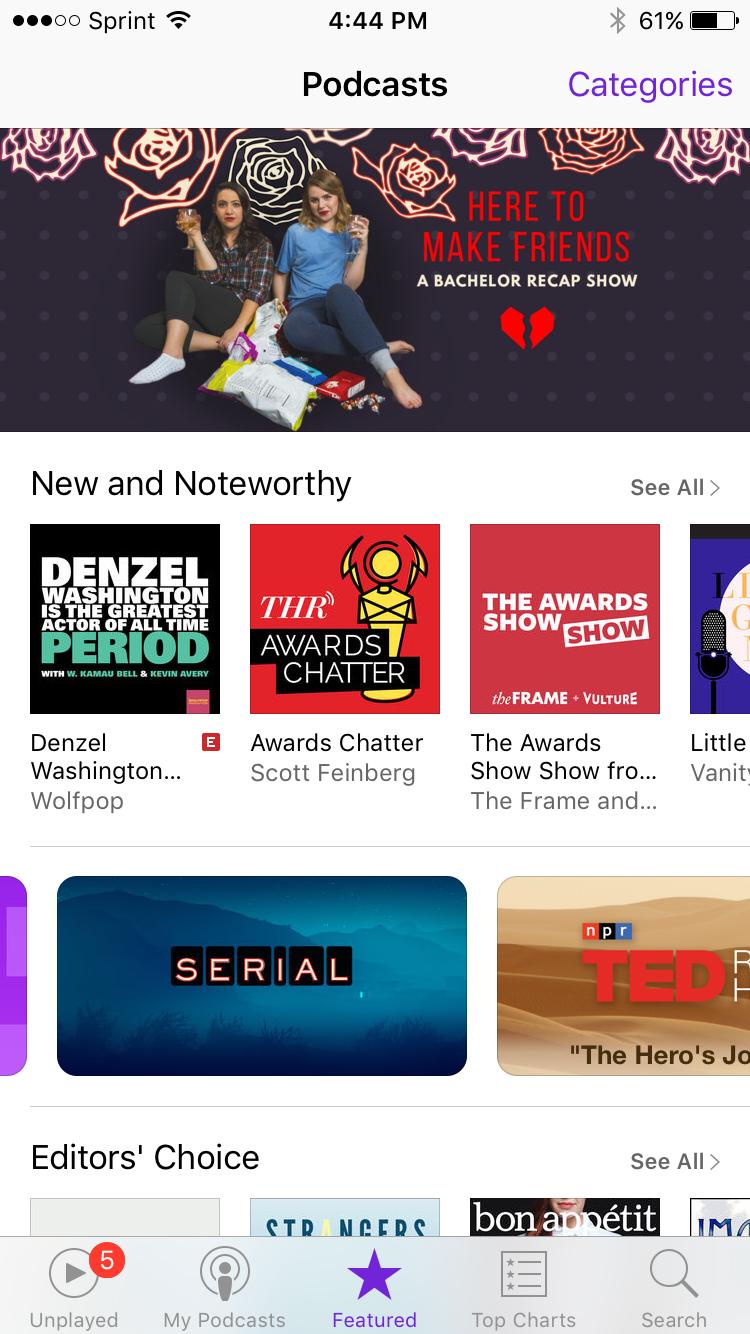
If you’re unsure what to search for, get suggestions by browsing the Featured area by tapping on that choice at the bottom of the Podcasts app. The Featured section shows you a curated selection of podcasts including New and Noteworthy, Editors’ Choice, Featured Collections, Featured Providers and more. Users can tap Categories in the upper right-hand corner to refine their browsing. Categories include arts, business, comedy, education, games and hobbies, government and organizations, health, kids and family, music, news and politics, religion and spirituality, science and medicine, society and culture, sports and recreation, technology, and TV and film (Figure 3).
By tapping Top Charts at the bottom of the Podcasts application, you can see what other listeners and viewers are most actively subscribing to and enjoying. You can view the average user rating on a scale of one to five stars, as well as how many users have rated the podcast.
Some investing-related podcasts that we recommend are:
Planet Money
Market Place
Freakonomics with Stephen J. Dubner
Masters in Business Bloomberg
MoneyLife with Chuck Jaffe
The Disciplined Investor
So Money with Farnoosh Torabi
The Truth About Money with Ric Edelman
Mad Money with Jim Cramer
This Week in Barron’s
The Economist
Your Money Matters – The Wall Street Journal
We would love to hear your recommendations if you currently listen to podcasts, or your recommendations of podcasts that you stumble upon after reading this article.
For more information about podcasts on your iOS device, check out the Apple Podcast FAQ page.
Apple Podcast App
Free
Discussion
FREE REPORT

Gregory Jones from TX posted over 10 years ago:
Jesse Johnson from FL posted over 10 years ago:
Jackie McClellan from IL posted over 10 years ago:
Gregory Boswell from SC posted over 10 years ago:
Jackie McClellan from IL posted over 10 years ago:
Sean McMahon from TX posted over 10 years ago:
You need to log in as a registered AAII user before commenting.
Log InCreate an account