


Chart Fu is an application that allows investors to capture images of charts and add their own annotations. Charts can be created on different programs or even taken directly offline and opened up into Chart Fu. The program simplifies the process by supplying its own screen capture feature. This allows the user to resize and drag a box over the chart they’re looking at on another website and capture the image without having to download any additional software for screen shots.
Once a chart is pulled up on Chart Fu, users have several different options to annotate it. If the chart isn’t big enough to view, you can start by resizing it. Across the left-hand side of the program there are a series of symbols, like a drawing toolbar, for the chart. Just as you would in a Paint document, you click on a tool that you can use for drawing. Some of these tools include different types of channels or chart patterns, Fibonacci sequences, trendlines and text boxes. This roster of tools enables the user to add their own personalized analysis to any chart. If you want to add more than one chart on the page or overlap pictures of charts, you can do that as well. Annotations can either be added from the side toolbar or the drop-down menu at the top of the program.
Users also have the ability to add notes without writing on the actual chart itself. If you just want to write a little paragraph explaining what you see or what you feel is important, click “tools” then “chart notes” from the toolbar. Once your annotations are added, you can choose to hide or reveal specific notes. Maybe you just want to look at the trendlines as opposed to the chart patterns. In that case, after you’ve created an annotated chart that you’re satisfied with, Chart Fu allows you to save the drawing by itself. Users can also export the drawing to a variety of file types.
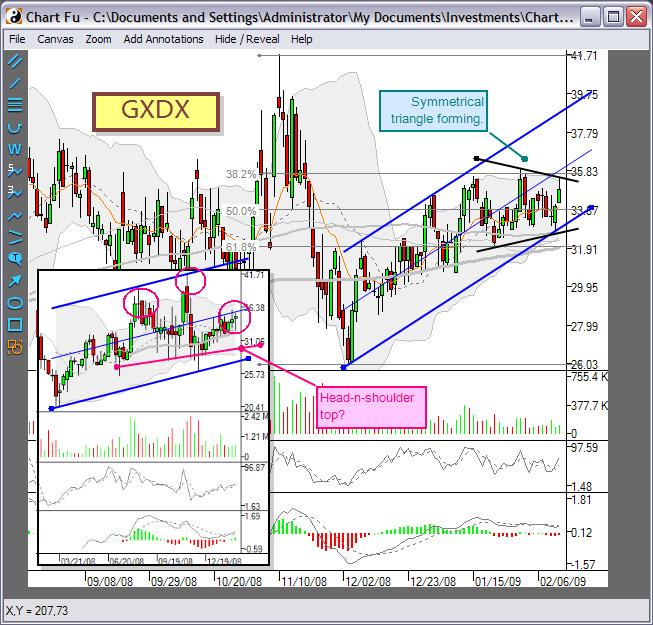
Overall it’s a very basic program, but something a little bit different than we’ve seen. It could be compared to a “chart journal.” Chart Fu comes with a help menu that has several different sources available if you’re confused about how to work the program. It is free for 30 days, and after that you have to purchase the program for $14.95.
Chart Fu
https://www.aaii.com/download-library/download?DL_ID=771
System Requirements: Windows 2000, XP, Vista, 7
Size: 2.77 MB
Price: Free 30-day trial, $14.95 to purchase
Discussion
FREE REPORT

Matthias Schoener from CA posted over 13 years ago:
Jaclyn from IL posted over 13 years ago:
You need to log in as a registered AAII user before commenting.
Log InCreate an account