


Wayne Thorp leads a class in AAII's new Essential Investing Video Course. Go to https://www.aaii.com/ves for more information and to subscribe.
$169 (Cherry MX Blue switches)
Updated mechanical keyboard with dedicated media hardware and high-speed USB port.
Over four years ago, I reviewed the Das Keyboard Model S Professional mechanical keyboard from Metadot. Metadot was at the forefront of mechanical keyboards when it introduced the original Das Keyboard in 2005. As a huge fan of mechanical keyboards—I had gone so far as to start buying used Dell models from eBay—I was very impressed with the Das Keyboard. The audible and tactile feedback of the mechanical, in my opinion, allowed me to type faster than the typical “quiet key” keyboards that ship with most of today’s new PCs. Last year, I reviewed another mechanical keyboard, the ROCCAT Ryos MK Glow backlit gaming keyboard. While it is geared toward gamers, the Ryos still offered the mechanical keyboard traits I love with the added bonus of backlighting. It was the backlighting, and the slightly cheaper price tag, that put the Ryos above the Das Keyboard in my book.
Earlier this year, Metadot came out with a revamped model, Das Keyboard 4 Professional. With an even sturdier design and additional features, I have to rethink my choice of the top mechanical keyboard.
Out of the Box
The mechanical keyboards I have tried are all workhorses. They are nothing like the flimsy afterthought accessories that come with new PCs. Just like its predecessor, the Model S Professional, the Das Keyboard 4 Professional is solidly built. The first thing I personally noticed about the updated board is its lack of a high-gloss finish. I have been using the Das Keyboard Model S Professional since 2010 (I liked it so much that I bought the review model), and it looks terrible. Its high-gloss finish shows every splash of coffee and fingerprint from the last four years and, frankly, it has started to look a little grungy. The powder-finished, anodized aluminum top panel of the Das Keyboard 4 Professional adds additional durability to the keyboard and does not show fingerprints.
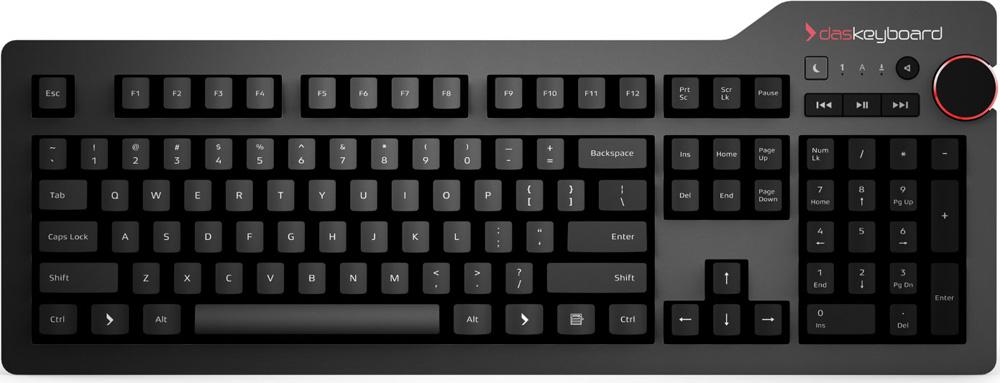
The second thing that is immediately obvious, compared to the previous model, is the presence of dedicated media keys, a sleep button and a volume knob. All of these components reside on the upper right of the keyboard just above the keypad. There are buttons for mute, play/pause, next track and previous tracks along with an instant sleep button that, when pressed, puts the connected computer into sleep mode.
On the top right edge of the keyboard are two USB ports. However, they now support the faster USB 3.0 specification, which is 10 times faster than USB 2.0. This is an especially nice feature if you transfer a lot of high-resolution photos and video from USB devices to your computer. In addition, the ports are backward-compatible with all USB 2.0/1.1 devices and hosts, so you do not have to worry about hardware and accessories that are not compatible. However, keep in mind that you will need to plug the keyboard into a USB 3.0 port on your computer in order to experience the 5GB-per-second transfer speed.
Speaking of plug, Metadot continues to offer a 6.5-foot cord. While this does not sound like a big deal, try running a too-short cord through desk grommets to a PC under the desk. Also, the Das Keyboard 4 Professional now only uses a single USB port to connect the keyboard to your PC and power the USB ports at the same time. This is an especially big deal if you have a laptop, where USB ports are usually at a premium.
The keyboard itself has a typical 104-key U.S. layout. Compared to the ROCCAT Ryos, there are no macro keys. For the typical user, this probably is not a concern, since macros are mostly popular with gamers. Metadot points out that the key inscriptions are laser etched to prevent fading. However, I have noticed that, over the course of the last couple of months, the lettering has become discolored and faded. Arguably, the biggest shortcoming of the Das Keyboard 4 Professional, compared to the ROCCAT Ryos, is that the keys are not backlit. For a keyboard of this level and price, this is kind of a surprising omission.
Are far as specs go, the Das Keyboard Professional 4 measures 18 inches by 6.8 inches by 0.8 inches and weighs in at 2.9 pounds. These specs are very similar to the previous model. What really impressed me, however, is the fact that while the new keyboard looks and feels even more solid than the previous Model S, it actually weighs slightly less. Compared to the ROCCAT Ryos, the 4 Professional is nearly 17% lighter.
Finally, Metadot has done away with the folding legs many keyboards use today to elevate them at an angle for easier typing. Instead, the Das Keyboard Professional 4 includes a detachable magnetic footbar that raises the keyboard to four degrees. Furthermore, as an odd twist, the footbar doubles as a 16-inch ruler because, as the Das Keyboard website states, “why not.” Some reviewers see the footbar as an inelegant feature, but I disagree. Once it is attached, the footbar stays put and you never have to re-fold feet if they collapse or replace them if they break off. The usefulness of the ruler part, I am not so sure about.
Setup
Like its predecessor, the Das Keyboard 4 Professional is ready to use out of the box. There are no drivers to install, unlike with the ROCCAT Ryos. This is literally plug and play into any Windows, Linux, ChromeOS or Mac computer.
Performance
Over the last several months, I have been using the ROCCAT Ryos keyboard more and more. I moved it from my test lab and into my office because I prefer to work in dark spaces and the backlighting was optimal for that purpose. However, as soon as I started typing on the new Das Keyboard 4 Professional, it felt like I was home again. The tactile and audio response you get with a mechanical keyboard is amazing, though I must admit I am not sure how much my colleagues appreciate hearing me literally bang away on the keyboard. This is all due to the gold-plated Cherry MX Blue switches on the keyboard. If you want the same tactile response with less noise, you can buy the same model with Cherry MK Brown switches, but it will cost you $4 more. The same gold-plated switches give the Das Keyboard unrivaled durability. According to Metadot, since gold does not rust, the switches are designed to withstand 50 million actuations, or keystrokes, compared to only 10 or 20 million for the typical keyboard.
The “clicky” tactile feedback you get with Cherry MX Blue switches helps increase your typing speed by reducing the effort needed to push the keys all the way down. Furthermore, your hands and ears register when you type or do not type, which, for me, cuts down on the number of typing mistakes I make. Compared to the ROCCAT Ryos, which does not have quite the same audible feedback, I find myself typing noticeably faster with the Das Keyboard 4 Professional.
Price
Today, most consumers do not spend a lot of time pondering their computer keyboard. Many of us simply use the “throwaway” keyboard that comes standard with a new PC. It is amazing to see the evolution of freebie keyboards over the last 15 years or so. PC makers have become so obsessed with eliminating extraneous materials that it seems like a decent gust of wind would blow many of today’s keyboards away. Since many of us have probably never bought a keyboard on its own, you may be a bit shocked by the Das Keyboard 4 Professional’s price tag: $169 ($173 for the silent model). This is $40 more than the previous model and $20 more than the ROCCAT Ryos that offers macro keys and backlighting.
One reviewer put the price discussion in excellent context by comparing buying a computer keyboard to buying a mattress. While most of us prefer saving money, it is really worth skimping on the cost of a mattress when many of us spend a third of our lives in bed? I spend, on average, at least nine hours a day on my office computer. When I have a tool that allows me to be more productive—I figure I can type some 20% faster with a mechanical keyboard than a traditional keyboard—why would I not invest the extra money? If you spend a lot of time typing, the money you spend on this keyboard is worth every penny.
Overall
While some would say it is hard to get excited about a keyboard, the Das Keyboard 4 Professional elicits just that response. This is a keyboard that offers amazing quality and can make you more productive at the same time. While I truly love the ROCCAT Ryos MK Glow, the new Das Keyboard 4 Professional is the best mechanical keyboard I have tested. That being said, there is one area that I think Metadot can work on: backlighting. Perhaps there is an engineering reason why many mechanical keyboards on the market do not offer backlighting. While the ROCCAT Ryos MK Glow does have backlit keys, it does not have the Cherry MX Blue switches that provide the audible feedback I crave from a mechanical keyboard. For a keyboard at this price point, however, backlighting would make the cost more justifiable to the masses.
While this is the best mechanical keyboard I have ever used, it does not mean this is the right keyboard for everyone. If you are someone who only sends the occasional email and otherwise spends most of your time away from the computer, the price of this keyboard is too high. However, if you are someone who spends a lot on time on the computer writing email, typing letters or articles, etc., consider the price an investment toward improving your productivity. In addition, the gold-plated switches make it very likely that the Das Keyboard Professional 4 will outlive your next two or three computers.
Pros
- Sturdy, well-built
- Gold-plated switches offer considerably longer life versus typical keyboard
- Integrated hub supports USB 3.0
- Dedicated media keys, volume knob
- New matte finish is much easier to keep clean
Cons
- Expensive, even relative to other mechanical keyboards
- No backlighting, and key lettering becomes discolored over time
- No macro keys
Das Keyboard 4 Professional Mechanical Keyboard $169
(Currently $168.48 from Amazon.com)
Discussion
FREE REPORT

James Hurley from CT posted over 11 years ago:
Wayne Thorp from IL posted over 11 years ago:
E Ruth from CA posted over 11 years ago:
You need to log in as a registered AAII user before commenting.
Log InCreate an account