


$79.90
Active camera with GoPro-like capabilities but with a price tag that is significantly less.
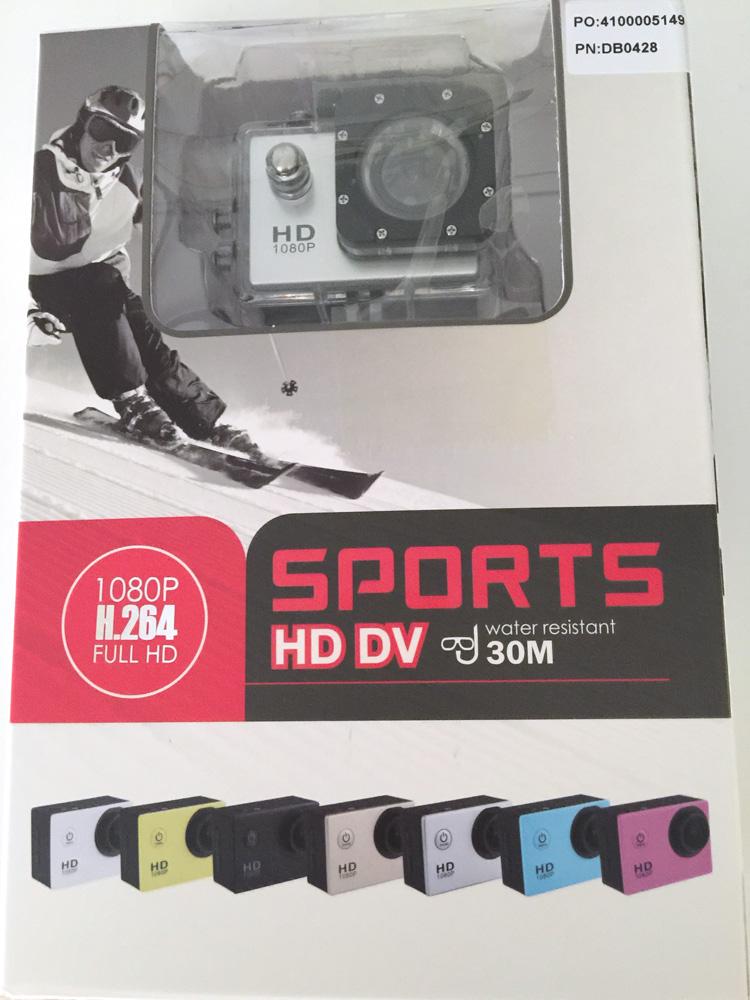
GoPro is a new publicly traded company with a hefty valuation based on its sports camera business. Success like that breeds copycats, and DBPower is a Chinese copycat. Since not everyone can afford or wants to buy a GoPro camera, here’s a look at one of the fast followers in the active camera space, the DBPower Action Camera SJ4000.
Out of the Box
The box is solid and the contents well-packaged when received, which is important when you have ordered any type of camera. The camera is smaller than a small bar of soap, although slightly thicker. The camera will already be inside of the waterproof case that comes with it. Beyond the waterproof case, there are numerous other accessories to enhance your use of the camera, such as a number of different clips and brackets to secure the camera to helmets or other gear. While the package that I received seemed acceptable, some other buyers have complained about poor workmanship or missing components, something you should be aware of.

The camera is thicker than GoPro cameras but quite light. It has a 1.5-inch LCD display that shows you what the camera is seeing, a feature that other cameras in this space generally lack. The downside of the LCD screen, though, is that it aggressively uses up battery life. The dimensions of the camera are 2.4 inches by 1.6 inches by 1.2 inches. Buttons are minimal, with the mode button also serving as the power button. The OK button on the top is how you start recording. Two buttons on the side control the zoom. DBPower claims that this design makes it easy to adjust settings on the camera. The camera has an immersive ultra-wide-angle 170-degree lens. It weighs just 2.05 ounces (0.13 pounds), which is actually an ounce lighter than the GoPro Hero 3 at less than one-third to one-fourth of the Hero 3’s price.
The clips and brackets are plastic but feel sturdy and dependable once installed, so you don’t have to worry about your camera getting damaged. The process to install the clips and brackets is not documented in the instruction manual, which leaves the buyer on their own to figure out how things fit together. Considering that the clips or brackets are holding your camera, that’s enough to make you a little nervous. Poor documentation is a common problem among Chinese manufacturers; it is not unique to DBPower. Still, one can only hope that over time Chinese companies that hope to sell to a global audience improve this aspect of their offerings.
One thing you will not see in the box is any accessory such as a charging cradle that would allow you to charge by plugging into the wall. This is a big oversight in my book. I wouldn’t be able to charge this camera without my laptop.
According to the manufacturer, the case is waterproof down to 30 meters and apparently will float if separated from you in the water.
Setup
You will need to purchase a micro SD card separately; it can accept up to a 32-gigabyte card, which provides over three hours of video capabilities. The micro SD slot is on the left side of the camera, next to the HDMI and USB slots, which is convenient; some manufacturers put the SD slot next to the battery. DBPower recommends in its instruction manual to use only “branded” micro SD cards, otherwise they are not responsible for the camera not working. It is unclear how that is defined, and I don’t think there should be any reason for a non-name-brand micro SD card not to work. Once the micro SD card is securely in the camera, you can turn it on by holding down the mode button on the front of the camera for a few seconds.
The battery case opens by pulling back the switch at the bottom of the camera. The top of the case may not pop up at first, and you might need fingernails or a small flathead screwdriver to pry it up. After the first time, however, the top seems to pop up easily.
You will hear a whoosh of music to welcome you to the camera. Once the camera is on, you can do any number of things using the LCD screen to guide you, such as adjust the zoom or the brightness of the camera. This screen is a luxury that not even the GoPro offers.
The camera is charged via USB, so you can charge it with your computer or even from your car, if your car provides a USB port. The camera is able to record video or snap pictures while it is being charged, which is a plus, for example, if you want to use it as a dashcam.
Accessories are installed by screwing them into the appropriate holes with your hand and then, if you wish, tightening them with a small Phillips screwdriver. Most of the accessories already have their screws and nuts in place, so there is no need to try and figure out which screw or nut goes where. This is helpful since, as I mentioned above, there is a lack of instruction on assembly.
The lack of proper instructions also leaves you using trial and error to determine which pieces go together to do what task. For example, if you wanted to place your camera inside the waterproof case and attach that case to your helmet, it becomes a puzzle to figure what pieces will make that happen.
It is highly recommended that you practice assembly of clips for the tasks you plan on doing before you go out to do them.
Performance
Pressing and holding the OK button at the top of the camera allows you to record video or take a picture. The camera records about 70 minutes in 1080p with a standby time of about three to four hours. It allows you to do timed recording as well. The audio is not as good as GoPro’s, but the quality of the video is amazing given its price. The menu allows you to change the resolution, use a self-timer, alter image size, or adjust white balance. The camera has exposure compensation, anti-shake, face detection and more.
It is difficult to tell if the camera is recording unless you are looking at the LCD screen, which is a problem when you have it installed on your helmet. The buttons don’t provide any other feedback that they have been pressed beyond visual.
The batteries are swappable, which is good since you only get 70 minutes of recording time at the highest resolution. The anti-shaking feature on the DBPower camera is not as good as on the GoPro, so depending on your activity your video could be less than optimal.
Overall
Overall, the camera is a reasonable facsimile of a GoPro for a significantly lower price. It offers 1080p video recording, although only for 70 minutes per full charge. The camera’s biggest advantage is that it is $50 cheaper than the cheapest GoPro camera, which will attract budget-conscious buyers. The camera as a whole is solid and useful and, at its offered price, almost disposable. Still, there are some downsides as mentioned: the instructional manual is lacking, the battery life is relatively short and quality can be hit and miss.
Whether this can work for you depends on your priorities; do you have a one-chance opportunity to record something you may never do again? Spending more money on the GoPro probably makes more sense in that case. Having the bonus of being able to record fun activities that you already do without concern for the camera means a clone camera such as this may work.
As for me, I’m taking the DBPower Action Camera SJ4000 up a mountain and will enjoy any video or pictures I get out of it.
Pros
- Inexpensive relative to the GoPro line
- Excellent video quality
- Lots of accessories included
Cons
- No micro SD card included
- Short battery life means you need to always carry an extra battery or two
- Price advantage with GoPro is closing
$79.90
Discussion
FREE REPORT

Stephen Krmpotich from MN posted over 11 years ago:
Hareesh N. Jayanthi from Illinois posted over 11 years ago:
You need to log in as a registered AAII user before commenting.
Log InCreate an account