


Free - $0.99 a month
Real-time quotes, charts and news on stocks and indexes from respected financial websites.
Stocks: Realtime Quotes Charts for Android is an app made by StockSpy Apps Inc. that assists investors in tracking stocks and markets through price quotes, charts, news and more. The app is available for several different operating systems, but this version was downloaded to an Android tablet.
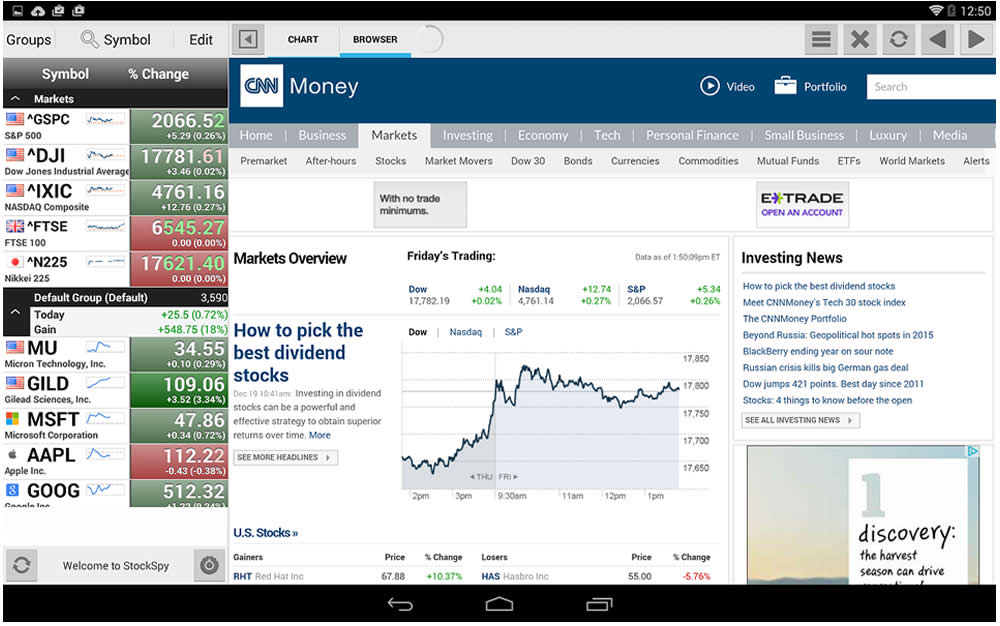
After you download and launch the app, you will be brought to the home page. Here you have the choice of looking at charts or a browser. Both selections are available at the top of the app. If you choose charts, you will see a list of indexes along the right-hand side as well as a default group of stocks. To see a given chart, click the ticker symbol of the chart you would like to view. If you choose the “browser” option, you can search the Internet with the app open. This is an interesting feature not common in many stock-related apps.
The Default group of stocks is customizable. To add a company you can search for the ticker symbol by typing it into the box titled “symbol” in the top left-hand side of the app. You will then click the tab titled “trades” and you can choose to add it into the default group. You will also notice that you can view an individual security’s chart when you search for the ticker symbol by clicking the “chart” button next to the browser button. This will switch your view from browser to chart. You have the option to view a time period of five minutes, 30 minutes, days, weeks or months. There is a yellow sliding bar that will appear on the chart. If you upgrade to the pro version, you can move this cursor along the chart and view news items that correspond to where you have selected.
There are four different tabs available when you search for a stock: news, links, stats and trades. If you click “links” you will see links related to the particular company you have searched. This includes the company website and several different pages dedicated to that particular company on popular financial websites such as Yahoo Finance, Google Finance, Morningstar, Forbes, Reuters and more. To view a particular link, simply click on it and the page will appear in the right-hand side of the app. If you want to view the website in full-screen mode, click the arrow at the top of the app, to the left of the chart and browser viewing options.

Users who download the free version can add five trades to their app, and pro users can add as many as they’d like. Adding trades simply allows you to view the return you’ve earned on a particular stock. The app will display the realized and unrealized return, position, cost and market value. To add trade information to a particular stock, search the stock’s ticker and then click the trades tab. At the top of the app, next to the company’s ticker you will see a button to edit. Click edit, then press the plus button on the left-hand side. The app will ask you for basic trade information, including trade type (buy, sell, short, cover), purchase price, quantity, commission and the date of purchase. When you are finished inputting this information, click done.
Overall, this app has basic stock and index tracking capabilities when the free version is downloaded. The most interesting feature about it is the ability to search the Web and keep the app as somewhat of a toolbox on the side.
The pro version has many more features, including: automatic cloud sync to sync your symbols, groups, trades, feed and links (works with StockSpy for Android, Mac, iOS, Windows 8); unlimited trades; unlimited symbol groups; unlimited customizable link templates; unlimited customizable news feeds; access technical overlay; access all symbol links and more. The pro version will cost you $0.99 a month.
Stocks: Realtime Quotes Charts for Android
Free - $0.99 a month
Discussion
FREE REPORT

No comments have been added yet. Add your thoughts to the discussion!
You need to log in as a registered AAII user before commenting.
Log InCreate an account