


$86.99
Mini projector for use as a business presentation tool and as a television source which is portable and will allow you to project virtually anywhere.
Online video providers such as YouTube and Netflix have exploded in recent years as video consumption has moved online. However, watching on your laptop or tablet or phone can be limiting and socially isolating. More and more entrepreneurs have been looking at the television space for potential disruption. One idea that has emerged has been to bring the video out of the device by using a projector thereby simulating a traditional TV experience while still cutting out the cable company (to an extent). Projectors have gotten noticeably smaller and less expensive. Additionally, the bulbs have also gotten cheaper and their lives have increased dramatically.
Traveling professionals have been buying the smallest of these projectors, called pico projectors, which are little bigger than your phone and are particularly appropriate for business presentations that include video. Consumers who are comfortable on the bleeding edge of technology have been adopting tech from the business sector for years and the adoption of pico projectors, ad their bigger brethren is no different. With the advent of services such as YouTube and Netflix and the on-the-move society we now have, a 200-pound television seems antiquated now. Early-adopting consumers have bought these mini projectors in droves, looking to have bigger images of the services they do sign up for and which allow them mobility. Imagine being able to project a 40-inch screen on the wall with your own programming while traveling instead of having to rely on the hotel’s television. Or escaping Elmo while the kids are home to move your football game to a quiet corner of the house. It sounds appealing, but while early adopters have found some success with this strategy, the question is whether these products are only for a niche or if a broader consumer base can join in and have successtoo.
Mini projectors range in size, but the smallest ones are only a little bigger than your basic phablet. They are measured primarily by the lumens produced. They cover a wide range of prices, but can start as low as $100. For a renter, this is a dream; mobile TV wherever I wanted it. In your living room, no problem. In your bedroom, yes sir, because it’s easy to move. In the outdoors at night, yes, because it’s easy to move and generally powerful enough. Plus, mini projectors can be pretty cost-effective.
Is this an idea whose time has come?
Out of the Box
The first thing you will notice is that the package is lacking when it comes to accessories (which can be forgiven) and documentation (which cannot).
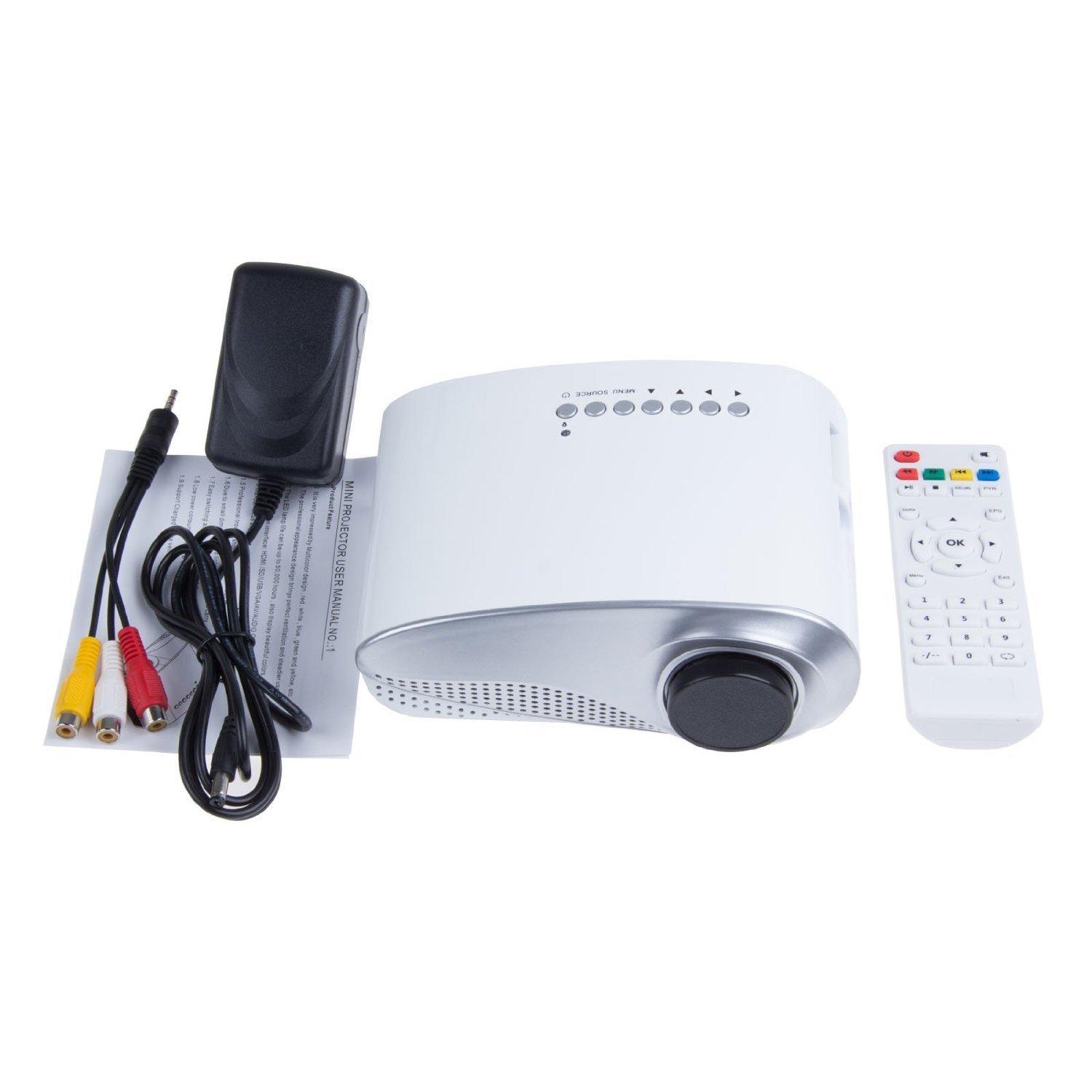
The unit weighs 820 grams (1.81 pounds). It is covered in white plastic, which can feel a bit cheap but is solid. Out of the box, the lens is covered by a plastic lid. You must remove this lid to be able to project images. This is also where you will discover that the unit requires manual focus. This is definitely a trial and error process. Bulb is a 25 watt led bulb which is rated for 50,000 hours; the projector is rated 60 lumens.
Yes, it’s very light, but it also feels fragile, so I wouldn’t just toss it into your backpack or into your car. I obviously didn’t have a chance to check the 50,000-hour rating on the bulb, but if that this anywhere near accurate it could mean decades of viewing ability. Projectors and bulb life in particular have gotten much better in the past few years. While the mobility is appealing, this projector is not a pico projector and has no battery. It must be plugged in to project anything. As Samsung would say, you will be a wall hugger. This is also true because the cord to plug into the outlet and the projector is quite short (perhaps 2 feet?). This makes trying to position the projector for a decent image particularly challenging.
The price is low, so you won’t find many accessories included in the box. One (very) short 3 to 1 AV cable, a remote control (battery not included) and the plug are the only additional hardware included. There is no need for drivers as the projector does not directly connect to the internet. The speaker in the projector is tiny and would not be enjoyable longer-term. Wireless speakers are an essential add-on. It has no built in tool for adjusting projection height. You will have to improvise to project at the right height for your needs. Be prepared to do a lot of trial and error.
Since it is a small projector, the room must be dark to get a decent viewable picture. Light can wash away colors and make the image almost unviewable in some cases. The menu is a little difficult to navigate; some users have complained about getting stuck on a foreign language.
There are seven buttons across the top for control or you can just use the remote control. It is claimed by the seller that images up to 100 inches can be shown. Perhaps, but the image quality starts to degrade substantially after 60 inches so a 100 inch projection seems optimistic. The projector includes HDMI, USB and AV connections.
A very thin user’s manual is also included with the projector, but it appears to have been written by a non-native English speaker. Although English is my second language, even I had difficulty in following parts of the product manual. Still, as with most issues related to this projector, a little patience will help get you through the documentation, as limited as it is. Ensure that you read it first before attempting any connections.
Setting up the Mini Projector
In order to successfully present images from your laptop, you will need an HDMI cable. The cable allows/facilitates the delivery of video in an uncompressed format which will show the best possible image from the projection device. Laptops typically have only one HDMI slot in the back. On the projector the HDMI slot is clearly marked, but ensure that the cable is facing the right way so it will slide in easily.
Once the computer and projector are turned on, you should see an image showing wherever the projector is pointing. You will have adjust the focus and the screen size (by moving the projector closer to or further from the wall) and by adjusting the angle of projection. It is a tedious process and not for the faint of heart.
The steps to enable the projector to work with your laptop also work with your Roku/Apple TV or your tablet. Although with your tablet, you will need an adaptor to go from the tablet to your HDMI cable. The HDMI cable carries both video and audio so you should be working upon following the steps above. As mentioned previously, be prepared to tinker.
Performance
Assuming the room is dark, the image is quite good and your ability to adjust the location and size of the image is quite useful. The manual focus, while finicky, is easy to adjust, and the sound while low, can be heard in a quiet room. For those people who don’t want a large TV occupying a room, this projection TV might do the job. It can be there when you need it and disappear into a cupboard when you don’t. Of all the positives of this unit, its mobility has to be near the top.
Best uses for the projection unit are gaming, as a second TV, or if you need mobility (for example for business presentations). On the other hand, the speaker is tiny and if you are in a room with any level of ambient noise, it will be difficult to hear. Anything less than darkness makes the images poor, meaning bad eyes need not apply. It’s also not easy to set up. Support is very limited. Additionally, I have to wonder about quality after the unit I was working with suddenly stopped functioning, despite the fact that it received high consumer ratings.
Overall
While the process is far from easy, when you can display your videos on your wall, it is quite rewarding. The image can be quite decent with acceptable sound. The affordable price tag and its mobility add to the inherent value of the product. Whether that reward is worth the effort for most people is up for debate though. The unit requires multiple accessories which are not included. Additionally, it requires patience and trial and error to get it working with an acceptable image. Looking for high definition? Forget it. Even in a dark room, you will be lucky to get a viewable projection. Poor eyes? This is not for you.
The bottom line is that if you’re looking for a cheap, portable video/gaming/business projection unit and have the patience to get the necessary accessories and to tinker with the unit, then this might be the mini projector for you.
If you’re looking for high-quality video projection right out of the box and have little patience to tinker or “figure things out,” then this is not the unit for you.
For me, while the interest was there and I was willing to sit and figure out how to get it to work, the fact that it stopped working after using it just a few times ended this experiment for me. This unit will be shipped back to the online retailer from whence it came. Look for a follow-up piece on my next attempt at projection television.
In summation, while this experiment did not prove fruitful, it may have more to do with the specific brand or even the specific unit rather than the broader question that was raised in the beginning of this review: Has the projection TV’s time come? It’s still an open question to me, though your experience may vary.
Until then, caveat emptor!
Pros
- In darkness, image quality is quite good
- Very light and mobile unit
- Affordability
Cons
- Feels plasticky
- Tiny speaker is inadequate
- Any light at all reduces image quality substantially
MeGooDo LED Mini Projector
$86.99 (On Amazon.com)
Discussion
FREE REPORT

No comments have been added yet. Add your thoughts to the discussion!
You need to log in as a registered AAII user before commenting.
Log InCreate an account