


Wayne Thorp leads a class in AAII's new Essential Investing Video Course. Go to https://www.aaii.com/ves for more information and to subscribe.
$119.95
Activity tracker monitors your steps, distance and calories burned as well as heart rate, blood oxygen level and sleep cycle.
Over the last couple of years, wearables have become a popular technology niche. Wearable technology consists of devices worn on the body in items such as watches, glasses, jewelry, and accessories. On the heels of Apple’s long-awaited announcement of its Apple Watch, we look at another wearable gadget: the Withings Pulse O2 activity tracker. This device not only counts the number of steps you take each day, it also measures your distance traveled, calories burned, heart rate and blood oxygen level. The oximeter is a unique feature that undoubtedly piques people’s interest. Furthermore, it monitors your sleep duration and quality as well as the number of sleep interruptions. With the integrated Withings app, you can keep track of your history.
Out of the Box
When opening the box, you find the Withings Pulse, a silicon/metal clip, wristband, micro-USB charging cable and quick installation guide. The Pulse itself is relatively small: it measures 1.69 inches by 0.87 inches by 0.31 inches and weighs roughly one-quarter of an ounce (0.28 ounces to be exact). It has a rectangular shape with two rounded sides.
The Pulse itself has a black matte finish and an OLED screen with a 128-pixel by 32-pixel resolution. A button on the side lets you turn the Pulse on and off, cycle through the different function screens and change modes. On the opposite side is a micro-USB charging port, while on the back is the optical sensor that serves as the oximeter and monitors heart rate.
Withings App
Setting up the Pulse O2 requires the Withings Healthmate app, which is available for both Android and iOS. You begin by entering in your age, height, weight, sex and other vital information. You then sync the device with the app via Bluetooth. You do not have to sync the Pulse O2 to your mobile device every day, however. It can store up to 10 days of data before you need to “offload” it to the app. Once the device is synchronized with the app, it is ready to go.
Beyond collecting the data from various Withings devices, the Healthmate also offers a number of reminders that encourage healthy habits: sleep more, drink more water, take your blood pressure. However, these reminders are driven by the data you send the app. I get the sense that the app could do a lot more to be considered a true “health” app.
Performance
I have been wearing the Pulse O2 on an almost daily basis for several weeks. Well, to be honest, I have been wearing a Pulse O2 for several weeks. The one I am wearing now is actually the third one I have had. The first one met its demise in my washing machine. Having ditched a watch years ago when I started carrying my cellphone with me everywhere, I was not keen on wearing the Pulse as a watch. So I used the clip instead and forgot to remove it from my shorts before washing them. As Withings points out, the Pulse O2 is not water resistant. Frankly, however, I am even paranoid to keep it on my wrist when washing my hands.
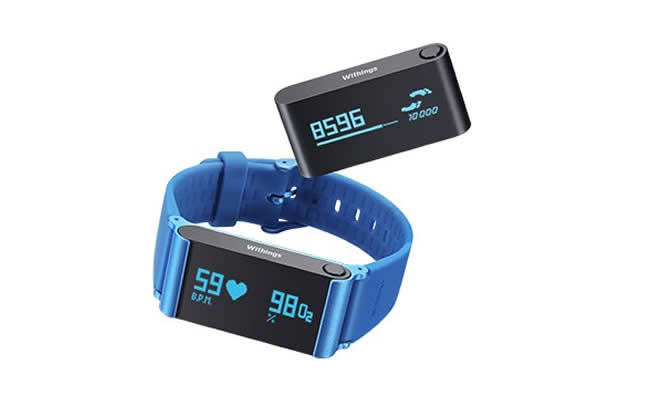
After buying a second Pulse O2, I used the wristband that comes with it instead of the clip. Trying to make use of the sleep monitoring function, I wore it pretty much 24/7, except when taking a shower. However, after about a week my skin started reacting with the metal clasp that holds the device, so I went back to the clip. The clip is rather cumbersome and depending on the thickness of the material you want to clip it to it may not stick. My second Pulse O2 fell out of my pocket on a day when I was wearing shorts that were too thick for the clip.
My current, and third, Pulse O2 is worn during the day using the wristband. Taking it off at night seems to prevent the metal from irritating my skin. However, that means that I am not able to make use of the Pulse’s sleep monitoring feature.
While wearing the Pulse O2 as a watch, the wristband itself was reasonably comfortable. If you want to use the Pulse O2 as a watch, you need to change the orientation to vertical. However, this can only be done through the Withings app. One you have done this, the time appears whenever you press the button. I found this slightly annoying, however. The same screen also displays the number of steps you have taken that day, but depending on your eyesight, you may have trouble reading the small numbers.
When I was wearing the Pulse O2 to sleep, it was able to recognize the difference between light and deep sleep. Since I can go through periods of sleeplessness, it was interesting to see if there were patterns of when I was waking up. One annoying quirk of the sleep monitor is that you manually have to enable sleep mode when you go to bed. It turns off automatically, however, once you wake up and take 10 steps.
The heart rate/oximeter feature is a unique selling point for the Pulse O2. However, in order to use that function you have to remove the device from the clip or wristband. If you are wearing the Pulse O2 in the wristband, removing it from the metal clasp is no easy task. Then you use the button to cycle to the heart and moon (heart monitor/sleep monitor screen), tap the heart and then hold your finger to the sensor on the back of the device. This means you have to stop what you are going in order to get a reading. A much more useful feature would be a continuous heart rate monitor. As it stands, this is not a feature you can realistically use when working out, which is when you really want to know your heart rate.
Navigating the various screens using the button, and then having to swipe and tap to access submenus or enable/disable certain functions, took some getting used to. The Pulse O2 definitely is not one of the more intuitive devices I have reviewed.
Battery
Withings claims that a full charge of the Pulse O2 will last 10 days. After using multiple models for the last several weeks, I would say that real-world experience confirms that. Once the battery is fully drained, it takes less than 45 minutes to fully recharge. Seeing how infrequently you have to recharge it, it would make perfect sense for the company to cover the micro-USB charge port to reduce the risk of getting it wet.
Overall
Having gone through two previous models, I have committed myself to the Withings Pulse O2. It is a great step counter, and I have found that knowing how active (or inactive) I have been in a given day will spur me to go a bit further the next. Withings also makes a number of other health- and fitness-related products, all of which you can sync with the Withings app. For example, I have a Withings Smart Body Analyzer scale, which I have synchronized with the app so I can track my weight over time, set weight-loss goals and monitor my progress toward those goals. If you already have other Withings devices and are looking for an activity tracker, the Pulse O2 is well worth it.
Beyond a step counter, however, I found the Pulse’s usefulness to be rather limited. First, this is not for the hard-core fitness junkie. The Pulse’s biggest drawback is that it is not water-resistant. For most of us, when we work out, we sweat. The charging port on the Pulse O2 is open to the elements, which means I hesitate to wear it out in the rain, let alone to the gym. In my mind, that rather defeats the purpose. I am thoroughly perplexed as to why Withings did not put a rubber cap on the port that you can remove when you need to charge the device, which is not very often.
The oximeter, while it’s a feature not found on many activity trackers, is probably not of much use to most. First of all, I was not sure what the reading even meant. However, and probably most importantly, is the fact that it is not a constant monitor. Whether you are wearing the Pulse O2 in the clip or the wristband, you first have to remove it in order to get a reading.
Before I started writing this review, I was generally pleased with the Withings Pulse O2. The more I wrote, though, I found it harder and harder to come up with good things to say about it. Yes, it is a very good step counter, but at $120, I want a lot more. The sleep monitor is a nice feature, but you have to get into the habit of enabling it before going to sleep. The heart rate monitor and oximeter are not continuous, which would be great for when you are working out. Instead you have to stop, possibly remove it from the clip or wristband, and hold your finger to the sensor. Very clunky indeed. Lastly, I cannot get past the lack of water resistance. People sweat when they work out and I have seen user comments that say the Pulse O2 cannot withstand a trip to the gym.
Since I am still wearing my Pulse O2 almost every day, there is obvious utility to it. Using it along with my Withings Smart Body Analyzer scale allows me to stay on top of my activity and weight. However, I do find that the negatives greatly outnumber the positives. If you are looking for a very good step counter with an integrated app that allows you to track your activity over a long period, the Withings Pulse 02 fits the bill. I’m just not sure the $120 price tag is justified.
Pros:
- Excellent pedometer
- Withings App
- Reasonably priced
- Compact size
- Long battery life
Cons:
- Metal clasp irritated my skin
- Not water-resistant
- Not a continuous heart monitor
- Screen not always on
- Difficult to read display in bright sunlight
- App lacks true coaching
Withings Pulse O2 Activity Tracker
$119.95 (Currently $119.95 from Amazon.com)
Discussion
FREE REPORT

No comments have been added yet. Add your thoughts to the discussion!
You need to log in as a registered AAII user before commenting.
Log InCreate an account