


Wayne Thorp leads a class in AAII's new Essential Investing Video Course. Go to https://www.aaii.com/ves for more information and to subscribe.
$69.99
Bluetooth in-ear headphones.
Over the years I have reviewed several Jabra products, including Bluetooth headsets, headphones and speakers. I have always been impressed with their products and welcome the chance to review any new products they roll out. Recently, I received two sets of Bluetooth in-ear headphones from Jabra’s PR firm. In this installment of Gadget Corner, I test-drive the Jabra STEP wireless earbuds.
Out of the Box & Setup
Upon unboxing the STEP earbuds, I see that they somewhat resemble the BlueAnt Pump HD Sportsbuds I reviewed a year ago. They are in-ear earbuds with detachable GelHooks that allow you to secure them behind the ear. The earbuds themselves protrude from two square black boxes that are connected to each other with a thick rubber-coated wire.
The headset’s battery and Bluetooth receiver are both in the right earpiece. Having the internals inside the earpiece means they stick our farther than typical earbuds, meaning it is all but impossible to wear the headset without the GelHooks. If you are not a fan of behind-the-ears headsets, you are probably going to need to look elsewhere.
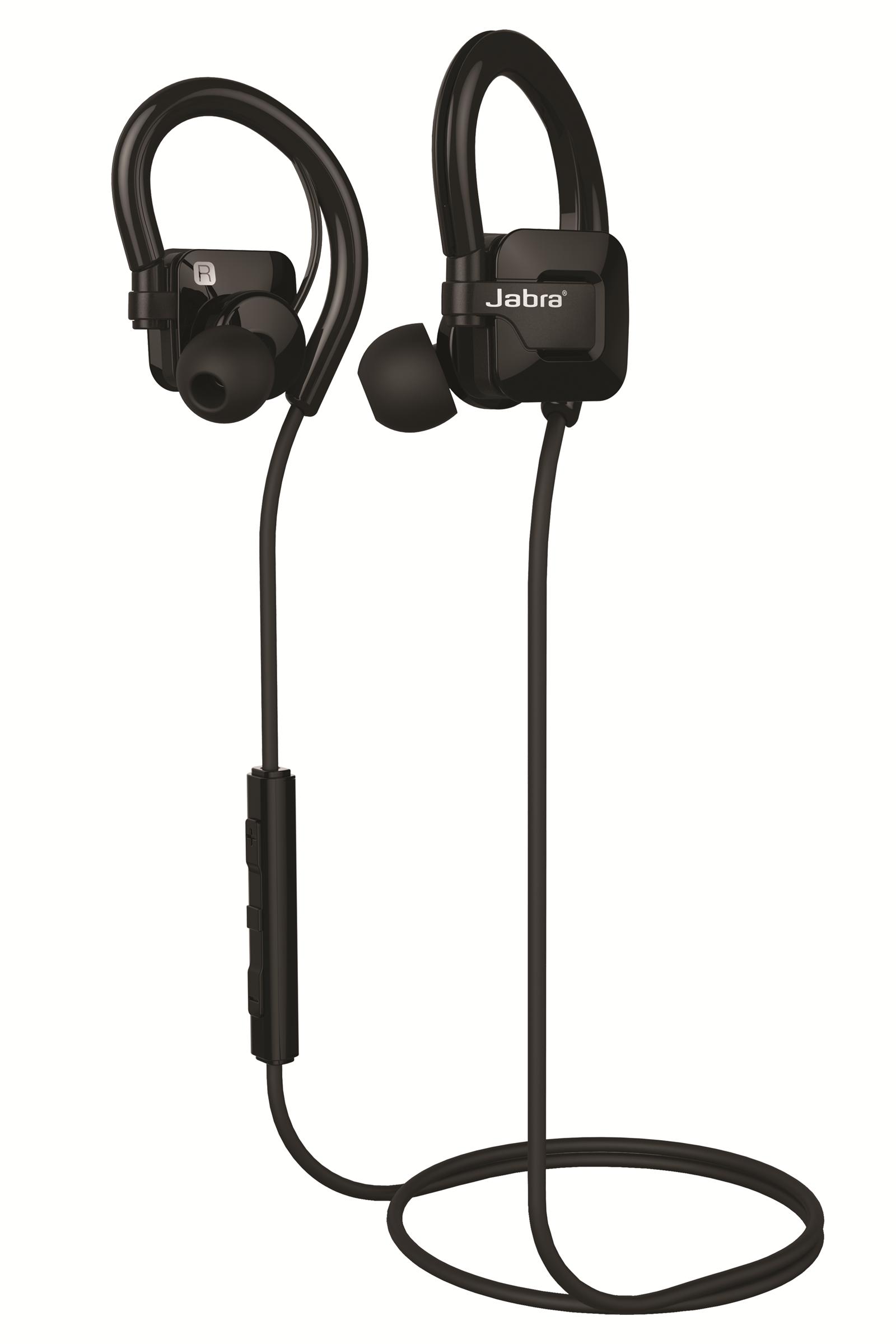
Also on the right earpiece is an LED indicator light that shows you what mode the headset is in and the micro-USB charging port.
The STEP headset offers some options when it comes to customizing the fit. The GelHooks are detachable, meaning that you can adjust the “slack” of the earbuds to fit your ear. In addition, there are three sets of EarGels, each of differing size, to help you get the best in-ear fit.
Also in the box is a micro-USB charging cable and a user’s guide.
The STEP headset is lighter than the BlueAnt Sportsbuds, at 0.58 ounces versus 1.1 ounces. Interestingly, though, the STEP headset felt heavier because the weight was centered inside the ear canal instead of being distributed behind the ear.
On the rubber wire are the in-line controls and microphone. There are three control buttons—volume up, volume down and the multi-function button. You can turn the headset on and off with the multi-function button.
The STEP headset has the latest-generation Bluetooth, version 4.0. To put the headset in pairing mode, press and hold the multi-function button for five seconds. You receive a voice indication that the headset is in pairing mode and the indicator light flashes blue and red. You then select Jabra Step from the list of available Bluetooth devices to finish the pairing process. You can pair up to eight devices in all and connect with two at the same time.
Performance
Having been a strong supporter of Jabra over the years, I was both surprised and disappointed by the breakdown in performance I experienced with the STEP headset.
It began when trying to pair the headset with my iPhone 6. Although Jabra STEP showed up as an available device, it took several attempts for the initial pairing to take place. It wasn’t until I placed the headset and iPhone right next to each other that the two paired. After some online research, I found that this isn’t an uncommon occurrence.
Next is the positioning of the in-line controls, which in my opinion is terrible. The rubber wire that connects the earbuds is designed to go across the back of your neck. However, that positioned the controls nearly on my right shoulder, making adjusting the volume and advancing or repeating tracks somewhat awkward. Looping the wire under my chin allowed for the controls to hang down a bit lower, making them easier to reach.
I also discovered that the black boxes attached to the earbuds rubbed on the inside of my ear. No manner of adjusting the GelHooks prevented that, which meant the headset became uncomfortable to wear after less than an hour.
Line-of-sight connectivity was also a problem with the STEP, although this is something I have come across with almost every Bluetooth headset I have tested. When I am commuting to and from work, I usually carry my phone in a pocket of my messenger bag. However, there are times that the signal gets disrupted and the audio breaks up or disconnects altogether.
When the STEP was connected to my iPhone and functioning as expected, the sound was quite good for Bluetooth earbuds. The 10mm dynamic speakers pumped out bass that was a bit flat for my tastes, but overall I thought the sound quality was crisp.
The STEP headset is also water-resistant, which makes it useful for those looking for a wireless headset option when working out.
Battery Life
Jabra claims that the STEP delivers roughly four hours of continuous talk or listening time, and my experience backs up those claims. This is only half that of the BlueAnt Pump Sportsbuds and wouldn’t last a flight between New York and Los Angeles. It also takes approximately two and a half hours to fully charge the headset.
Overall
Based on my experience, the Jabra STEP did not live up to the reputation Jabra had built up with me after using several other products of theirs. The connectivity issues, uncomfortable fit, awkward design features and relatively short battery life more than offset the sound quality and reasonable price. For this reason, I cannot recommend paying $70 for this headset.
Pros
- Good sound quality
- Lightweight
- Reasonable price
Cons
- Difficulty pairing with my iPhone the first time
- Not suited for prolonged wearing
- Relatively short battery life
- Awkward positioning of controls
$69.99 (Currently $52.99 from Amazon.com)
Discussion
FREE REPORT

No comments have been added yet. Add your thoughts to the discussion!
You need to log in as a registered AAII user before commenting.
Log InCreate an account