


FREE
A basic portfolio tracker with added visualization tools.
As an investor, keeping track of the holdings and performance of your portfolio(s) is one of your most important tasks. However, picking the right software, website or app for this job can be onerous. Needs vary by investor, so while a mobile app with limited functionality may be appropriate for a mobile warrior on the go who just wants to glance at their portfolio value, it may not suffice for an investor who wants to be able to easily connect their investment information with a power database such as Quicken, for example.
There are numerous apps and websites for tracking your portfolio, and the obvious question when looking at a new app is: Why should I use this one? Nowadays, new apps tend to be more evolutionary than revolutionary. In the case of Portfolio Manager by Smart Code, a few incremental improvements on a basic portfolio tracker make it appealing for a broad group of investors.
The iPad app is built to consolidate your information in one virtual location, with the ability to track multiple portfolios in multiple currencies. It allows you to see historical prices for various assets as well as the historical performance of any of your portfolios at a particular point in time. Of course, the app will track your investments’ performance through your portfolios as well as any cash flows that emanate from the holdings.
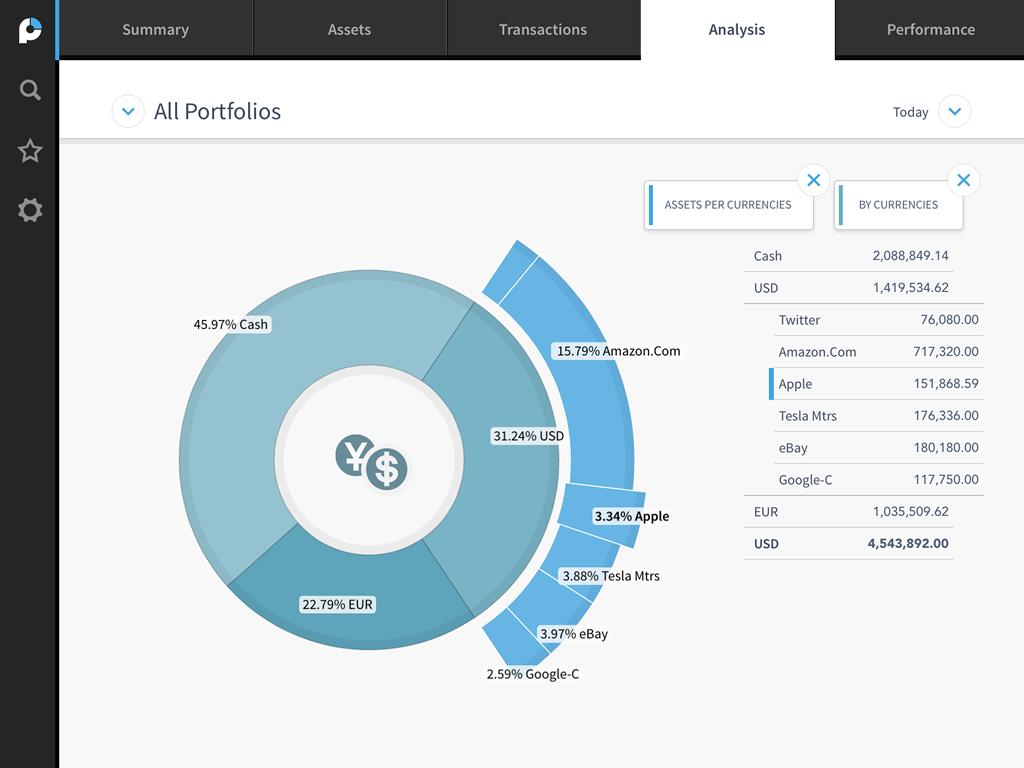
Powerful data visualization tools allow users to perform detailed analysis of their portfolio(s) in an easy-to-understand and attractive graphical layout.
A new user starts creating a portfolio on the main page by pressing the ‘+’ icon in the lower left of the screen. This ‘+’ button carries forward to most screens and is used to add entries. A dialog box pops up requiring three pieces of information: a portfolio name, a portfolio currency and starting cash amount. The summary screen lists all stored portfolios as well as recent performance data and the total value of each portfolio.
Users can add positions in the Assets tab using the same ‘+’ button. You will need the stock’s International Securities Identification Number (ISIN) number, which you can get easily from your brokerage statement. Smart Code has one of the largest financial databases around, covering over 1,800 markets as well as stocks, funds, bonds, commodities and more; therefore, the odds are quite high that this portfolio tracker will recognize any security you want to add and have historical information on it.
The Assets page lists every individual asset you have in your portfolios. You can look at the performance of a given asset over a selected time frame.
The Transactions tab allows users to enter cash deposits and withdrawals, while the Analysis tab shows various performance graphs where users can select the portfolio and time frame. More performance information can be found on the Performance tab, including an attractive line chart.
The buttons felt small to me and I would sometimes struggle to have the app recognize my taps, though I always got it to work in the end.
Although this is not a unique feature, you can create a watchlist of assets for tracking purposes. The app is currently only available for the iPad. No information is available on Android availability.
While investors have differing needs for portfolio tracking, Portfolio Manager by Smart Code is an attractive choice for investors on the go.
Portfolio Manager by Smart Code (for iPad)
FREE
Discussion
FREE REPORT

No comments have been added yet. Add your thoughts to the discussion!
You need to log in as a registered AAII user before commenting.
Log InCreate an account