


Free - $2.99
Track your expenses to easily analyze your cash flow over time.
Spending Tracker is an easy-to-use personal finance application that assists users in manually tracking their spending and saving habits. After first downloading the application, you will see an explanation of how to get started, though that message will only stay up for about 20 seconds before disappearing. Then you will be left with a screen showing the current month, a line for income and a line for expense (both with $0.00), and then a total balance. Toward the bottom of the screen you can click on Expense or Income to add one or the other.
There are four options along the bottom of the screen: spending, transactions, categories and settings. Before entering your income and expenses, click the settings tab at the bottom right-hand corner of the application. Here you can enter some of your preferences regarding your cash flow and budgeting. Initially, you should choose how you want to track your spending via the “time period” selection. This will be the time period the app shows by default when it starts up. Your choices include weekly, monthly and yearly. You will also have to specify when the monthly and weekly start dates will be.
Users have the option to operate in Budget Mode. This will allow you to set a specific spending limit for each time period. To turn on the budget mode, go to settings and click on Budget Mode, which is the second option from the top of the screen. The next choice in the settings area is whether you would like to allow your balances to carry over. Balance carryover determines whether the remaining balance at the end of one time period is carried over to the next time period. If you want only positive balances to be carried forward, make sure to turn on “positive only” as an option. You also have an option to add the amount carried forward to your total income per time period via the “add to income” option. From the settings screen, you can add different accounts. Here you specify if you have a savings account, or if you have several accounts from which you spend money.
The categories tab, which can be accessed from the bottom of the screen, provides a wide range of expense and income categories. To create a custom category, simply click the plus button in the top right-hand side of the application.
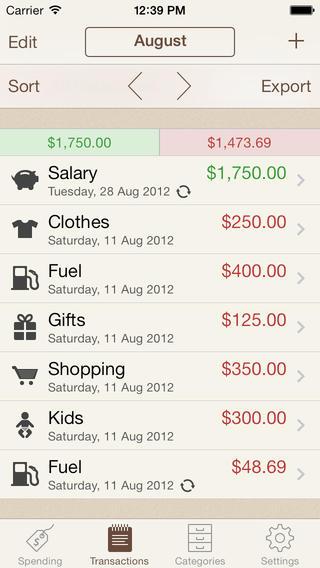
To add transactions, click the transactions tab along the bottom of the screen. In order to properly add a transaction you have to specify the date of the transaction, the amount and the category. From the transactions page, you can switch between different accounts by tapping the button that looks like an outline of a person’s head on the right-hand side of the application, next to the export button.
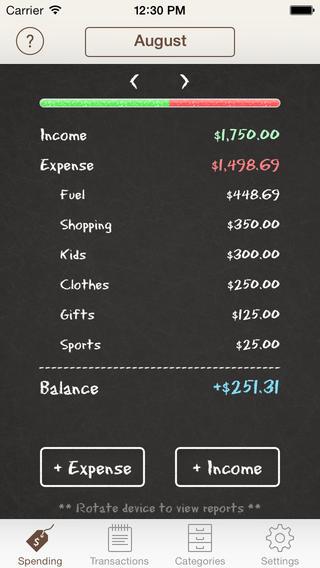
The spending tab, also accessed from the bottom of the application, shows an overall summary of your income versus your expenses. You can choose to view income/expenses per account or all of them together simply by tapping the icon that resembles an outline of a person’s head in the upper right-hand side of the screen. In order to view reports regarding your individual categories or cash flow, rotate your device sideways. After rotating, you have the option to view your spending or income by category in the form of a pie chart or a bar chart. You can change in between expenses or income by clicking the plus or minus button on the upper left-hand side. To view the charts in terms of percentage or dollar amount, click the designated sign in the upper right-hand corner of the application. When looking at cash flows, you can click on a particular line to see the actual figures of spending versus income.
The spending screen has a question mark in the upper left-hand side of the application. If you click the question mark you are brought to a “Help” section, designed to help users efficiently use the app.
The Pro upgrade of Spending Tracker costs $2.99. If you upgrade, you can input repeating transactions; access automatic syncing, backup and restore options; export options via CSV and PDF formats; and benefit from having no ads or pop-ups. Overall, the application is very useful for individuals trying to simply track their expenses. Nowadays, many individuals are concerned with cybersecurity and the safety of syncing their account information to an application. Spending Tracker lets you input your income and expenses manually, and easily analyze your cash flow over time.
Spending Tracker (for iOS, Android, Windows)
Free - $2.99
Discussion
FREE REPORT

No comments have been added yet. Add your thoughts to the discussion!
You need to log in as a registered AAII user before commenting.
Log InCreate an account