




$5 setup.; $1/mo. or 0.25% of assets
App provides an easy way to get started investing in ETFs.
Stash Invest is a newly created application for iOS and Android that allows you to save money and invest in a select group of ETFs based on your profile and investing style.
In the FAQ, Stash explains, “Investments in Stash are exchange-traded funds (ETFs) or stocks. Stash picks a select group of the thousands of ETFs and stocks available, based on factors like low fees, managed risk, and historical performance. Stash recommends a set of those investments for you, based on the profile you fill out when you sign up. For each investment available to you on Stash, you can see the primary company or companies included, and can visit the website of the investment for more information.”
From what I can tell, Stash features only a select group of ETFs at this point in time. Some of the ETFs that appeared when I went through the process included First Trust NASDAQ CEA Cybersecurity ETF (CIBR), SPDR S&P Homebuilders ETF (XHB), iShares MSCI USA ESG Select Fund (KLD) and Vanguard Small-Cap ETF (VB).
After paying a $5 initial set-up fee, Stash is free for the first three months. After those three months, it charges a service fee of $1.00 per month for account balances under $5,000. Once your balance is over $5,000, Stash charges 0.25% of your account balance per year. Electronic statements and trade confirmations are free, but paper confirmations will run you $2 and paper statements cost $5.
Getting Started
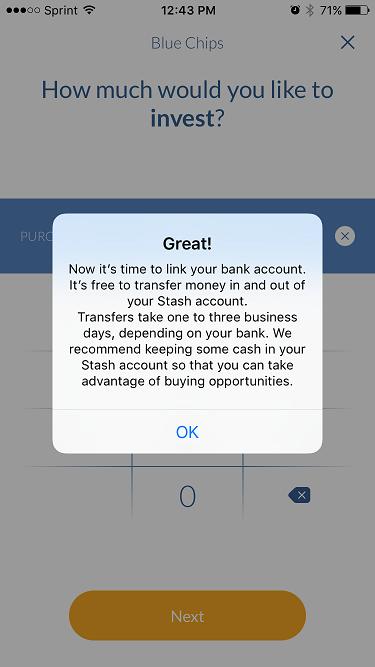
When you click “get started” there are three steps to follow: Create your profile, select your first investment (from a list based on your chosen investing style, from conservative to aggressive) and verify your identity. Once you get past the setup (which didn’t require me to verify who I was via email) and fund your Stash account (Figure 1), you can choose additional investments.
The home screen displays three main tabs at the bottom: My Stash, Discover and Account. The My Stash tab contains four different subtabs along the top: Portfolio, Balance, Potential and Ideas. The Portfolio page displays your holdings and pending transactions. The Balance subtab displays your account balance over time, including deposits and withdrawals. Users can quickly invest money from the Balance tab by clicking “make a deposit” or check their historical transactions by clicking “view account history.”
The Potential subtab is designed to show users the potential growth of their portfolio over time. It uses compounding concepts and is accompanied by a calculator where users can input their potential monthly deposit and growth potential (expected annual return). Based on your estimated monthly deposit and annual return, the app displays what you could potentially earn over the next year, five years and 10 years.
The Ideas subtab shows recommended investments based on the information input during setup.
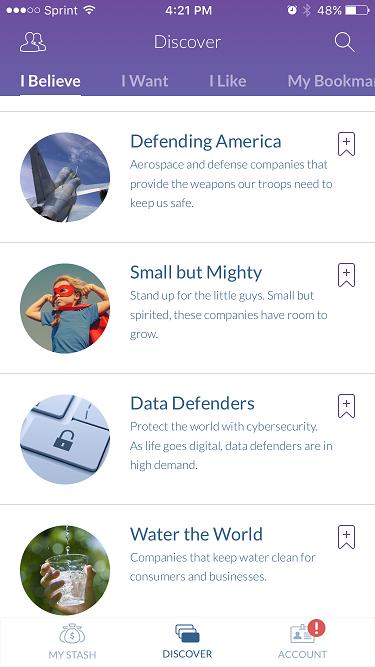
The presentation of different investment vehicles is different than you might expect. Instead of listing individual fund names, Stash lists categories. Categories may include Data Defenders, which represents a cybersecurity ETF, or Small but Mighty, which represents a small-cap ETF (Figure 2).
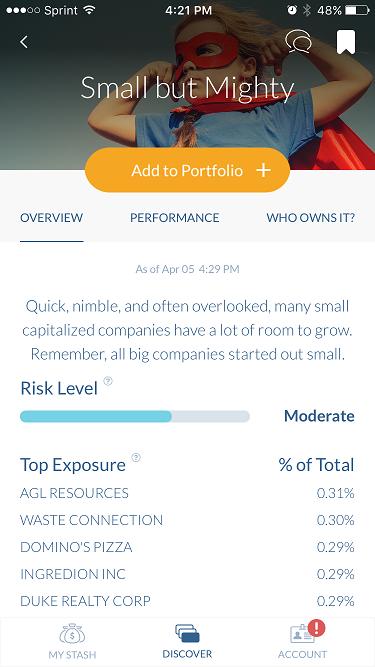
The second main tab, Discover, has three subtabs: Overview, Performance and “Who Owns It?” The Overview page includes a brief description of the fund style, risk level (conservative, moderate, aggressive), top portfolio holdings, the underlying security (typically an ETF), the ticker symbol, dividend yield and expense ratio (Figure 3).
The Performance subtab shows performance of the security over the last one, five and 10 years as well as since-inception return on a chart. The page lists the latest price, one day change, and year-to-date change.
The “Who Owns It?” subtab shows the percentage of the Stash community with your chosen level of risk that is investing in that particular security. You can also click “follow friends” to see if anyone in your contacts list is using Stash and what they are investing in. The tab also displays other investment ideas based on your risk profile.
Every metric on each tab has a small question mark. Clicking the question mark will bring you to the definition of the term.
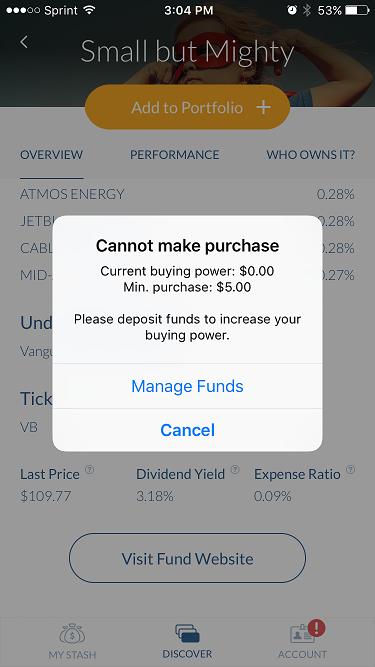
To invest in a particular category or ETF, click Add to Portfolio. You will need to have funds deposited into your Stash account before you’re able to make any purchases (Figure 4).
To search for a particular stock, click the search button in the upper right-hand corner. Here you can search for specific stocks to see if they are included in any of the ETF options. I tried searching specific ETF tickers, but that yielded no results.
Application Usability/Fuctionality
Stash’s interface made the application really easy to use. I wasn’t confused during the setup process and felt that the app gave adequate instructions while walking me through the first steps.
Stash’s attraction comes from its low-cost model and its convenience. Individuals can invest in ETFs by simply opening the application on their phone and tapping a button. The application displays ETFs as categories and “beliefs” as opposed to actual ETF names and ticker symbols. I can definitely see how this interface would attract a younger crowd, but it may be somewhat irritating for the individual investor who would like to just see names of ETFs and ticker symbols.
The search function is definitely useful, but it also seems to be limited at this point in time. I put myself in the “aggressive” category, and the choices Stash recommended for me weren’t overwhelming. It is hoped that Stash can add additional ETFs and strategies down the line. I think it would be beneficial if users could search by risk level. For example, I would like to compare the funds in the “aggressive” category against those in the “moderate” category. Aside from being able to simply search for stocks, it would be helpful if users could search for specific ETFs.
Another interesting feature is Stash’s assistance with tax filings and information. From the beginning, the application makes it clear what forms you will be receiving in relation to your account. Information regarding taxes is displayed in Stash’s FAQ section.
Stash’s interface is very similar to that of Acorns, which is an application that allows you to round up change on your purchases and subsequently invest. Stash seems to be a mix between Motif Investing and Acorns. (I use Acorns and love it!)
Security
Stash has its own page dedicated solely to its security practices. Here are some of the safeguards Stash lists:
- Stash employs 256-bit bank-grade encryption to secure all your information, from personal info to purchase history and more. Stash uses Secure Sockets Layer (SSL) to help ensure any information in the Stash app and Stash website is (instead of are) are protected.
- To access your Stash account, you must supply your unique user ID, password and PIN. Anytime you leave the app, you need to enter your PIN or use Touch ID to get back into your account. Your account is automatically locked after three invalid login attempts.
- Stash software, hardware, and IT infrastructure are kept secure with multiple levels of defense. We constantly monitor the latest technologies to keep our systems up to date and up to the industry’s highest standards.
- After 15 minutes of inactivity, Stash will automatically end your session and require you to sign back in; this protects your account and lowers the risk of unauthorized access on an unattended phone.
Aside from application security features, Stash accounts are covered by the Securities Investor Protection Corporation (SIPC).
All holdings and cash are held at APEX Clearing Corp. For more information, see Stash’s FAQ section.
Conclusion
Overall, Stash is an excellent way for individual investors to quickly and easily invest. Stash seems to have progressed significantly since its launch in October of 2015 and recently added its Android application.
The application was built for millennials (and many other investors) who think investing can be too tedious or difficult. Many brokerages often require high minimum investments, as do many mutual funds and ETFs. In today’s day and age, applications and services such as Stash are taking advantage of fractional shares and making investing easier and more accessible than ever before. Don’t forget, however, with this new technology comes risk. Users need to be sure to read everything available on the Stash Invest website and go through the FAQ section until you’re comfortable with the application and its service. And never investing in anything that you don’t fully understand.
I am excited to see Stash’s service as it continues to develop. I hope to eventually see more investing choices (especially in the “aggressive” investor arena!). Considering that the app is a recent launch, I like what I’ve seen thus far.
Stash Invest
$5 setup.; $1/mo. or 0.25% of assets
Discussion
FREE REPORT

No comments have been added yet. Add your thoughts to the discussion!
You need to log in as a registered AAII user before commenting.
Log InCreate an account