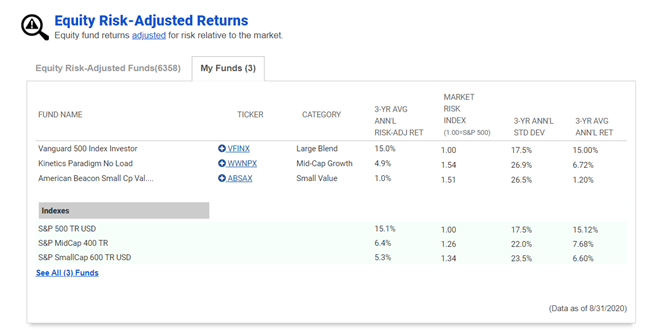
Whether you are looking for funds to invest in or tracking funds you already own, A+ Investor subscribers can see a fund’s performance based on its risk level compared to that of the market with AAII’s preprogrammed risk-adjusted return calculator.
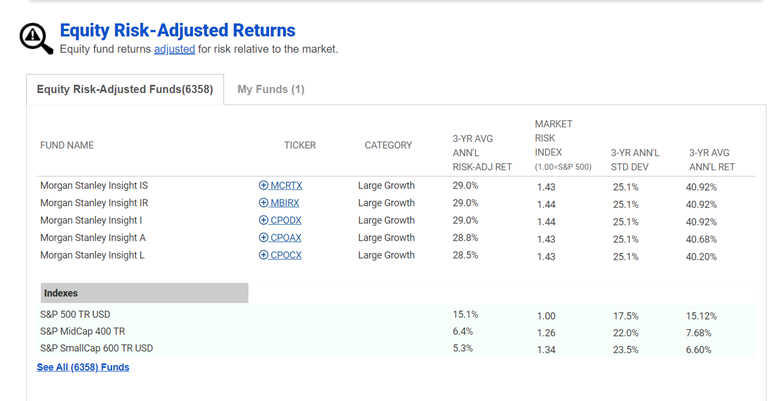
You can find the risk-adjusted returns table near the bottom of the Funds page of AAII.com.
The risk-adjusted return calculation is an easy way to understand the marriage of risk and return for funds. The calculation works by assuming the risk of all the funds you are looking at is equal to that of a market benchmark. U.S. Treasury bills are a common benchmark to use because they are considered virtually riskless due to their backing by the U.S. government. However, any index would work as a benchmark and each offers a different base of comparison.
The benchmark used by AAII for return and risk is the S&P 500 index. All of the data is calculated using monthly returns over the last three years. These figures have been annualized for easier comparison.
Clicking on the name of the Equity Risk-Adjusted Returns table, or the “See All Funds” link, will expand it to the complete list on its own webpage. From there, you can also filter for funds without loads.
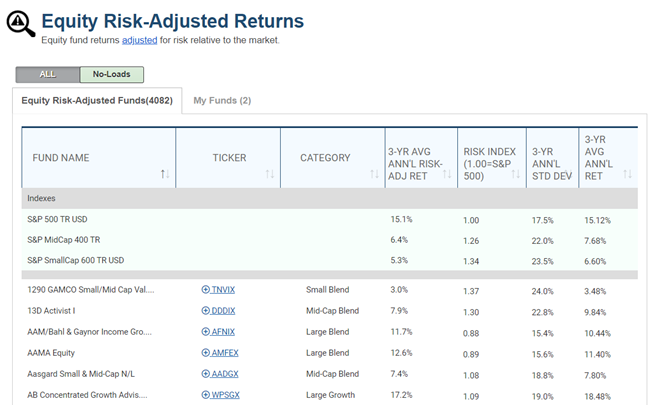
The table reports the risk-adjusted average annual return (what the fund would have returned if it had the same risk as the market), which is labeled as the “3-Yr Avg Ann’l Risk-Adj Ret.” This is a simple arithmetic average return over the last 36 months, which has been annualized.
The Risk Index column compares the standard deviation of the fund to the volatility of the S&P 500. Funds with greater volatility than the S&P 500 have values above 1.00, while risk index figures below 1.00 indicate that a fund had less volatility than the S&P 500 over the last three years.
By default, the risk-adjusted returns table focuses on equity-based funds. But you can see the risk-adjusted return for any fund by adding it to a portfolio set up in My Portfolio. Clicking the plus sign next to any fund’s ticker will allow you to place it in an existing portfolio or a new portfolio. Once a fund is added to My Portfolio, it will show up in the second tab of the Risk-Adjusted Returns table, called My Funds.