As an A+ Investor, you have access to a fresh stream of stock ideas. At the end of every trading day, we filter through the universe of over 6,000 actively traded stocks to see which companies pass our collection of stock screens. To help you focus your research on the screens and stocks that most interest you, we offer several different ways to compare the screens and allow you to select favorite screens to follow.
AAII’s stock screens are models of different stock selection strategies, some based on specific investment factors and others based on criteria outlined by well-known investment gurus, such as Warren Buffett.
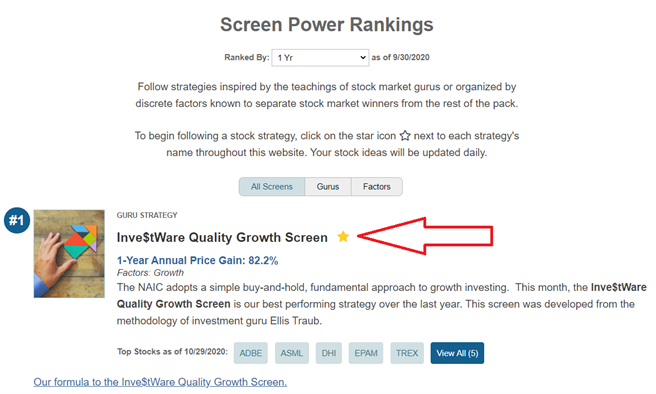
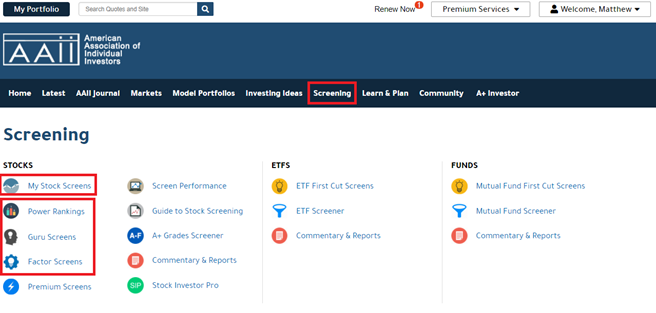
A+ Investors can follow any of these stock screens. To do so, click on the star that appears next to the name of the stock screen in several places across AAII.com. The star will appear yellow if you are following the screen. The option to follow a screen is available on the Screen Power Rankings page, Guru Screens page and Factor Screens page. These pages are accessible from the Screening tab on the menu bar at the top of AAII.com.
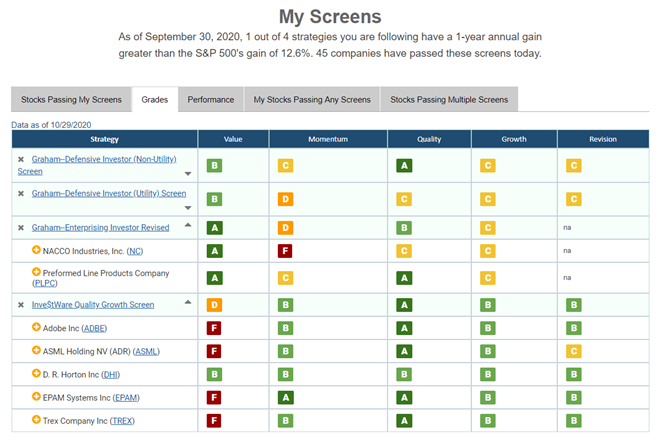
Any screens that you follow will be added to your list, which you can get to through the first link on the Screening page under Stocks: My Stock Screens. Your personalized stock screens table allows easy comparison of the strategies you are interested in. Data and lists of passing stocks are updated daily.
Five tabs offer alternate views you can choose from for comparing and sorting the information that the table displays. The first three deal particularly with your screens, showing which stocks are passing the screens you follow, as well as the stock grades and performance of the screens you follow and the stocks that pass them. The last two views are slightly different. They highlight stocks you follow in My Portfolio that are passing any of AAII’s screens and any stocks that are passing more than one screen. At the Stocks Passing Multiple Screens tab, you can change the number of passing screens to any number from 2 to 9.