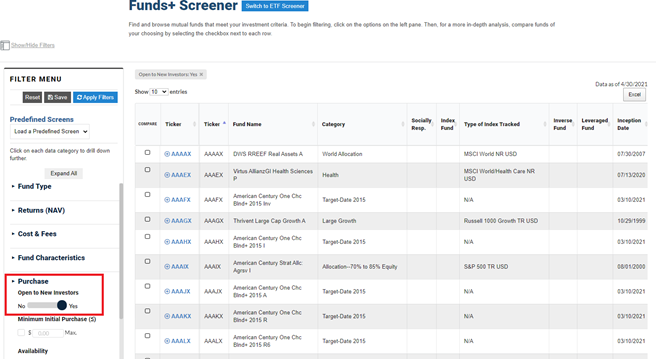
Shares of mutual funds are not publicly traded throughout the day as those of exchange-traded funds (ETFs) are. Mutual fund shares are transacted once a day after the markets have closed. This allows a fund’s management team to control its assets under management (AUM) in order to keep a fund in line with its objectives. Managers control the flow of money into and out of their funds by opening or closing to investors. A+ Investor subscribers can screen for only those funds that are open or closed using the Funds+ Screener.
Funds can be closed to new investors and current shareholders, depending on what the management team wants to achieve. Funds may close only to new investors, allowing current investors to buy additional shares or sell their shares.
Some investment strategies work equally well if the total AUM is small or grows to many billions of dollars. However, specialized approaches such as actively managed small-cap value mutual funds can become difficult to manage effectively if assets grow too large. As small-cap funds’ assets grow, it becomes harder for fund managers to build positions in small firms because the increasing amount of money they have to invest can have an impact on the underlying stocks’ prices. This also affects funds that invest in segments of the market that are less liquid, such as emerging markets.
When a mutual fund becomes “hot” and attracts more inflows than can be effectively deployed through its strategy, its investment objective may change. Of course, this can make the fund less attractive to the investors who initially purchased shares. Instead, the fund may be closed to new investment in order to keep its AUM at a size that allows the fund to stick to its objective.
A+ Investor subscribers can screen for only those funds that are open or closed using the Funds+ Screener. From the Filter Menu on the left side of the screener page, under the Purchase data category, move the slider to No or Yes under Open to New Investors. Be sure to select Apply Filters at the top of the filter menu. Any filters you apply will appear above the list of filtered funds. You can also save screens you’ve built or customized for future use.