


Getting your finances in order can be overwhelming, whether it’s budgeting, paying down debt or monitoring your credit. The right set of tools can aid in managing these chores. There is a plethora of budgeting apps that can help you manage and save your money, stick to a budget and even handle your investment decisions. It’s easier to control where your money goes when you have something to hold you accountable for your spending habits.
Using a budgeting app makes setting up and managing a personal budget easier, faster and more accurate since it automatically pulls income and expense transactions from your financial accounts. Over time, most budgeting apps give you insight into your spending habits, broken down by spending category. You can also receive alerts if you’re close to going over your budget.
Every financial situation is different, thus, the key to choosing a budgeting app is finding the one that best fits your circumstances. The apps featured in this article are Clarity Money, EveryDollar, Goodbudget, Mint, Mvelopes, Personal Capital, PocketGuard, Simplifi and YNAB (You Need a Budget).
Platforms and Costs
All nine apps are available on iOS and Android devices, as well as on PCs running Windows.
Free Options
Clarity Money and Mint offer their services completely free of charge, but in return they advertise accounts and credit cards to users based on their profiles.
EveryDollar, Goodbudget and PocketGuard all offer free versions of their apps, but also have premium fee versions with additional features. Personal Capital is also free, with an optional fee-based advisory service.
Paid Versions
EveryDollar’s Ramsey Plus costs $129 annually. It connects to your bank for automatic transactions, allows you to see all of your accounts in one place and offers custom reports on income and spending.
Goodbudget Plus is priced at $60 annually. It includes unlimited regular envelopes (budget categories), unlimited accounts, the ability to use it on up to five devices and seven years of history and email support.
Mvelopes costs $55 annually for a basic plan, $99.95 annually for the premier plan and $190 annually for its plus plan; a free trial is available. The basic plan includes unlimited envelopes and accounts, the automatic import of transactions and account balance monitoring, live chat for support, access to the knowledge base and interactive reports. The premier plan adds access to the Mvelopes learning and debt reduction centers as well as assistance with the initial setup. The plus plan adds a personal coach, a personalized financial plan, higher level support and quarterly coaching sessions.
Personal Capital’s adviser service charges an annual expense ratio on a sliding scale: 0.89% for assets between $100,000 and $1 million; 0.79% for assets of $1 million to $3 million; 0.69% for assets between $3 million and $5 million; 0.59% for assets between $5 million and $10 million; and 0.49% for assets of $10 million or more.
PocketGuard Plus costs $34.99 annually. It allows you to create customized categories, change the date of transactions, export transaction data, create as many goals and category budgets as you wish, track cash that you spend and receive, manage ATM deposits and withdrawals and automatically save and split transactions into different categories.
Simplifi costs $35.99 annually, with a free trial available.
YNAB is priced at $84 annually and also offers a free trial.
App Overviews
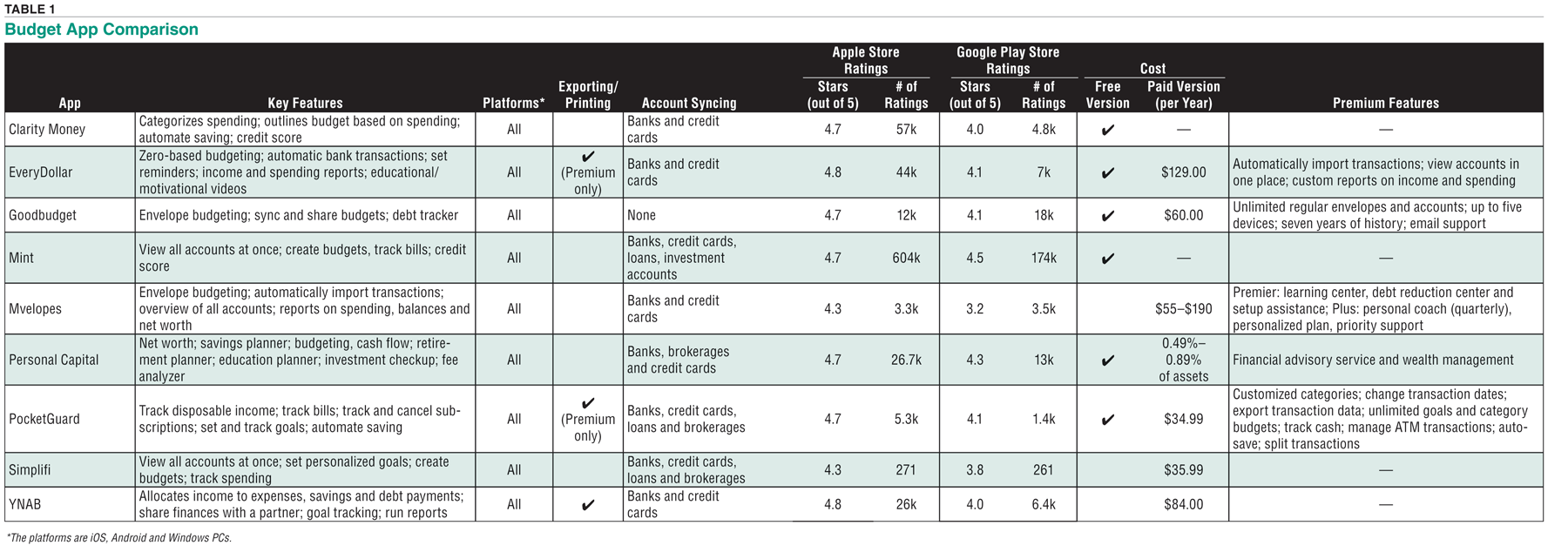
Seven out of the nine budgeting apps are simple and straightforward to use. Mvelopes and Simplifi have interfaces that are more difficult to navigate through. Table 1 summarizes the apps for easy comparison.
Clarity Money
Clarity Money keeps tabs on transactions across all of your financial accounts and gives you the total balances of those accounts as well as your overall financial status. The app uses artificial intelligence to filter your spending into categories and outlines a budget based on historical spending, but it doesn’t force you to come up with realistic spending patterns. The app helps you keep track of your spending but is not a budgeting app.
In a unique twist, Clarity Money can negotiate on your behalf to lower some of your bills. If Clarity Money saves you money, it takes one-third of it as a commission.
EveryDollar
EveryDollar follows the zero-based budgeting approach, wherein each dollar of income is given a “job,” so your money is purposely spent or saved. EveryDollar is straightforward and solely focused on budgeting. The app features Dave Ramsey’s “7 Baby Steps” approach, which aims to help users build their wealth and get out of debt. Those steps include:
- Save $1,000 emergency fund
- Pay off all debt using the snowball method (smallest account first)
- Save three to six months of expenses
- Save 15% for retirement
- Start a college fund for the kids
- Pay off the house
- Build wealth and give
Goodbudget
Goodbudget uses the envelope budgeting method. It provides regular envelopes to keep track of recurring expenses and additional envelopes for occasional expenses. Goodbudget will alert you if you overspend in a particular envelope.
The app offers helpful tips on how to create a budget, get a month ahead on expenses and make progress toward your goals.
Mint
Mint allows users to create budgets, track bills and receive a free credit score. It uses information from your financial accounts to recommend budgets and shows how your spending decisions affect the money you have at the end of the month or year.
Mint allows you to set your goals in the app and get actionable money-saving advice, and it tracks your progress along the way. You can track your bills alongside your account balances, and the app will alert you of any upcoming bills.
Mvelopes
Mvelopes uses the “envelopes” method to budgeting. The app asks for your financial goals to help determine the direction you want to go. It provides a complete picture of your financial accounts and offers extensive reports, which cover your monthly envelope spending and funding, account balance and net worth over time.
Mvelopes provides a helpful debt center that allows you to create a debt payoff plan. It shows you how long it will take to pay off the credit card with the lowest balance (the “snowball” method). You can also see how long it would take to pay the credit card with the highest interest rate (the “avalanche” method).
Personal Capital
Personal Capital’s financial dashboard offers a variety of tools to track your finances. The app automatically tracks all of your income and expenses. It also separates your expenses into spending categories and provides graphical tools to see where your money is coming from and going to.
Personal Capital is primarily an investment tool and helps you to track and optimize your investments. Once you link your retirement and other investment accounts, you can track your portfolio by account, asset class or individual security. Through the built-in intelligence available on the tablet version of the app, you can also discover opportunities for diversification and risk management and see any hidden fees you might be paying. The tool also includes a retirement planning tool that you can customize to your specific circumstances.
PocketGuard
PocketGuard boils budgeting down to the one thing most users want to know, how much money they have leftover for spending. The “In My Pocket” feature shows you exactly how much disposable income you have for everyday spending after paying your bills, saving for your goals and setting aside enough money for essentials, like food and transportation.
PocketGuard also works to save you money in various ways, such as negotiating lower bills and finding high- interest savings accounts. The app uses financial services that can help you lower your bills, improve your credit score, pay off loans and even get rebates on shopping.
Simplifi provides users with a personalized spending plan, which tells you how much you can spend each month using three basic components: income, bills and goals. You can create simple budgets based on your income and bills to make sure you aren’t spending more than you make every month.
Simplifi
Simplifi’s watchlists let you keep tabs on how much you’re spending in a particular category. The watchlists help you to monitor areas of high spending and stay on top of special or one-time spending events. You can also add a target number to limit your spending to a specific dollar amount in particular categories.
YNAB (You Need a Budget)
YNAB uses the zero-based budgeting method. The method allocates all of your income to expenses, savings and debt payments. You do the work of learning to budget instead of having artificial intelligence determine it for you.
YNAB requires more effort to master compared to competitors but offers more educational material to help out, such as a book about its philosophy, over 100 free workshops and free podcasts and webinars on a range of financial topics. ▪

Related

Financial Planning
Creating and Following a Real Financial Plan
Related
Financial Planning
Analyzing Your Financial Health Using Personal Financial Ratios
Discussion
FREE REPORT

GLENN B from MD posted over 6 years ago:
KEVIN R from NH posted over 6 years ago:
CHARLES L from PA posted over 6 years ago:
CHARLES L from PA posted over 6 years ago:
KEN K from WY posted over 6 years ago:
KEVIN S from CA posted over 6 years ago:
CHARLES R from IL posted over 6 years ago:
PHIL C from CA posted over 6 years ago:
M M from MA posted over 5 years ago:
JEAN H from IL posted over 5 years ago:
You need to log in as a registered AAII user before commenting.
Log InCreate an account