

Related

Member News
Use Facebook’s Privacy Checkup to adjust the level of visibility you allow when participating in AAII Investing Clubs.

Earlier this year, we launched AAII Investment Clubs as part of our broader community effort. These Facebook groups allow you to connect with and learn from other individual investors in an online environment.
We realize that privacy is a preeminent topic when using social media platforms such as Facebook. The good news is that users are getting more control over how their digital actions are tracked and collected as data. Social media companies, in particular, have an obvious need to appeal to users’ desire for privacy and security controls. As a prominent social media website, Facebook has group benefits for individual users.
To retain its users and encourage taking advantage of its tools, such as groups, Facebook has addressed digital privacy concerns with more transparency and user control of settings. Given the launch of the AAII Investment Clubs, we thought there would be interest in knowing how to access and adjust these settings.
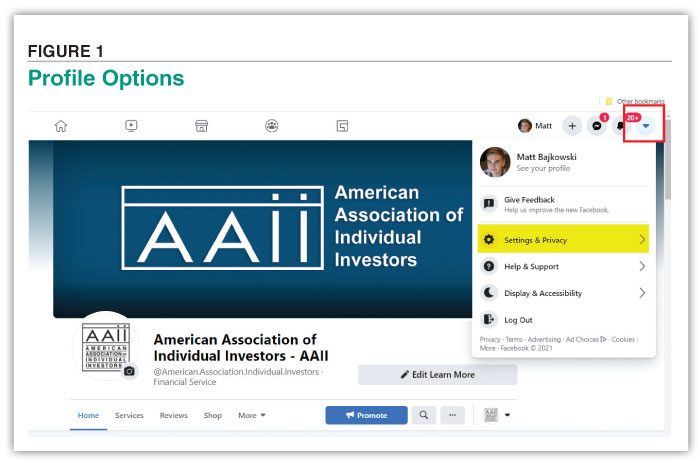
There are several places to access privacy and security information about Facebook across the company’s service. The disparate locations make sense but are confusing in their isolation. To dig into your Facebook privacy, start by finding your profile options with the drop-down menu at the last button on the far-right side of Facebook, when logged in (Figure 1). Click on Settings & Privacy.
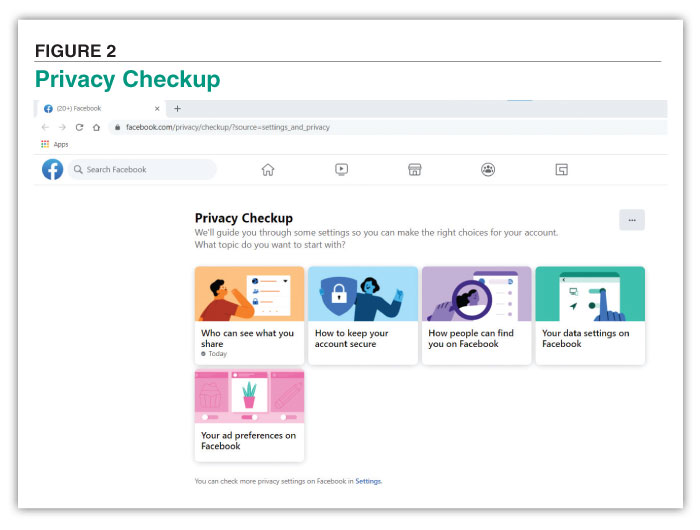
If you aren’t familiar with online privacy settings, then start with Facebook’s Privacy Checkup (Figure 2). It groups similar settings under common topics of concern, such as who can see what you share, how people can find you on Facebook and your ad preferences.
The first topic walks you step-by-step through all of your profile information and posts. Facebook allows you to adjust who has visibility of your profile. You can customize your audience and even choose only a small group of friends to see specific fields. Under the topic of how people can find you on Facebook, you can turn off your profile’s link to outside search engines such as Google. This will block your profile from appearing as a search result for your name.
If you are concerned about your digital privacy, you should keep your Facebook account secure. Facebook offers two-factor authentication and notifications for account access from unrecognized devices. Two-factor authentication is available with multiple methods to make it convenient. You can use third-party authentication apps or a basic text-message system. To access these settings, click on “How to keep your account secure” on the Privacy Checkup page.
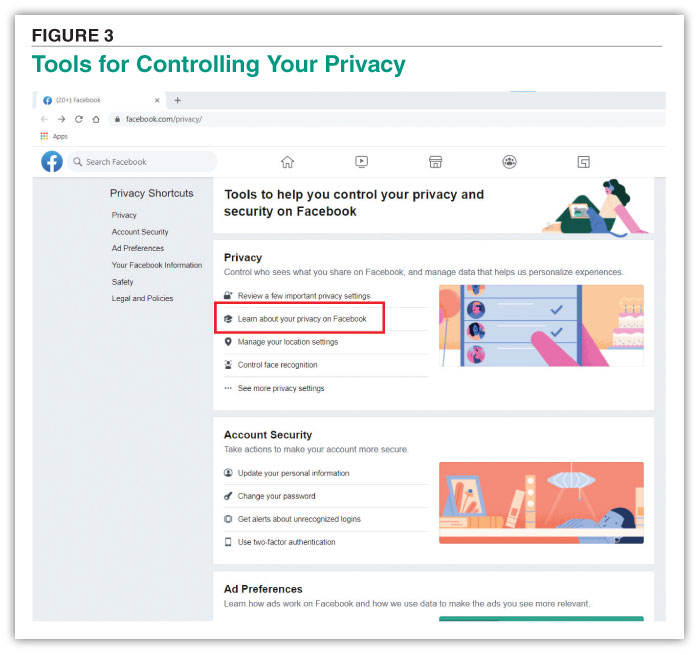
For more background and reading on controlling your privacy and security on Facebook, the company offers its Privacy Shortcuts page at www.facebook.com/privacy. Facebook’s Privacy Basics can be accessed through the shortcut, “Learn about your privacy on Facebook” (Figure 3).
These are Facebook’s frequently asked questions about privacy answered in simple slideshows of text and supplemental graphics. At the end of each slideshow is a link to the pertinent grouping of the FAQs within the Privacy Checkup.
If you want to feel more secure while using Facebook, then it is worth the time to allay any privacy or security fears you have by using Facebook’s Privacy Checkup. As its name implies, it is intended to help you check your concerns. Conveniently, you can set a reminder to do a privacy checkup if you want to periodically adjust your settings.
Some privacy settings become more nuanced under general settings. For most Facebook users, the Privacy Checkup will suffice for covering the privacy and security concerns of using Facebook.
We think you’d like this related webinar! Individual Investor Show: Leisure Stocks, Dividend Stock Screening and AAII Club Privacy on Facebook
Although prudence should always be used when interacting with others online, Facebook’s privacy settings can help you connect with like-minded investors at AAII Investment Clubs.
 Connect with other members to discuss and share strategies. Learn more at www.aaii.com/community and sign up today to join the conversation!
We think you’d like this related webinar! The Individual Investor Show: Investing Community Segment hosted by Ryan Reeh
Member News

Computerized Investing

MARC M from VA posted over 5 years ago:
You need to log in as a registered AAII user before commenting.
Log InCreate an account