


Many AAII local chapters and special interest groups (SIGs) now offer online meetings alongside in-person events. These virtual sessions provide valuable opportunities to learn from leading investing professionals across the country. Another trend is collaboration: Local chapters and SIGs are partnering to co-present meetings, expanding both the quality and variety of programming.
In the June 2026 Field Notes From the Chapters, we covered how to use the Community Events tab and calendar to track upcoming meetings. A second, highly effective option is to subscribe to email updates from chapters or notifications from SIGs that match your interests.
Log in to the AAII Community using your AAII email address and password. Then, click on the All Communities tab. Use the drop-down menu to browse either Local Chapters or Special Interest Groups (SIGs). You’ll need to view each category separately to see the full list of available groups.

To join a local chapter and receive their emails, you will need to opt in through your AAII.com profile. Go to Update My Local Chapter Communications and log in to see the list. Choose as many chapters as you’d like.
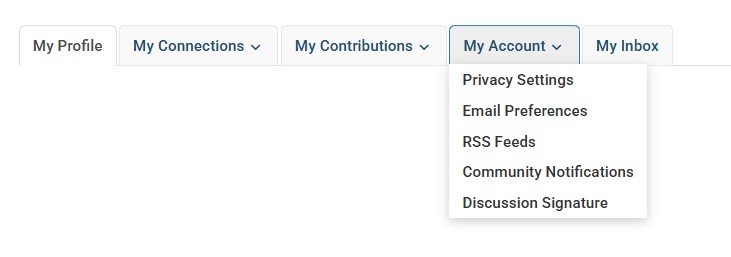
To join a SIG, just click the Join button next to any group on the AAII Community site. SIG notifications are sent in batches via Communication messages. To set your preferences for receiving event announcements and message threads, go to your profile in the AAII Community and select My Account.
—Lorraine Lauper, AAII Sacramento Chapter program chair, and Todd Blickenstaff, AAII Portland Chapter Income and Cash Flow SIG co-coordinator
Discussion
FREE REPORT

No comments have been added yet. Add your thoughts to the discussion!
You need to log in as a registered AAII user before commenting.
Log InCreate an account