


Not long after the New Year’s glow begins to fade, we receive our W-2s from our employers—a not-so-friendly reminder that we need to start looking into preparing our 2014 tax returns. In order to help you with that oft-unpleasant task, we have reviewed three of the most popular tax preparation services: H&R Block, TaxACT and TurboTax.
There are many reasonable tax preparations services around, whether online, software or in person; however, here we discuss online and software programs, with much of the focus on the online versions. More and more people are shifting to this method of filing their tax return, as it is usually the easier and less expensive way to file.
This comparison is a review of the three most popular websites for tax preparation. While many options seem similar on the surface, there are some clear differences between the offerings that may make a particular one more or less attractive to you. We also highlight which offering we liked the best among the three, but keep in mind that the right service for you depends on your particular needs and preferences.
The Services
The first decision you will have to make is whether you wish to prepare your tax return online or via dedicated software hosted on your computer. There are some pros and cons to each option. The online services are primarily less expensive and offer a quicker turnaround (according to the companies) while the downloaded software offers users the comfort of knowing their information resides only on their own computer and not on a company server. The trend, however, is clearly toward the online version, so that where we have placed the focus of the reviews.
While each offering has its differences, they also provide a number of features that are similar, if not identical. For example, all three offerings include one free federal tax return if using the online version of the software, with an extra charge for the state return. All three offerings also automatically check the return for errors and help you maximize deductions. Additionally, all the options have similar system requirements to run their programs, which are highlighted in Table 1.
As stated, the online versions of the three tax preparation services are reviewed here. Keep in mind that while the online services may be easier and facilitate faster filing, all the information is saved on the companies’ servers. This is how you are able to start, save and return to a tax return in progress. It is also why you are able to retrieve previously submitted tax returns (if you filed through that same company). This is a trade-off that you need to be comfortable with in order to use the online version, which millions of people do safely and securely every year. If you do not feel comfortable with your information stored on a company’s server, your other option is to purchase and download software from these companies. This means that the information is stored on your desktop until filed; however, it is only as secure as your personal computer.
TurboTax, H&R Block and TaxACT allow users to file simple tax returns, such as a 1040, free of charge. However, many users will need to upgrade to the “deluxe” version or higher, because deluxe versions can handle the reporting of items such as additional dependents, investment income and home ownership. The deluxe versions are not free and can range from $12.99 to $79.99 per federal filing. If you don’t know which version fits your needs, all the services allow you to begin filing a simple return and switch to a more sophisticated version if needed. Your answers as you proceed through the simple return will tell the service if you need to upgrade and it will communicate that to you. You are not asked to pay for the filing until you are ready to submit your tax return.
Any of the three offerings will also file your state tax return(s) for an additional fee, if you so choose. Most people decide it is worth the cost, as all three offerings make it easy to use by simply importing the information from your federal tax return.
Table 1 highlights the features and costs of each offering.
|
Online Service |
TaxACT Deluxe |
H&R Block Deluxe |
TurboTax Premier |
|
| Website | www.taxact.com | www.hrblock.com | www.turbotax.com | |
| Federal Cost | $12.99 | $29.99 | $79.99 | |
| State Cost | $9.00 | $36.99 | $44.99 | |
| System Requirements | Windows | XP/Vista/Win 7/Win 8 | XP/Win 2003/Vista/Win 7/Win 8 | XP/Win 2003/Vista/Win 7/Win 9 |
| Macintosh | Mac OS X 10 or higher | Mac OS X 10.5 or higher | Mac OS X 10.5 or higher | |
| Min Browser* | Internet Explorer | Version 8 or higher | Version 8 or higher | Version 10 or higher |
| Mozilla Firefox | Version 11 or higher | Version 11 or higher | Version 11 or higher | |
| Safari | Version 5 or higher | Version 5 or higher | Version 5 or higher | |
| Chrome | Version 4 or higher | Version 4 or higher | Version 4 or higher | |
| Version Required for Investors | Deluxe | Deluxe | Premier | |
| Donation Valuation Assistance | Yes | Yes | Yes | |
| Bonus | Video Tutorials | A gift card with up to 10% of your federal tax refund | 5% of your refund on Amazon gift card |
*can vary by operating system
H&R Block
The online version of H&R Block At Home Deluxe is $29.99. The service prompts you to sign in or create an account, but there is also an option for those of us who can’t stand the idea of creating another online account. However, you will need to have one in order to e-file your return, which is a powerful incentive to create an account.
Once you proceed past the sign-in screen, you are given the option of importing your data from last year’s tax return. The information can be imported from H&R Block and from TurboTax and TaxACT as well. This will autofill many fields on your return based on last year’s return, but it is not mandatory. You can import W-2s as well, but this is also an optional feature.
The program then identifies the likely documents/information that you will need to successfully complete the return which, in graphical form, makes it very easy to understand.
The first page of the Personal Information section under the Federal tab prompts you to provide information for the past year regarding marital status, family life and employment situation. The next page goes through each box that you checked and explains what effect that item has on your tax reports. For example, if you checked “recently married,” H&R Block describes the effect on your taxes of changing your name or being married. The next couple of pages go through simple step-by-step questions involving filing status and tax report basics. You are presented with the exemptions you qualify for, credits you can receive, and information pertinent to any new filing status.
Throughout the process, the program refers back to any relevant information you provided in this first section: For example, if you indicated that you lived in multiple states during the prior year, the service will refer to that later when filing your state returns. In order to maximize your deductions, the service asks you if you had any medical conditions, such as being vision-impaired, in the prior year.
After the personal information section has been completed, the service highlights important tax law changes for 2014. The service asks you questions related to the Affordable Care Act to determine whether you had minimum essential health coverage for all of 2014. If you did not, it will let you know that you may have a shared responsibility payment owed but will provide that final determination after the income section is completed.
One thing I found irritating was that the service would periodically ask me if I wanted to create an account even though I declined to do so at the start of the tax return and there is a create account link at the top of the page. The prompting seemed excessive.
After the Personal Information section, a page pops up to describe what paperwork you will need in order to fill out the next section: Income. The Income section breaks your income into categories: common income, business, rental, partnership, farm and royalties, investments, retirement and Social Security, sales and transfers, and other income. The site prompts you to click any boxes that apply, and if you’re unsure of how to classify an income source, H&R Block provides assistance in selecting the appropriate option. In our test run, we chose income from employment wages, interest income from bank accounts, and dividends or capital gain distributions. The many options for sources of income give experienced users the advantage of checking boxes that pertain and skipping other income sections. However, there are Learn More links next to each item should you need clarification on anything. After I indicated that I had received dividends or interest during the 2014 tax year, H&R Block’s service indicated I needed to upgrade to a different version, which would be fine, except that it required me to create an account. Once the account is created, the information you previously entered is automatically transferred to the upgraded version.
Entering the information from your W-2 is relatively painless, although I wish that my employer information could be pulled from the employer identification number as I’ve seen done elsewhere, but that’s a small quibble.The site makes it easy for you to input the information by providing sections on the website that have a direct correlation to the boxes on the W-2. The page headings tell you which boxes on the W-2 apply to the questions you’re answering, so it’s easier to locate the information needed. Certain sections have “learn more” links here too, in case the user is unsure or confused. If a mathematical error is detected, the site will ask you to correct it before continuing. Other filing sections include 1099-DIV and 1099-B. H&R Block can automatically load this information from your brokerage account, or you can enter the information manually. Accepted websites that H&R Block At Home Deluxe can access include broker websites such as Scottrade, E*Trade and Charles Schwab.
Before moving onto the next section, the program allows you to check your income. It displays a list showing each income source, along with a link to follow the item if it is incorrect. If your return is relatively straightforward, it shouldn’t be an issue, but I had 1099 income last year (self-employed) along with W-2 wages. The W-2 wages section was pretty straightforward, but twice I got lost trying to figure out what should be entered where for the 1099. The Learn More links did not sufficiently help me to figure it out.
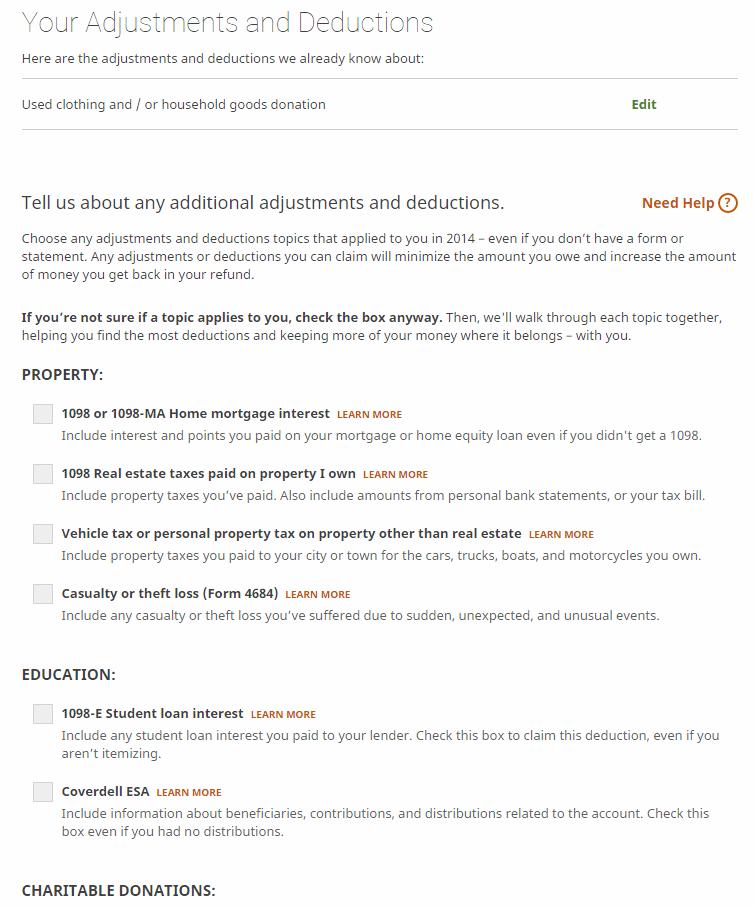
Adjustments and Deductions is the next section. Again, H&R Block provides you with a list of documents or paperwork needed to adequately complete the section using images. The website refers back to information provided in the first section if it affects this section of your taxes. Common adjustments and deductions are listed with checkboxes for the user to select those that apply. Other adjustments and deductions can also be checked. Next to each item there is a link explaining what qualifies, so you can be sure that it pertains to your situation. In our test, we clicked ‘used clothes donation.’ H&R Block offers assistance in calculating our charitable deduction for the year, which most tax preparers now offer. The website makes it very easy to input the information and, again, asks you to make corrections if any numbers don’t match up. The last page has an overview of all the adjustments and deductions you input and gives a total for the standard deduction. Generally, the standard deduction is what will be recommended for simple filers, but your case may vary.
Credits is the fourth section in H&R Block Basic. Common credits and other credits are listed, and you check the individual boxes that apply. The program automatically adds checks to boxes that would apply based on information that has been previously provided. Links are again located next to each item for clarification. In the case of tuition expenses, the site lists tax breaks that may be available by walking you step by step through amounts paid for tuition and exactly where the money came from. H&R Block also provides assistance on expense credits for foreign tax paid, homebuyers, and the elderly and disabled. After inputting the information, the program lists each tax break that you qualify for. At the end of the credit section, the program runs through each allowable credit and provides a “go to” button if anything needs to be edited.
The Taxes, Penalties and Payments section requests information based on payments made throughout the year. Documents that you need for this section include statements of IRA and HSA investments, Form 1040-ES showing any federal estimated tax payments made, Forms 1099-INT and 1099-DIV for children under age 24, records detailing household employees’ wages paid and COBRA health insurance coverage. By reviewing these documents, you can figure out if you owe any additional taxes and penalties, or qualify for any other tax breaks. Checkboxes are provided for users who know what situations apply, and each subsequent page goes through any boxes checked in detail. The overview displays what taxes, penalties and payments will appear on your tax report. If you answered earlier (in the taxes section) that you did not have health insurance for all of 2014, the service will let you know what additional documentation you will need to maximize your refund. Additionally, the service asks for details about which months of 2014 you did have insurance coverage. During the test, I was able to earn an exemption by saying that I was not offered an opportunity to buy insurance when I was working for myself prior to joining AAII.
H&R Block runs a verification and accuracy check before your tax return is completed. The test goes through your return and notifies you of any mistakes so you can choose to fix or ignore the issue. My return identified a Material Participation error, which meant nothing to me. I clicked Fix Issue and it took me to the beginning of the Personal Information section, but I couldn’t find exactly what the problem was. If the service finds what it thinks is an error, you cannot e-file. The error must be fixed or you have to print out the return and mail it in.
The final page of your federal return displays how much you owe or will be refunded, with a breakdown of your adjusted gross income, taxable income and deductions. H&R Block can electronically file your federal tax return at no additional cost if you have set up an account.
Directly after completing your federal taxes, H&R Block Basic will help you complete your state taxes for $36.99.
The website allows you to designate a bank account for the IRS to automatically deposit a tax refund or withdraw a tax liability. If you are eligible for a refund, H&R Block can automatically deduct its fees directly from that amount.
Throughout the whole tax reporting process, the website offers a Help Center where users can search for answers to commonly asked questions. If your questions aren’t answered there, the website provides a Q&A section where questions are answered by tax professionals at the firm. Other available resources include tax tips and a blog.
If at any point in the process you need to leave your computer, the service allows you to save your work and continue at another time. Additionally, you can now start a tax return on one type of device—your desktop computer, for example—and pick it up on another device, such as a tablet.
TaxACT Deluxe
TaxACT Deluxe is a do-it-yourself tax return that is offered online for only $12.99 for the federal return. You can start the tax return process and wait to pay until you are ready to file at the end. If you get stuck at any point, phone help is available for free for Deluxe users.
The first step is filling out the basic info section of the website. Users are asked if they are returning from last year and if they want to import vital information from previous reports. For our review, we started from scratch. TaxACT allows you to import digital copies of important tax documents (such as images, PDFs, text documents and spreadsheets), W-2 forms from select payroll providers and stock transaction information using a comma-separated-values (CSV) file. TaxACT Deluxe first goes through personal information about you and your spouse, if applicable. The questions are very basic and checkboxes are provided for responses that apply. It asked for my spouse’s information early in the return but gave me the option to leave that blank.
The Life Events section asks you about significant happenings from the past year. These events are separated into categories: family, employment and retirement; home, auto, and personal property; money and investments; state filings; and other topics illustrated by pictures that make them easy to understand. You choose what pertains to you or your life situation. Under the Guidance heading on the side, TaxACT gives you information on how each event affects your taxes through applicable links. One thing I found irritating was the constant advertisements to upgrade to Deluxe.
There is not much filtering of questions as you progress through, so you will see some questions that clearly do not apply to your situation.
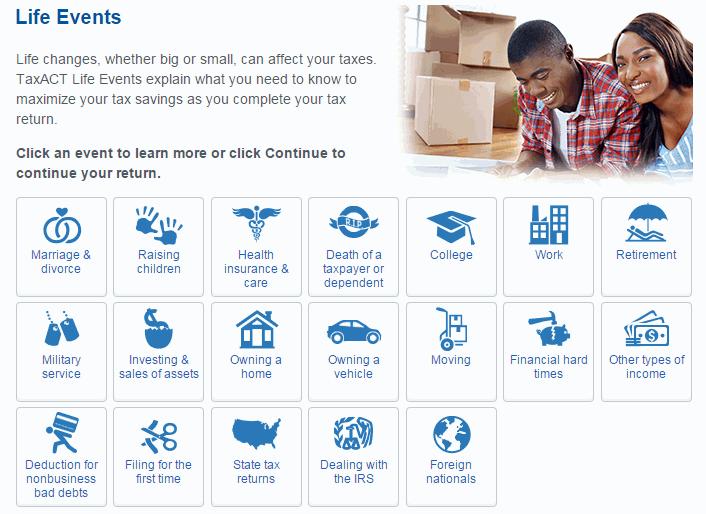
Continuing through the Life Events section brings you to the Federal Q&A. Income is the first set of questions regarding wages: If you click “yes” to the question of whether you or your spouse received any wages or salary from an employer in 2014, you are given the option to complete your W-2 information using Quick Entry or Step-by-Step Guidance. Choosing Quick Entry brings up an electronic W-2 that you can quickly fill out by jumping to the various fields in a form that mimics the actual W-2 form that you received. Step-by-Step Guidance leads you through each of the fields.
The Quick Entry form is probably a better option for individuals who feel more comfortable entering the data into a form that looks exactly like the one they are holding in their hand. Step-by-Step Guidance shows each field in list format, and blanks are provided for the user to fill in, giving you more directed help to input the required data.
When you reach the Investment Income section, the site tells you what forms are needed based on what types of investment income you declare. The page gives a description of what “investment income” may include and also offers additional guidance for forms that may be useful.
The Investment Income section asks you a series of questions and, after answering yes or no, each response is evaluated and subsequent questions are asked. You can import indirectly using a CSV file if you are using the Deluxe version or higher. You can also manually enter your stock transactions using the Stock Assistant. The import CSV file feature is useful, but your formatting must meet the specifications of the offering and variations will result in an error. Once you understand what is required, however, it is a very smooth process. You can try to use the electronic import feature, but the list of accepted brokerages is limited and missing common brokers such as Scottrade. It does offer a link to request that a broker be added.
The site goes through mortgage interest, principal payments, interest income, investment expenses and foreign taxes, interest deductions, and interest exclusion, among other income items. When providing information about any of these items, you again are given the option of entering information using Quick Entry, where you essentially copy information directly onto a form that looks like a 1099-INT, or Step-by-Step Guidance, where the website walks you through each step. Questions about other income such as sale of home, business income, rental and royalty income, retirement plan income and Social Security benefits pop up before the section is finished. Each page asks a series of questions to help you figure out which income items pertain to you and where the correct information can be found. At the end, a page summary is provided that displays each category of income. If you need to edit anything, you can click “review” to fix any mistakes.
The Deductions portion of the tax report comes directly after income. Information from previous sections carries over, and TaxACT asks additional questions to determine which sections may need further input. The program asks if you would like to fill out itemized deductions and recommends that you answer yes. The site will only use itemized deductions if doing so lowers your tax bill. The deduction examiner allows you to review each deduction or go back to edit any mistakes. The Itemized Deductions section is a table broken down into medical/dental expenses, taxes paid, interest paid, gifts to charity, casualty and theft loss, miscellaneous and other miscellaneous. The Credits section inquires about adoption expenses, residential energy credits, foreign tax credits, and child and dependent credits, among other types. The information from previous sections translates over, and the program automatically recognizes if you are eligible for certain credits based on previously provided information. The same review process is available, and TaxACT makes reviewing or editing your credit information easy.
Under the Miscellaneous category, users can input estimated tax payments for 2015 to avoid penalties when taxes owed are not covered by the withholdings amount on each paycheck. Different methods are provided for calculating estimated tax. All three offerings have this option. On the right-hand side of the page, popular help topics are provided to educate inquisitive filers.
A Federal Tax Summary is provided after the questionnaires in each section have been completed. At this point, the site gives three options: review Q&A topics, preview form 1040 or continue. After clicking continue, TaxACT offers to automatically transfer data to your state tax form. If you want this to be done, click the appropriate responses. Continuing forward, a review is performed on your tax report. The program scans for incomplete or inconsistent information, and a series of suggestions or corrections that need to be made will pop up in order to ensure an accurate tax report. TaxACT Deluxe has several pages of tools that you may find useful, and offers other programs that may help you based on information you provided.
A couple of filing options are provided. You can file electronically or by mail. If you are receiving a tax refund, you can choose to have it wired electronically to an account or have a check mailed to you. If any amount is owed, you can request that the IRS withdraw the funds directly from a designated account, you can mail in a check or you can have the amount owed charged to a credit card. TaxACT will file your state return electronically for an extra fee of $9.00.
TurboTax
TurboTax (any version) requires users to create a username and password before allowing any work on your return. While not enjoyable, creating an account means the information you provide will be saved so there is no need to finish your tax return in one sitting. In addition, if you filed using TurboTax in the past, some of the personal information will be filled out automatically. If this is your first time using it, the first section begins by asking for personal information such as name, marital status and occupation. At the end of each completed section, the website provides a summary of the information entered. Double-check each section carefully before proceeding to the next section. I started out using the free federal return option but then answered yes to a question about investment income. The program immediately told me that because of my investment income, I would have to upgrade to the deluxe version. I said yes to that, and my information was brought over from the free version. The federal tax return filing fee for the Premier level is $79.99, with a state fee of $44.99. As Table 1 indicates, this is quite a bit more expensive than the two other offerings discussed in this article.
TurboTax breaks down the federal tax return into six sections: wages and income, deductions and credits, health insurance, other tax situations, federal review and smart check. The new health insurance section is to ensure that you had health insurance throughout 2014 in compliance with the Affordable Care Act. After completing the personal information section, TurboTax will ask for wages and income, which typically begins with a W-2. Completing the W-2 section is straightforward: Users simply fill each box with the corresponding information shown in the W-2 form provided by their employer. After completing the W-2 section, TurboTax asks a few questions regarding special income situations, such as whether you have worked outside the U.S. or whether you worked for a foreign government within the U.S. TurboTax asks what additional forms of income pertain to you, such as investment interest or dividends, forgiveness of debt, sale of stocks or other investments and contract work. The program can link directly to major brokerage accounts to download investment data, which is the easiest way to accurately provide the information. At the end of the wages and income section, TurboTax also reminds you to enter data on investments or brokerage accounts held outside of the U.S.
When the wages and income section is complete, you move on to deductions and credits. TurboTax gives you a choice of two options for completing this section: ‘Guide me’ (recommended by TurboTax) and ‘Jump to a full list.’ As the names suggest, Guide me walks you through each deduction and credit, while Jump to a full list allows experienced tax filers to jump from item to item. Guide me is often preferred, as it makes it less likely for you to miss an item.
There are 10 deduction and credit items, and Guide me goes through each one in detail. At the ending summary section, be sure to double check that all your deductions and credits have been entered. When you are comfortable with the information provided, move on to the next section, which covers other tax situations.
Other tax situations include such items as the alternative minimum tax, additional tax payments and other return info (including deductions such as presidential campaign fund contributions). TurboTax provides help for each section, which is accessed by clicking on the Learn More link next to each corresponding section.
After the final section is completed, TurboTax performs a comprehensive review of the entire tax return and brings any errors to your attention. You are then given an opportunity to correct any errors that were found.
When the federal return is completed, TurboTax offers the option of transferring the data to a state tax return. If you decide to use this option, TurboTax will ask a few personal questions, such as whether you lived in the state for the entire tax year and whether there has been a change in residency during the year. The program then presents a list of state deductions, allowing you to check off the pertinent ones. A final state tax review is presented at the end. Just as with the federal review, any errors and inconsistencies are brought to your attention.

Before filing, TurboTax shows your audit risk based on whether your tax return contains aspects that have historically triggered IRS audits. If you are concerned about the possibility of an audit, you can purchase audit defense through TurboTax. However, the reliability of this tool is unknown.
When ready, TurboTax can electronically file your return. The website can set up a bank account where tax refunds or payments are automatically debited or credited. If you are receiving a refund, the tax preparation fees can be automatically deducted from the refund amount; alternatively, you can pay using a credit card.
If you get stuck, Deluxe and higher versions provide priority phone support, although I did not test its usefulness.
TurboTax is also offering to give you 5% of your refund back to you in the form of an Amazon gift card.
Conclusion
While the three offerings have many things in common, some features and methods vary that can impact their value to a user. TaxACT is the cheapest offering of the three and does many of the basic tasks well, but can be overwhelming as information isn’t as tailored to a user’s specific situation. The help offerings are pretty boilerplate, which can leave a user feeling confused. Don’t come here looking for hand-holding. This service falls into the bare-bones category. H&R Block feels a bit more polished, but it has some blemishes and can be confusing at times. It feels like H&R Block is confused about its identity by trying to appeal to budget filers, such as those who use TaxACT, as well as premium filers, such as TurboTax users. The program handles the basics well, but felt muddled once you moved on to more advanced functions. I have to wonder: Why pay more to only have basic tasks done well?
TurboTax is the most expensive of the three offerings, but it also felt the most polished. I felt safe as I was progressing through my return. While there some irritating issues with TurboTax, they are minor compared to the pluses. The best aspect of the offering is that it doesn’t overwhelm you, offering bite-sized bits of information as appropriate.
It is important to remember that no matter which offering you end up selecting, the numbers produced are only as accurate as the information provided by the tax filer. For me, in the end it came down to saving money or having the comfort of a little hand-holding for the first time. I ran multiple tests with each of the three offerings with different scenarios using mostly realistic figures and produced what seemed to be reasonable figures from all three. The tests included both federal and state returns and the numbers changed as expected as I changed certain inputs. I didn’t find a significant variation between the three as far as accuracy.
While no one likes to pay more, in this instance I felt most comfortable using TurboTax. The layout was comfortable, the questions understandable and the process easy. While I am no accountant and can’t vouch for the error-checking and refund-maximizing parts of their software, I was impressed with how easy it was to do my state and federal taxes and am considering filing my taxes using TurboTax despite the higher cost. TurboTax and Intuit more generally have had issues in recent months and years with some questionable decision-making (see CI’s blog post about TurboTax here) and product releases (See Quicken review and comments here) but its online tax preparation software made me feel the safest of the three offerings.
Of course, after reviewing the strengths and weaknesses of all three offerings, you may have a different opinion. Settle on whichever service best suits your individual needs.
Discussion
FREE REPORT

Donald Ruth from Michigan posted over 11 years ago:
Donald Heath from TX posted over 11 years ago:
Bernard Katz from VA posted over 11 years ago:
Joel Maynard from CT posted over 11 years ago:
Paul Hopler from VA posted over 11 years ago:
btlRickas01 from IL posted over 11 years ago:
Sloan from Nevada posted over 11 years ago:
Bernard Binder from IL posted over 11 years ago:
Sloan from Nevada posted over 11 years ago:
Bernard Binder from IL posted over 11 years ago:
Eric Eklund from Overseas posted over 11 years ago:
Eric Eklund from Overseas posted over 11 years ago:
Charles Sarahan from DC posted over 11 years ago:
Steven Helton from IN posted over 11 years ago:
Bob N. from Illinois posted over 11 years ago:
Doug Spencer from TX posted over 11 years ago:
H Mercer from TX posted over 11 years ago:
William Law from TX posted over 11 years ago:
You need to log in as a registered AAII user before commenting.
Log InCreate an account