


BiggerPockets is a networking and education website for real estate investors.
BiggerPockets defines itself as a movement within the real estate community and offers users four main benefits:
- Interact with real-life investors and build profitable relationships through the social network.
- Ask questions in the forums, read posts on the BiggerPockets blog, or listen to interviews on the BiggerPockets podcast to gain knowledge and pick up new skills.
- Analyze deals using the property analysis calculators—and print reports to give to lenders, partners and others.
- Advertise your haves or wants in the Marketplace and start doing business with those in the community.
I am personally a member of BiggerPockets and enjoy the community aspect of the website, so I figured it would be beneficial to share with Computerized Investing subscribers! As someone who recently entered the real estate investing world, I have found BiggerPockets to be a great resource. I have gotten a chance to answer questions as well as ask them.
I will start by going through the four main ways the site helps real estate investors: network, education, tools and marketplace.
Network
Forums
One of the most unique aspects of BiggerPockets is its extensive forums. The idea of a forum is that any user can ask a question to the community and have their question answered. This can range from basic questions like, “How would you recommend someone get started in real estate investing?” to more complex questions like, “How do I purchase tax liens in my county?” BiggerPockets has over 3.4 million forum posts and over 550,000 discussions.
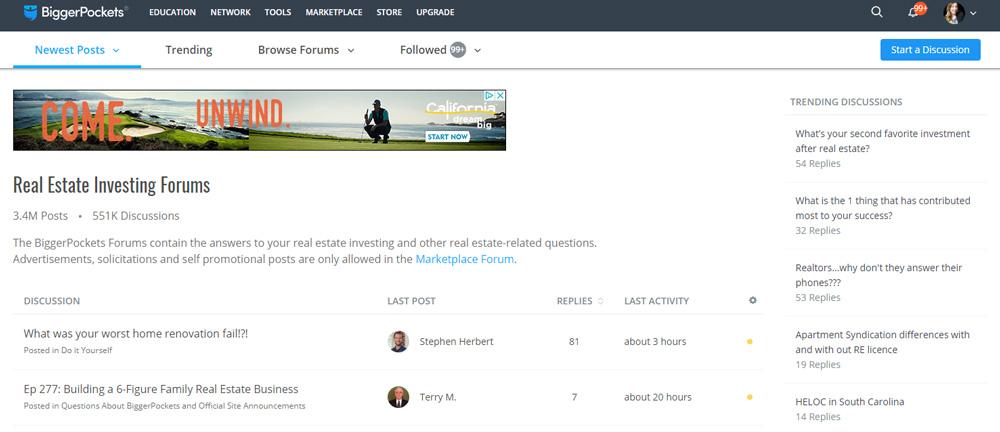
The forum categories are as follows: local real estate forums; general info; general real estate; reviews and feedback; investor basics; landlord and tenant forums; foreclosures; real estate strategies; commercial real estate; business basics; real estate technology and the internet; loans, mortgages, credit lines; financial, tax and legal; real estate professionals; real estate market place; and off topic.
Once you determine which category you want to post your question in, you fill out the subject line and then the content of the post. You have the option to receive email alerts when people mention you in a forum or comment on a forum question that you posed to the community.
When someone comments on a particular thread, other community members can “vote” on responses they like.
Other community members can be tagged in a post by using the @ symbol in front of their user name, similar to how one would tag someone on Facebook or Twitter.
Users can also search the forums by most recent posts to see what people are talking about, by number of replies or by latest activity. To check out posts that haven’t been answered yet, users can click “newest posts,” then “unanswered discussions.”
Along the right-hand side of the forum landing page, users can see “trending discussions” or discussions that are getting a lot of action in the forums.
One key feature is the ability to follow certain discussions. If a user is interested in a particular discussion, even if they haven’t commented on it, they can follow the discussion and get notifications when someone posts to the discussion.
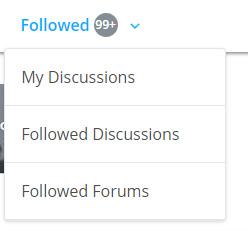
Users can also easily view discussions they’ve created by clicking “my discussions,” or forums that they have followed by clicking “followed forums.”
Following an entire forum is different than following a specific discussion. Following a forum allows you to follow an overall topic and the applicable discussions posted within that forum, while following a discussion allows you to follow just a specific topic within a forum.
Another notable feature is the ability to search for “local forums.” Real estate is often a local market business, meaning, each sub-market can be very different from the next. In the case of Chicago—Chicago itself is a local market, but each neighborhood has different demographics, renter behavior, etc. Being able to follow local forums helps users to connect with other real estate investors close to them. It also helps to get more specific answers to questions like, “Does anyone have a good contractor in Chicago?” or questions about Cook County regulations.
Not every question gets answered, but in my experience, people usually respond fairly quickly, and you’d be surprised how much detail some members offer.
Members
Users have the ability to “follow” other members, which allows them to track posts and comments that they make. Users can also “connect” with other BiggerPockets members (similar to “friending” someone on Facebook).
If a user is interested in connecting with local real estate investors, they could search for members based on keyword, location (where they’re located), interests (types of real estate investing they’re interested in), markets (markets that they invest in), status (membership level) or activity (whether or not to show only active users).
Local Companies
BiggerPockets allows users to search through a local real estate company directory. For example, if one were looking for a lender in Chicago, they could search the BiggerPockets directory. Each company can create a “company page” that displays a brief description about the company, its contact information and BiggerPockets members that are part of that company.
Events
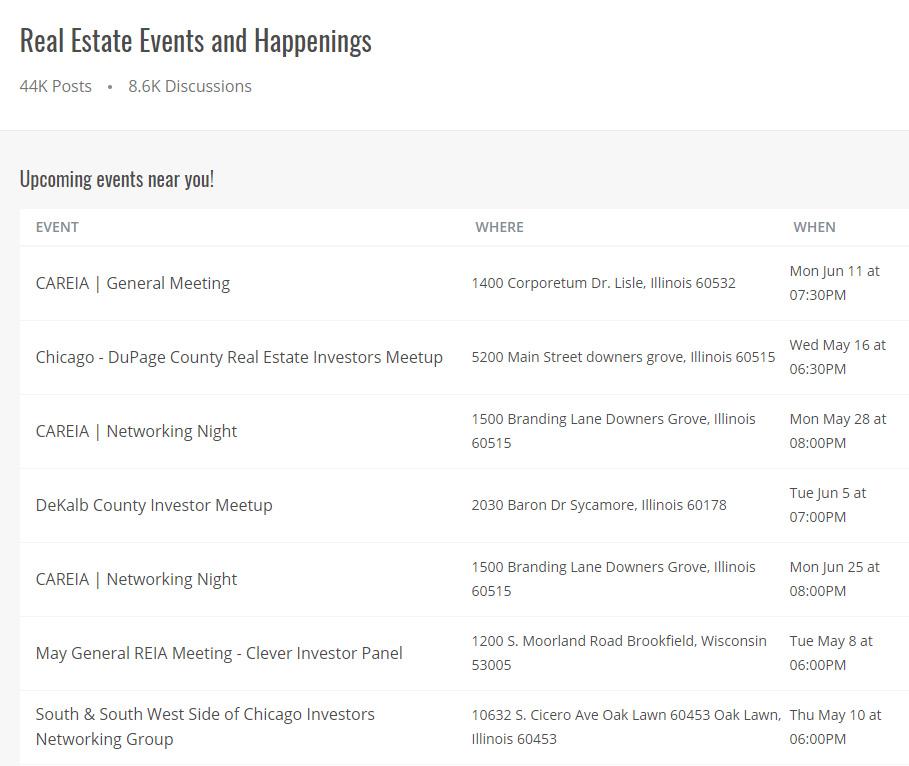
BiggerPockets members can look up events in their area. This can be found on the “network” tab at the top of the page. This includes BiggerPockets meetups or other meetups organized through real estate associations in the area. This is a great way to get involved with the local community.
Figure 3 shows an example of local events in the Chicagoland area that I could potentially attend.
Education
BiggerPockets Blog
BiggerPockets posts a wide array of articles geared toward real estate investing education. This ranges from basic topics like “12 Tenant Nightmare Stories I Swear Are Actually True,” to more advanced articles like “How BRRRR Increases Your ROI (And Why You Should Be Using It).”
BiggerPockets blog categories include: home, starting out, landlording, flipping, wholesaling, management, finance, commercial real estate, news, real estate marketing, mortgages, investor stories and podcast.
One of the easiest ways to find applicable content is to use the search bar in the upper right-hand corner to search for articles that address a topic you’re interested in learning more about. For example, if I search “evaluating cap rates” in the search bar I get a wide array of results. What makes this search unique is that BiggerPockets lets you filter by resource within their website and also apply filters to a search. Figure 4 shows the search results displayed when I typed in “evaluating cap rates.” As the screen capture shows, I can filter this search by: members, companies, blog, forums, podcast, webinars and marketplace (these choices are displayed horizontally under the search bar).
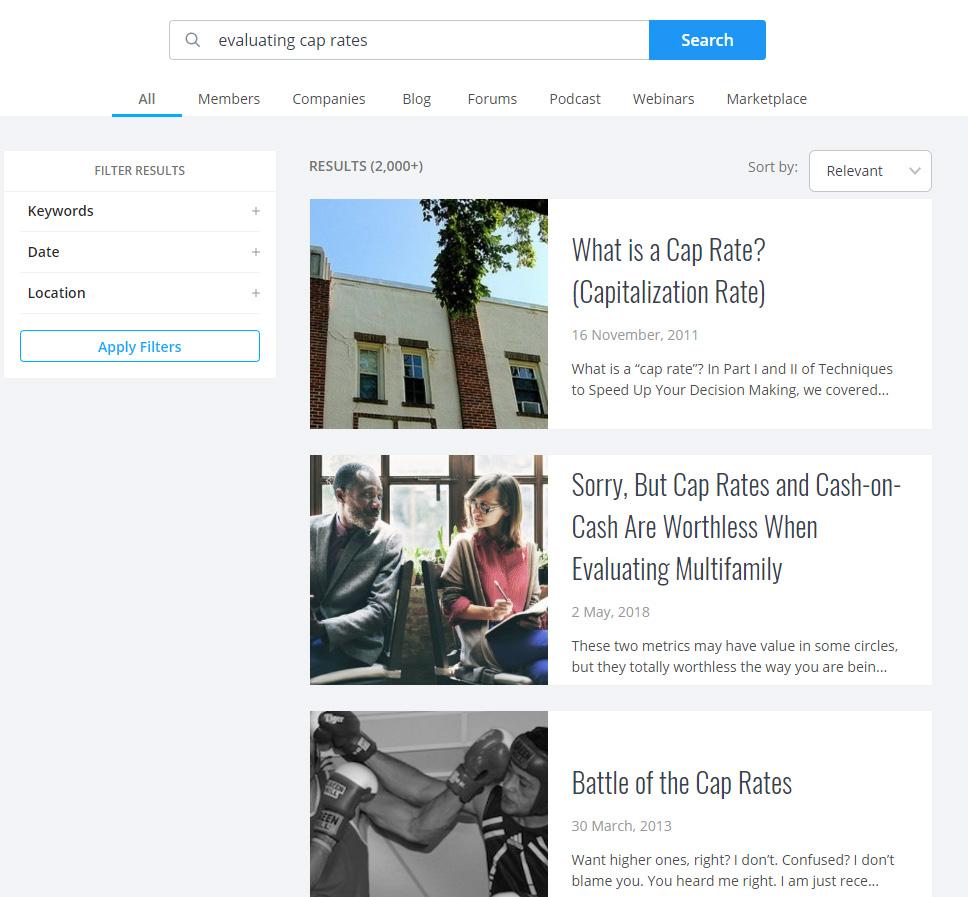
Along the left-hand side of Figure 4 are additional filtering items: keywords, date and location. Users can filter for articles that may apply solely to their area, or search for more recent articles using these filtering features.
Member Blogs
A unique aspect of BiggerPockets is the ability for users to have their own blogs. So, not only does BiggerPockets maintain its own blog, it allows users to create their own content and post it to the website.
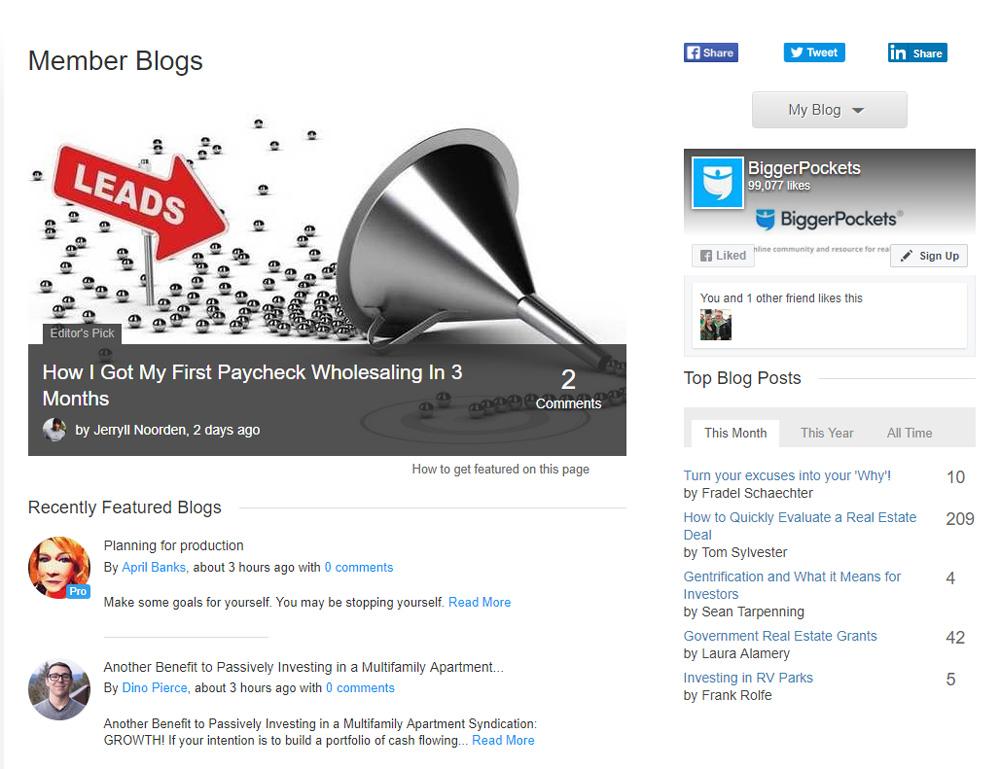
On the Member Blogs landing page (found through clicking on the Education tab at the top of the page), users can see recently featured member blogs, as well as top blog posts over the last month, year and for all time. Figure 5 shows the Member Blogs landing page.
Users can comment on other investors’ blog posts as well as subscribe to different member blogs. Subscribing to a member blog means that you’ll receive email notifications every time a new post is published.
Guides
The website also includes many guides for real estate investing. Users can get to the guides section by clicking on Education at the top, then selecting Guides. The guides section is a collection of beginning investor real estate articles.
Some of the many additional guides include:
- The 1031 Exchange Ultimate Guide for Real Estate Investors
- Investing in Office Buildings: A Beginner’s Guide
- Jumbo Loans: A General Guide
- The Ultimate Guide to Finding Incredible Mentors
- Tenant Screening: The Ultimate Guide
- The Landlord’s Ultimate Guide to Collecting Rent
- Buying a House: The Ultimate Guide to Purchasing Your First Property
BiggerPockets Podcast
Living in Chicago (and I’m sure many other areas) has a significant downfall—the commute. I technically live in Chicago (roughly five miles from downtown) and it takes me an hour to get to the office every day. Many people read during that time, but because of my motion sickness on the train, I was forced to seek out alternative means of occupying my time. Thankfully, I discovered the BiggerPockets podcast. I started at podcast number one and have gone through almost all of them. I have been very surprised at how much motivation, real estate aside, these podcasts have provided me. Some of the guests not only talk about their successes but also provide details on their failures.
The BiggerPockets podcast usually ranges from 40 minutes to an hour per show. It is hosted by Josh Dorkin, founder of BiggerPockets, and Brandon Turner, BiggerPockets employee and author.
You can listen to the BiggerPockets podcast on the company’s website by visiting the BiggerPockets podcast page, or on your phone by using a podcast application.
Recent podcasts include:
- Early Retirement ($10k/Month) by Age 35 with Bryce Stewart
- Buying 300 Homes While Working a Full Time Job with Attorney Rob Oliver
- Because of These 3 Simple Rules, I’ve Bought Over 600 Units and Never Lost Money with Paul Morris
- An Introduction to Passive Income Through Real Estate Note Investing with Dave Van Horn
On each podcast’s page, BiggerPockets members can read a transcript of the podcast, watch the podcast (if it was videotaped), access useful links that were discussed in the show, see which books may have been mentioned in the show, read “fire round” questions and answers (a unique segment of the podcast where the hosts ask a series of questions meant to be answered quickly), get information on how to connect with the podcast guest, as well as comment on a thread with other investors who may be discussing that particular podcast’s content and topics.
BiggerPockets offers a new second podcast (I am not as familiar with this one) called BiggerPockets Money. This podcast is co-hosted by BiggerPockets’ Scott Trench and Mindy Jensen, and covers many beginning investor topics like how to get financing with bad credit, how to get started or shifting your mindset from nine-to-five to cash flow.
Webinars
BiggerPockets webinars are similar to online classrooms in that an educational topic is taught with accompanying video. Webinars are hosted by Brandon Turner (the same gentleman who co-hosts the BiggerPockets podcasts). They are roughly an hour long.
Members can attend live webinars for free, but in order to view and replay past webinars, you’ll need a Pro subscription (which we will discuss later).
To get to the webinar page, click the Education tab at the top of the website, then select the Webinars sub tab.
Closely tied to the webinars is BiggerPockets’ archive of video content. The video library includes categories like tips and advice, podcasts, interviews, BiggerPockets how-to, flipping houses or deal of the day.
Users can access the video content by clicking the “education” tab then selecting the “videos” sub tab.
Tools
BiggerPockets has created many tools for real estate investors over the years. Figure 6 shows the available options underneath the Tools tab on the BiggerPockets website.
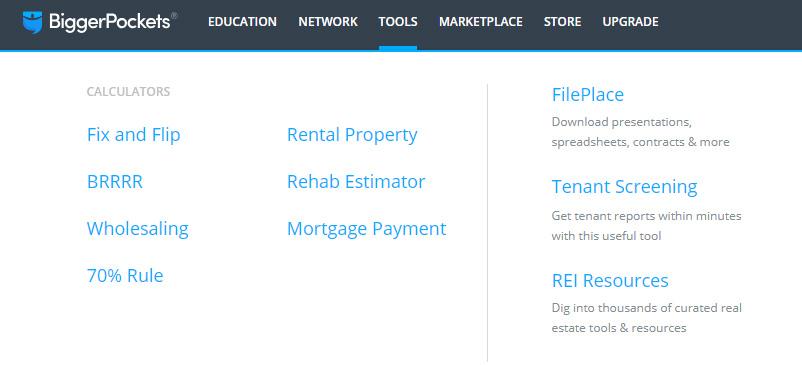
There is also a page called “Real Estate Investing Tools and Resources” that you can get to by clicking “REI Resources” from the Tools dropdown displayed in Figure 6.
Calculators
Each calculator has the ability to create printable PDFs to potentially show lenders or partners, although users must be Pro members to access this benefit.
This calculator allows users to:
- Estimate your potential house flip profit
- Calculate potential profit over customizable timelines
- Include all the costs to determine true value
There is also an advanced flip calculator available that includes additional input information.
“BRRRR” stands for buy, rehab, rent, refinance, repeat. This calculator helps users:
- Evaluate the profitability of a potential fixer-upper property
- Determine key metrics before and after refinancing a property
- Estimate potential monthly and annual cash flow
- Plan for unforeseen expenses
This calculator allows users to:
- Determine their maximum allowable offer
- Sell to a house flipper cash buyer or a rental property cash buyer
- Start from the end and work backward
- Estimate cash flow or profit for cash buyers
The 70% rule states that a rehabber should pay no more than 70% of the after-repair value (ARV), less any repair costs or other profit needed. Many “hard money lenders” (lenders used for rehab loans) often require similar terms before an investor can be approved for a loan.
Only three inputs are required for this calculator: estimated after-repair value, repairs needed and extra profit needed, The calculator then returns a desired estimated purchase price.
The rental property calculator helps users:
- Determine the profitability of a potential rental property
- Estimate potential monthly and annual cash flow
- Calculate return on investment (ROI) over time
- Plan for unforeseen expenses
The rehab estimator calculator helps users:
- Estimate costs based on labor and materials, cost-per-unit or a flat fee
- Organize costs by category
- Breakdown repair costs with over 40 different categories of repairs, both interior and exterior
- Track spending and keep track of their budget
The mortgage payment calculator is a basic calculator that helps to determine a monthly mortgage payment. The calculator has five inputs: loan amount, loan period, interest rate, annual taxes and annual insurance.
FilePlace
Another interesting and helpful section of BiggerPockets is its “FilePlace.”
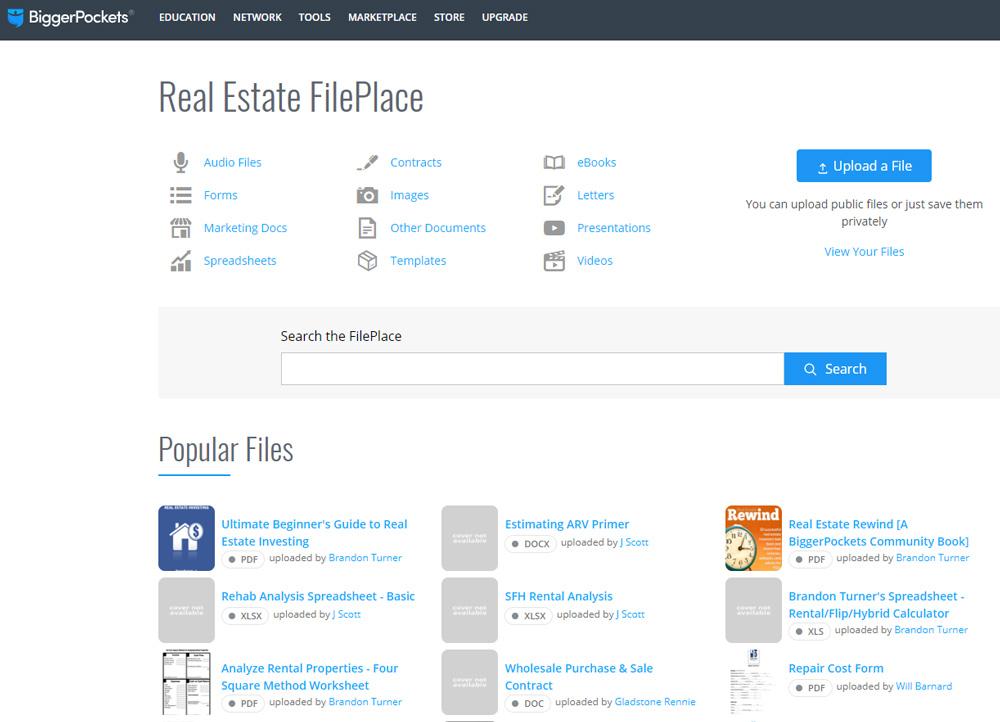
The FilePlace includes audio files, forms, marketing documents, spreadsheets, contracts, images, other documents, templates, e-books, letters, presentations and videos.
Users can search through the FilePlace using a search bar. Users also have the ability to upload public files or just files privately (private file uploads are only available for Plus and Pro plans, described below). Figure 7 shows the FilePlace landing page.
Marketplace
The BiggerPockets marketplace is where members can promote or advertise their real estate business, deals and opportunities, financing, website and more. This is the only place where soliciting partners, financing, deals, leads or referrals, is acceptable on BiggerPockets.
Hovering over the “marketplace” tab at the top of the page will display three different options: properties for sale, find foreclosures and other ads.
Pricing
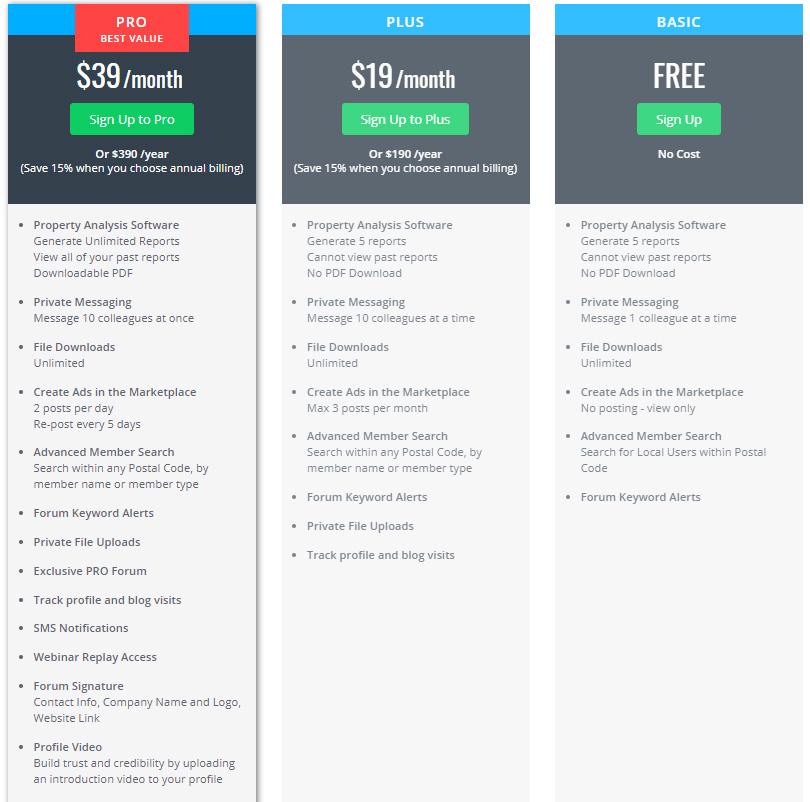
BiggerPockets has three different membership levels: Basic, Plus and Pro.
Figure 8 shows which features come with the different membership levels.
Conclusion
BiggerPockets is a great resource for real estate investors. I have personally benefited from using their website and tools over time and have been able to connect with other local real estate investors because of it. As the site itself warns, while they do their best to keep “spamming” to a minimum, it does happen. Often if a deal seems too good to be true, it’s likely because it is.
BiggerPockets has a mobile application, but in my opinion, it has a long way to go before I consider it particularly useful. The app offers an extremely limited version of BiggerPockets’ capabilities; navigating through forums is not as easy in the app as it is on the website.
For more information, review BiggerPockets’ FAQ page.
If you join the BiggerPockets community, feel free to look me up and connect!
Discussion
FREE REPORT

No comments have been added yet. Add your thoughts to the discussion!
You need to log in as a registered AAII user before commenting.
Log InCreate an account