

Related

Stock Strategies
Alerts notify you of changes to your investments based on parameters you determine. All AAII members have access to these alerts through My Portfolio.
by AAII Staff | April 2024

Portfolio alerts are a useful tool for investors who want to stay on top of their investments but do not want the pressure of having to constantly monitor their portfolios. Alerts notify you of changes to your investments based on parameters you determine.
Another advantage of alerts is that they cut through the market noise by only focusing on key criteria. You get notified of a change that is only important to your investment strategy. Whether you choose to act on the alert depends on a decision you make on your time frame—without the pressure of looking at your brokerage account during market hours.
The oldest form and most used type of portfolio alerts is a price alert. A price alert is a signal that a stock, exchange-traded fund (ETF) or mutual fund has reached a price level you have specified. These alerts are used to determine if an investment has reached an attractive entry point or a level that would prompt its removal from the portfolio. Investors can also use price alerts as a prompt to take a closer look at a stock. All AAII members have access to these alerts.
Other portfolio alerts can be helpful too. A+ Investor and AAII Platinum subscribers are eligible to receive A+ Stock Grade change alerts. These alerts notify you of changes in a stock’s underlying characteristics. They help you determine whether a company possesses the traits you find desirable. The A+ Investor Weekly Insights email provides an overview of your portfolio along with additional key metrics.
Price alerts are a tool for all AAII members to track daily price changes for stocks, mutual funds and exchange-traded funds (ETFs) that they follow in My Portfolio. A daily alert will be sent to you if one or more of the stocks, ETFs and mutual funds that are most important to you meet the price change criteria you select.
If you already have a portfolio of stocks, mutual funds or ETFs set up in My Portfolio, then you are ready to use the price alerts tool. If you do not have a portfolio set up in My Portfolio and want to receive price alerts, then the first step is to create a portfolio of investments to track in My Portfolio. You can learn how to set up a portfolio by selecting How-To at the top of the My Portfolio webpage.
Enabling custom alerts allows you to receive email notifications for investments you’ve added to any portfolio in the My Portfolio section. You can also visit the My Portfolio webpage to view your alerts (Figure 1). My Portfolio price changes will be available daily around 6:00 p.m. Central Time, Monday through Friday.
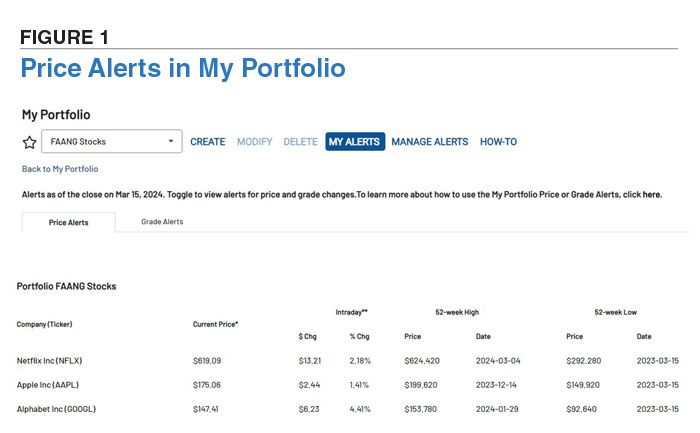
To set up and adjust your alerts, go to My Portfolio, found in the My Tools menu on the upper-right side of AAII.com pages. At My Portfolio, select Manage Alerts.
All AAII members can receive daily price alerts for any stock, mutual fund or ETF included in their portfolios that is exhibiting a price action passing your configurable alert rules. You can opt to receive an email notification when a stock or fund reaches a new 52-week high or low price as well as set an alert to be triggered when a stock or fund price increases or decreases by a certain percentage. By default, price changes of 5% or more (up or down) will trigger an alert, but you can change them to specify the percentage that is significant to you.
You can also select which of your portfolios you would like to receive alerts on. The price action settings are universal for all the portfolios you select.
A+ Investor and Platinum subscribers can receive daily alerts when there are changes in A+ Stock Grades of A–F for any stocks in their portfolios.
Rules can be set to trigger the daily grade alert for stocks that meet user-defined grade change movements up or down for the five factors: value, growth, momentum, earnings estimate revisions and quality. For each factor, you can select to view grades (up or down) that have changed by at least one grade, two grades, three grades and four grades (Figure 2).
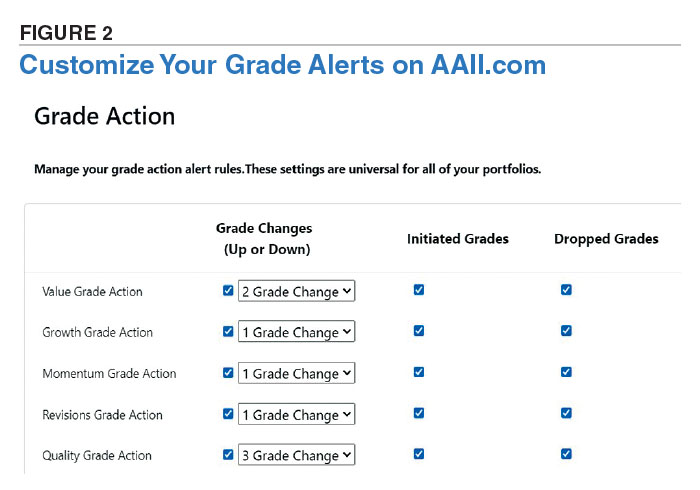
There are also settings for stocks with newly initiated grades and dropped grades. For example, some stocks may not presently have a grade for a certain factor because they don’t meet the minimum number of valid (non-null) ratios and corresponding ranking to be assigned a grade. When they do meet the criteria for generating a grade, you can be notified. Similarly, there are some stocks that may have had a grade for a certain factor because they met the minimum number of valid (non-null) ratios and corresponding ranking to be assigned a grade, but they no longer do.
You can choose to receive grade alerts for any or all of the portfolios you set up in My Portfolio. The grade action settings are universal for all of the portfolios you select. My Portfolio grade changes are updated daily around 9:00 a.m. (Central), Tuesday through Saturday. You can visit the My Portfolio webpage to view your grade alerts (Figure 3).
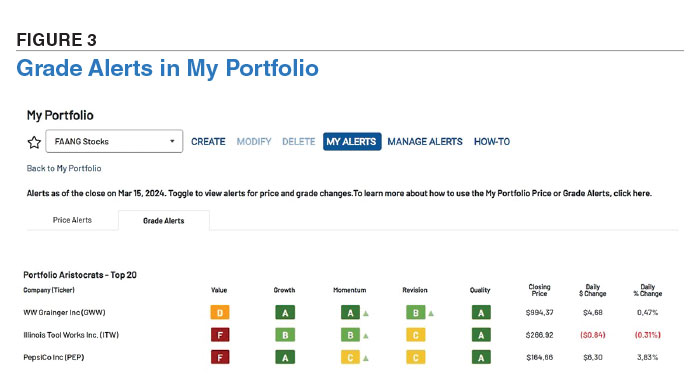
Weekly email notifications to A+ Investor and Platinum subscribers show notable metrics from your portfolios, such as best- and worst-performing investments, grade insights, screens that your stocks are currently passing and an asset allocation comparison.
Subscribers to VMQ Stocks have two additional alert options built into My Portfolio for convenience.
The Daily VMQ Stocks Grade Changes: Daily email alerts, reflecting changes from the previous trading day, that inform you of any VMQ Stocks grade changes for stocks you hold in your portfolios.
Weekly VMQ Stocks Portfolio Summary: Weekly email that compiles grade changes on your portfolios.
Stock Strategies



No comments have been added yet. Add your thoughts to the discussion!
You need to log in as a registered AAII user before commenting.
Log InCreate an account