

Related

AAII Model Portfolios
Visit the AAII Investor Hub to experience the new features of the AAII Stock Screens and My Portfolio.

Charles Rotblut leads a class in AAII's new Essential Investing Video Course. Go to https://www.aaii.com/ves for more information and to subscribe.
 Last month, both My Portfolio and the AAII Stock Screens were transferred to the AAII Investor Hub. The changes to these popular member benefits are far more than just cosmetic. They bring new features and improved usability.
The My Portfolio tracker is now fully integrated into the AAII Investor Hub. This integration gives AAII members like you new options for managing your portfolio.
The AAII Investor Hub app allows you to analyze your portfolio whether you are online or offline on the device of your choice (Figure 1). The Investor Hub app works on Windows PCs and Macs as well as on smartphones and tablets running either the Apple iOS or Google Android operating system.
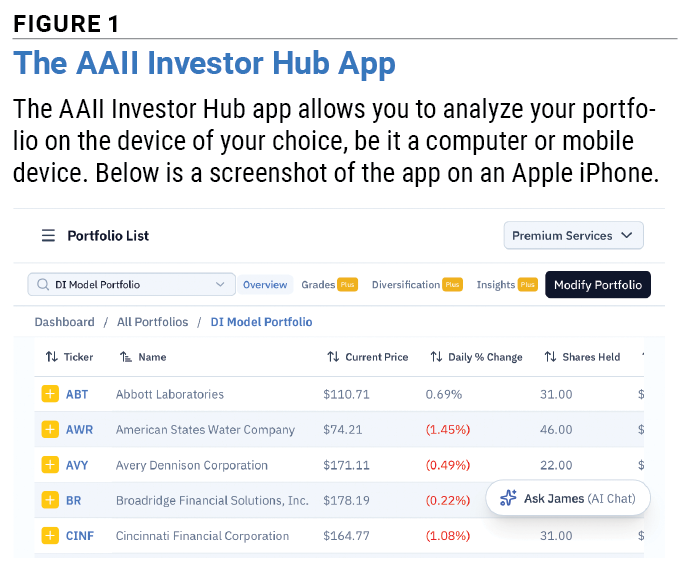
This gives you the flexibility to analyze your portfolio on your schedule. Simply update the app when you have an internet connection, then view your portfolio offline at any time of your choosing. Instructions for installing the app will pop up at the bottom of your screen in the Investor Hub.
My Portfolio has long provided AAII members with key return and valuation metrics for analyzing their stocks. The newly rebuilt My Portfolio continues to do so.
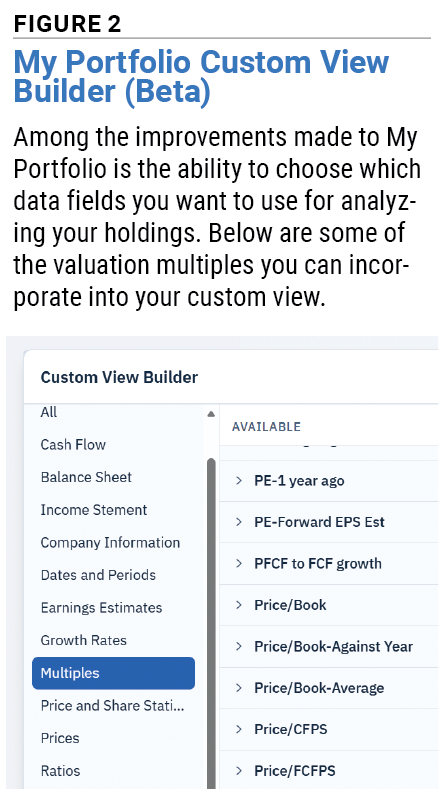
But, we realize that you may have your own preferred set of metrics for judging your holdings. Perhaps you like to look at earnings growth, debt ratios or relative price strength.
With the AAII Investor Hub, you can create a custom view incorporating the key metrics that matter most to you. To do so, simply select Create Custom View in the View drop-down menu located above your portfolio holdings. You will then be given the opportunity to choose from more than 2,000 data fields across multiple categories (Figure 2). These include financial statement data, company information, earnings estimates, growth rates, valuation multiples, price statistics, ratios and more. AAII members can choose up to five data fields; A+ Investor and AAII Platinum subscribers can choose many more.
If you follow the AAII Model Shadow Stock Portfolio, there is a customized view that shows the same metrics used to manage the portfolio. A+ Investor subscribers can see the Earnings Estimate Revisions, Growth, Momentum, Quality and Value Grades for their individual stocks. AAII Dividend Investing, Growth Investing, Stock Superstars Report (SSR) and VMQ Stocks subscribers have access to specialized views based on those portfolios. AAII Platinum subscribers have access to all portfolio views.
The new My Portfolio makes it easier to edit your portfolio, including the abilities to add new stocks and exchange-traded funds (ETFs), remove investments you no longer hold, and view individual lots. You will also notice that My Portfolio loads more quickly.
Direct broker integration is coming soon. This will allow you to import holdings straight from your broker. We know security matters to you. Broker integration will be provided via the Plaid network. Plaid is a read-only application widely used in the financial industry. Plaid provides just your portfolio holdings in the accounts you choose in a read-only format. AAII cannot alter or edit your brokerage holdings.
The new AAII Investor Hub makes it easier than ever to use the popular AAII Stock Screens. We didn’t simply move the screens to the Investor Hub; we completely rebuilt the interface for how you interact with them.
The new navigation allows you to quickly analyze the 55 screens by performance, risk and return, yearly performance, characteristics and power rankings. Jumping between these options simply requires clicking on a tab at the top of the All Screens page.
You will also see a brand-new interface once you click on a stock screen (Figure 3). The key characteristics for each screen are right at the top of the page. These include types of stocks the screen finds (value, momentum, etc.), the average number of passing stocks and turnover. (Turnover measures how often the list of passing stocks changes; higher values mean more frequent changes.) All members can see the average A+ Grades for the stock screens.
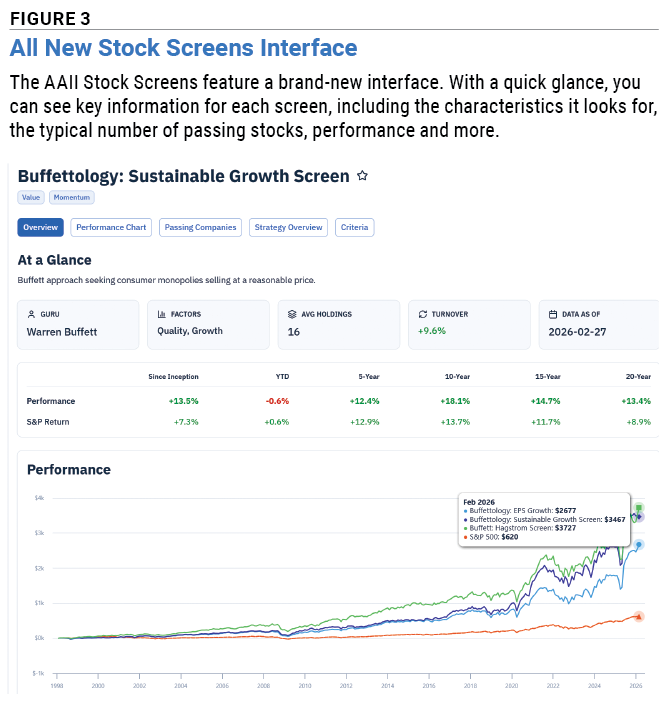
Charting functionality on the individual screen pages is also greatly improved. You can now click anywhere on the Performance chart to see how the screen fared for a particular month. This helps you better identify times when the screen has historically performed well or struggled.
Plus, it is easy to put a passing stock that piques your interest into a portfolio. Just click on the yellow “+” sign adjacent to any ticker symbol to add the stock to your portfolio.
On top of all these changes, we’ve redesigned the AAII Investor Hub home page too. It now provides a snapshot of your portfolios, including your favorited portfolio. An overview of the AAII Stock Screens, personalized selections of AAII commentary and your My Library are also easier to find on the Investor Hub home page.
Our helpful artificial intelligence (AI) chatbot, James, remains accessible on the home page and elsewhere in the Investor Hub. It is solely trained on the AAII knowledge base.
We’ve also maintained the ability to adjust the theme and appearance of the AAII Investor Hub. This is useful for those who prefer light or dark backgrounds and/or prefer a certain level of contrast. You can find those settings by clicking on the drop-down menu showing your AAII.com username in the upper-left corner of any page on the Investor Hub.
If you haven’t already started taking advantage of the AAII Investor Hub, I encourage you to do so today. It makes two of the most popular tools on AAII.com—My Portfolio and the AAII Stock Screens—easier to use than ever. Plus, more new features are coming to the Investor Hub to help you get even more out of your AAII membership. Log on to the AAII Investor Hub with your AAII credentials to get started.
We think you’d like this related webinar! Inside the New AAII Investor Hub & My Portfolio+
AAII Model Portfolios

AAII How-To


No comments have been added yet. Add your thoughts to the discussion!
You need to log in as a registered AAII user before commenting.
Log InCreate an account