For some investors, when the going gets tough, they head for the exits. Undoubtedly, investing is easier when the market is in an uptrend. Falling and volatile markets require a plan and offer opportunities to patient and well-informed investors. The war in Ukraine, rising inflation, supply chain issues and signaling by the Federal Reserve of aggressive interest rate increases are causing volatility to spike in the stock market, while at the same time presenting opportunities to those who know where to look.
Now is a good time to scan your holdings and watchlists to see how they match up with your investment approach and check for any stocks that might look promising when you are ready to deploy any excess cash you have.
With A+ Investor, you can see which stocks you track in My Portfolio pass any of the AAII stock screens as well as track those stocks in the overall universe that pass more than one of AAII’s stock screens.
The My Stock Screens link on the dashboard of the Screening section at AAII.com is where you can see the latest passing company results for the AAII stock screens that you have favorited, view A+ Stock Grades for the screening strategies you track and the individual companies currently passing these screens, as well as check the performance of favorite screens over varying periods.
If you have set up any portfolios using My Portfolio that contain stocks, the My Stocks Passing Any Screens tab will list those stocks in your portfolios that pass any AAII stock screen as of the previous trading day:
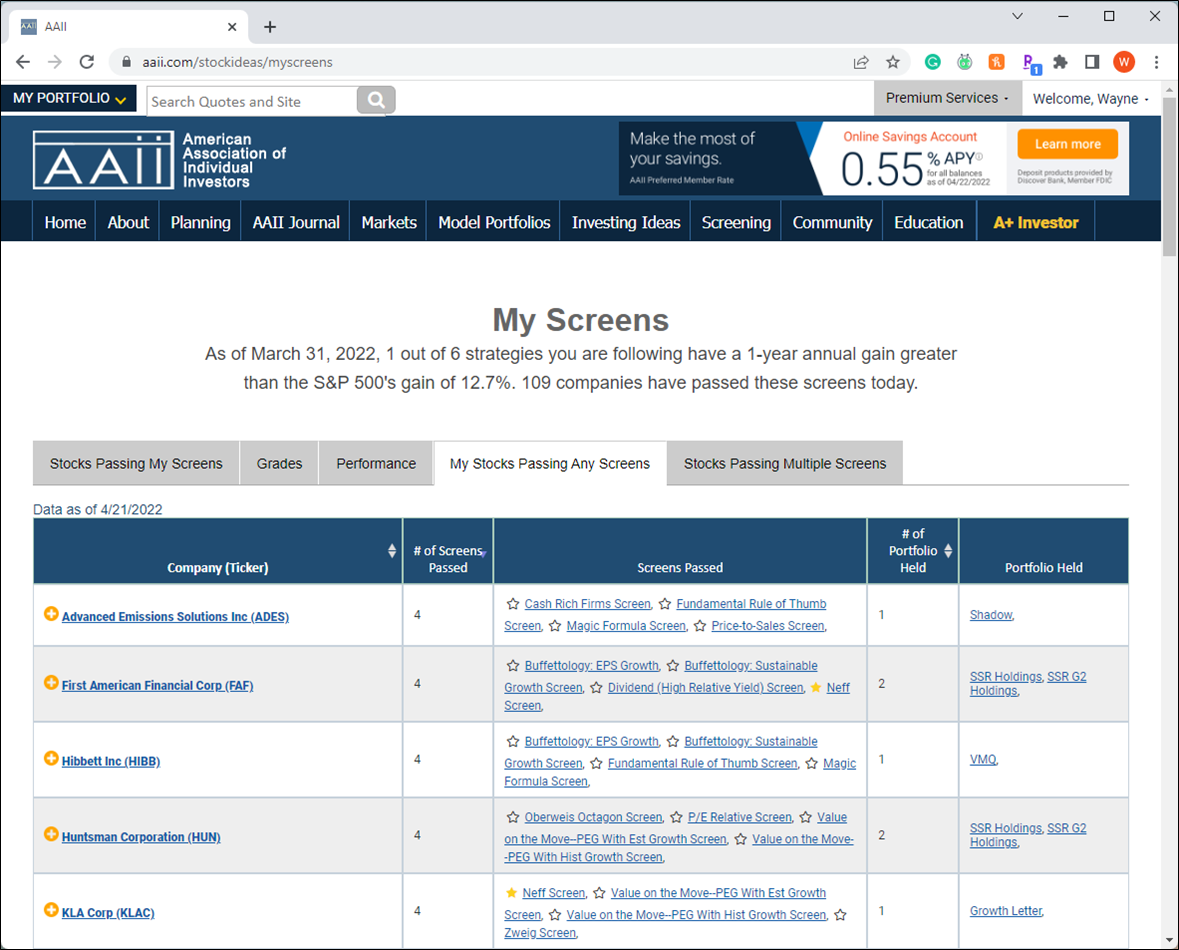
In the example above, we see that five stocks I track with My Portfolio pass four screens as of April 21, 2022: Advanced Emissions Solutions Inc.  (ADES), First American Financial Corp. (FAF), Hibbett Inc. (HIBB), Huntsman Corp. (HUN) and KLA Corp. (KLAC).
Looking at Advanced Emissions Solutions in this table, we also see the screens that it passed: Cash Rich Firms, Fundamental Rule of Thumb, Magic Formula and Price-to-Sales. Clicking on the links for any AAII Stock Screen allows you to read about the strategy, see the companies that pass the screen as of the end of the last trading day and the screen’s historical performance.
If the star to the left of a screen name in the Screens Passed column is yellow, that means it is a screen that you have favorited. You can also click a star that is not filled in yellow to start following that screen (the star will turn yellow).
The last column in the My Stocks Passing Any Screens tab indicates which of the portfolios a given stock is held in with the My Portfolio tool.
The Stocks Passing Multiple Screens tab is not particular to stocks you are following or your favorited screens. Instead, it lists all the stocks in the AAII database that pass at least one of the stock screens tracked by AAII:
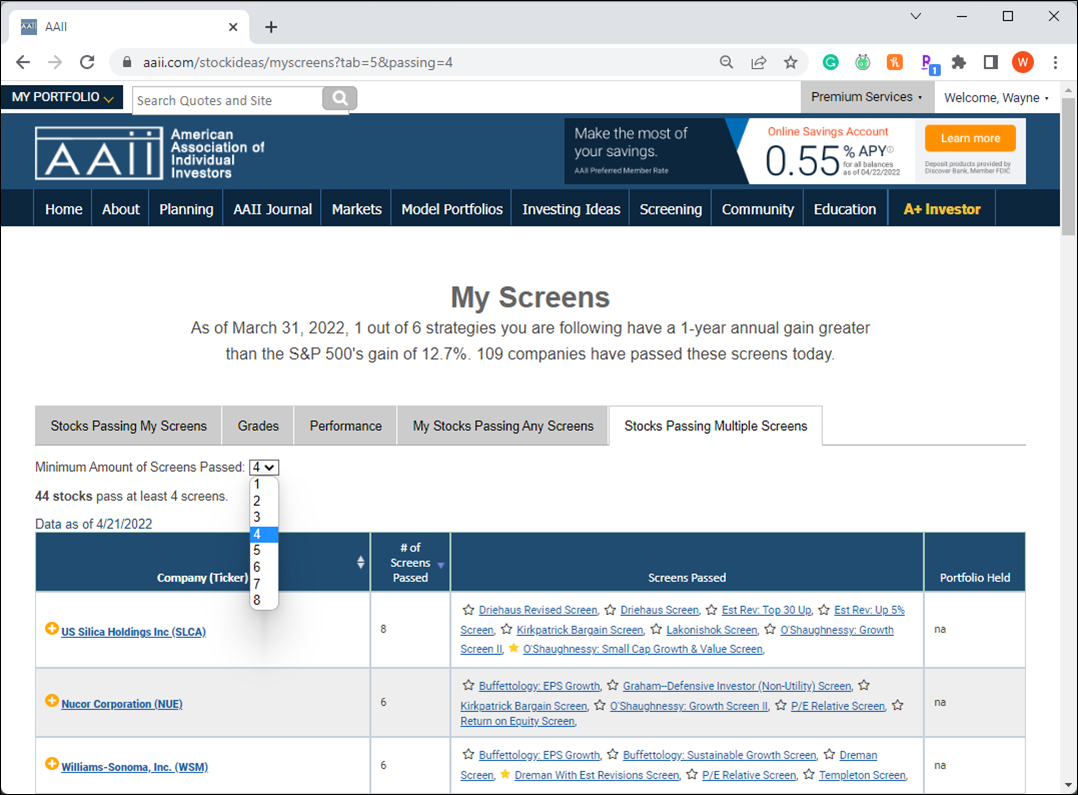
As of April 21, 2022, 1,081 stocks passed at least one of the screens AAII tracks.
To narrow down the list, you can change the minimum number of screens using the drop-down box at the top left on the tab. Note that some screens periodically do not have any companies passing (passing company lists for the screens are updated daily for A+ Investor subscribers and are refreshed after the close of each trading day).
Only 44 stocks pass four or more AAII screens as of the close on April 21, 2022 (image above).
By default, the Stocks Passing Multiple Screens tab is ranked from those stocks that pass the most screens to those that pass the fewest. The tab also lists all the screens that a given stock passes.
For example, as of April 21, US Silica Holdings Inc. (SLCA) met the criteria of eight of the AAII stock screens: Driehaus Revised, Driehaus, Estimate Revisions: Top 30 Up, Estimate Revisions: Up 5%, Kirkpatrick Bargain, Lakonishok, O’Shaughnessy: Growth II and O’Shaughnessy: Small Cap Growth & Value.
Further information on each of the screening strategies can be found by clicking on the screen name in the tab or by selecting Guru Screens or Factor Screens from the dashboard of the Screening area at AAII.com.
The Stocks Passing Multiple Screens tab also shows if a stock is held in any portfolios you created using My Portfolio. If you wish to add a stock on the list to an existing portfolio or a new portfolio, click on the yellow “+” to the left of the company name. The pop-up box will show if you have already added the stock to one of your portfolios.

