The My Portfolio tracker is now fully integrated into the AAII Investor Hub. As explained in January, your portfolios have already been automatically transferred over to the new My Portfolio. Additional integration work done over the last couple of months gives A+ Investor subscribers new options for managing their portfolios.
The new My Portfolio makes it easier to edit your portfolio, including the abilities to add new stocks and exchange-traded funds (ETFs), remove investments you no longer hold, and view individual lots. You will also notice that My Portfolio loads more quickly.
New features include:
The AAII Investor Hub app now allows you to analyze your portfolio whether you are online or offline on the device of your choice. The Investor Hub app works on Windows PCs and Macs as well as on smartphones and tablets running either the Apple iOS or Google Android operating system.
Log in to the Investor Hub on your device and click Install in the Install App pop-up window that will appear. If you don’t see this pop-up, go to the box at the end of this article for additional methods to install the app.
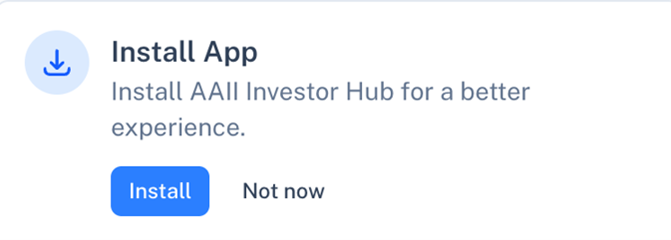
Once you have downloaded the Investor Hub to your device, it will automatically update when you open it while you have an internet connection.
My Portfolio has long provided AAII members with key return and valuation metrics for analyzing their stocks. The newly rebuilt My Portfolio continues to do so. But we realize that you may have your own preferred set of metrics for judging your holdings. Perhaps you like to look at earnings growth, debt ratios or relative price strength.
With the AAII Investor Hub, you can create custom views that incorporate the key metrics that matter most to you. To do so, simply select Create Custom View in the View drop-down menu located above your portfolio holdings. Alternatively, choose Manage Custom Views from the top-right of the screen and click the + New View button.
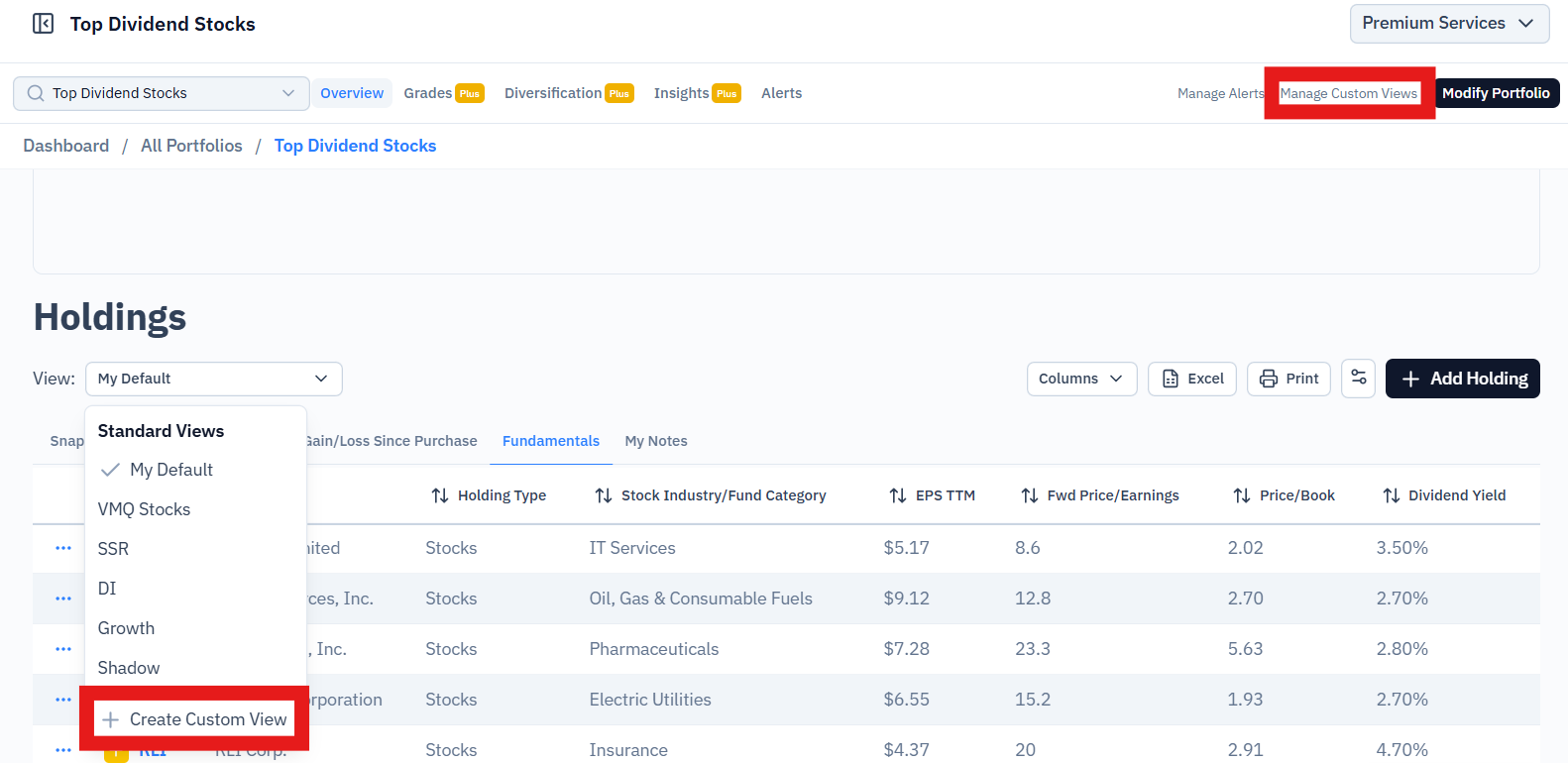
You will then be given the opportunity to choose from more than 2,000 data fields across multiple categories. These include financial statement data, company information, earnings estimates, growth rates, valuation multiples, price statistics, ratios and more.
As an A+ Investor subscriber, you can choose from any of the available metrics. Once saved, your custom views will show up on the View menu and on the Manage Custom Views page.
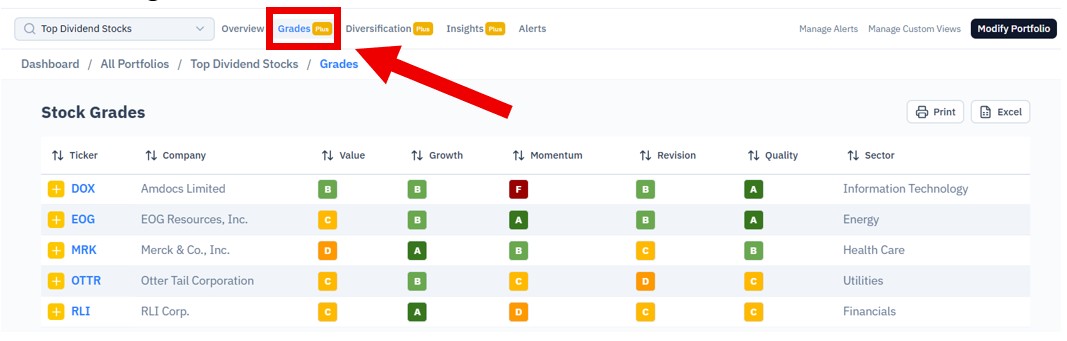
As an A+ Investor subscriber, you can see the Earnings Estimate Revisions, Growth, Momentum, Quality and Value Grades for stocks in any of your portfolios. Load a portfolio and then select the Grades button at the top of the screen.
As mentioned in January, there is a dedicated view that shows metrics particular to the AAII Model Shadow Stock Portfolio. And if you are an AAII Platinum subscriber, or subscribe to any of our premium model portfolios, you can choose specialized views based on the AAII Dividend Investing, Growth Investing, Stock Superstars Report (SSR) and VMQ Stocks portfolios.
Direct broker integration is coming soon. This will allow you to import holdings straight from your broker. We know security matters to you. Broker integration will be provided via the Plaid network. Plaid is a read-only application widely used in the financial industry. Plaid provides just your portfolio holdings in the accounts you choose in a read-only format. AAII cannot alter or edit your brokerage holdings.
Additional features and capabilities are being added to make the Investor Hub even more useful to A+ Investors like you. Select Roadmap at the bottom of the left-hand navigation menu to stay current with upcoming enhancements.
For help, see the My Portfolio User Guide. If you have any questions about these new features, please reach out to us at members@aaii.com or visit our Customer Support page.
If you do not see the prompt to install the AAII Investor Hub on your device, here are other ways to install it.
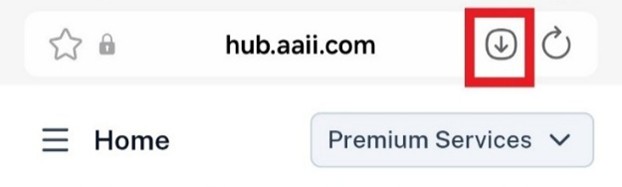
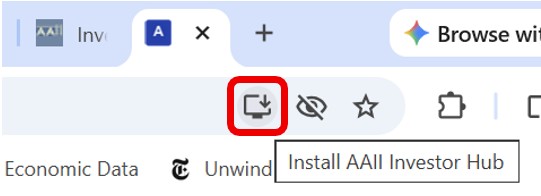
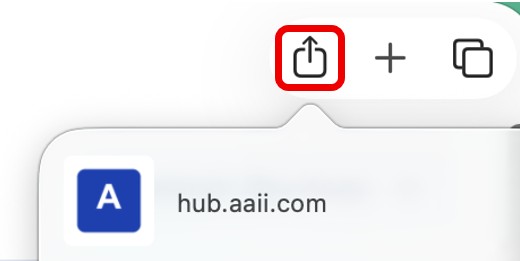
On both Windows PCs and Apple Macs, install the app by clicking the monitor icon in the top-right corner of the Chrome browser or the box with the upward-pointing arrow in the top-right corner of the Safari browser. We suggest dragging the icon to the Windows taskbar or the macOS Dock at the bottom of your screen for easy access.
Google Chrome Browser
Apple Safari Browser
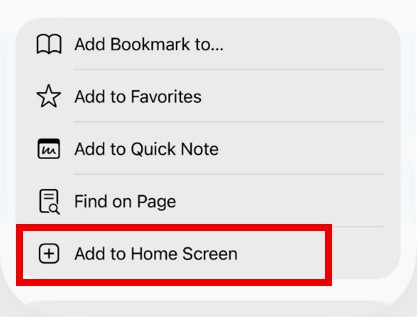
If you are using an iPhone or iPad, call up the Investor Hub in the Safari browser (the default web browser on iPhones) and click on the three horizontal dots at the bottom of the screen.
Then click Share, scroll down the list options and select Add to Home Screen. (Note: If you do not see the horizontal dots at the bottom of your screen, look for a square with an upward-pointing arrow and click on it to bring up a menu similar to the one shown below.)
Apple iPhone Safari Browser
If you are using an Android phone (e.g., a Samsung Galaxy) or tablet, click the down arrow in the upper-right corner in the browser bar.