The AAII office and U.S. stock markets will be closed on Monday, June 20, in observance of Juneteenth. This federal holiday commemorates the end of slavery in the U.S. and marks the day (June 19, 1865) when news of emancipation reached people in Galveston, Texas. The weekly Making the Grade email will return on Monday, June 27.
As I do quarterly, this week I present an update of the stocks in the A+ Investor universe passing the most AAII stock screens.
Even if you are a “buy and hold” stock investor, it is helpful to scan your holdings and watchlists periodically. You can see how your holdings and ideas match your investment approach and check for any securities that might look promising when you are ready to deploy any excess cash you have.
With A+ Investor, you can see which stocks you track in My Portfolio are passing any of the AAII stock screens, as well as track those stocks in the overall universe that satisfy the requirements of more than one of AAII’s stock screens.
The My Stock Screens link on the dashboard of the Screening section at AAII.com is where you can see the latest passing company results for the AAII stock screens that you have favorited, view A+ Stock Grades for the screening strategies you track as well as the individual companies currently passing these screens and check the performance of favorite screens over varying periods.
For these particular results, the table at the My Screens area has two tabs: My Stocks Passing Any Screens and Stocks Passing Multiple Screens.
If you have set up any portfolios using My Portfolio that contain stocks, the My Stocks Passing Any Screens tab will list those stocks in your portfolios that pass any AAII stock screen as of the previous trading day:
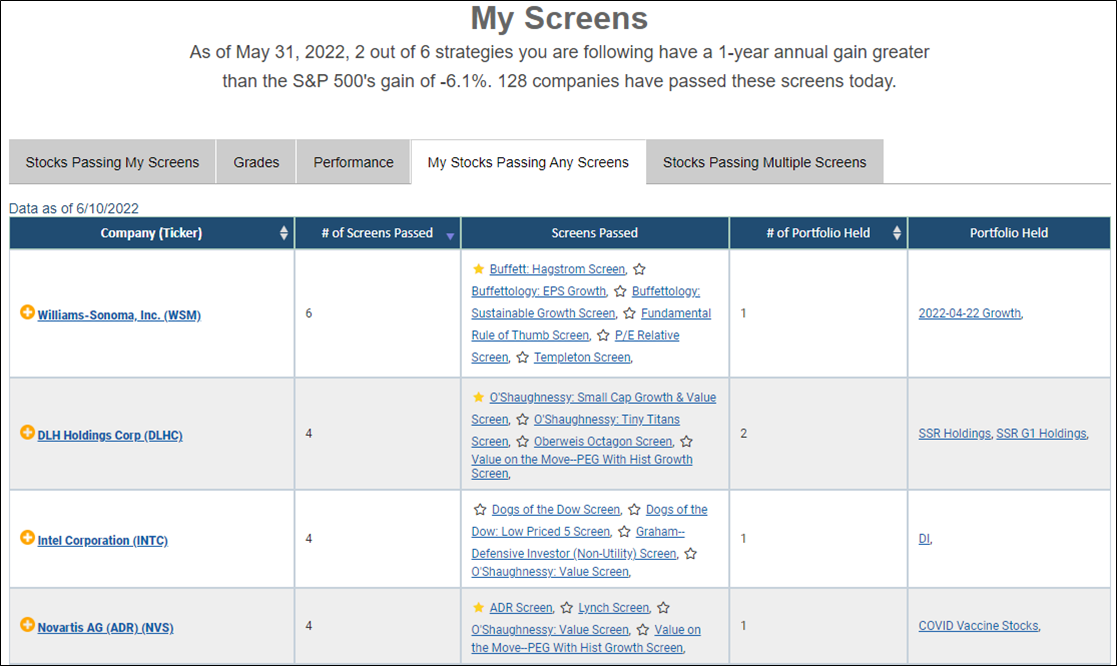
In the example above, we see that one of my portfolio holdings, Williams-Sonoma Inc.  (WSM), passed six AAII stock screens as of June 10, 2022: Buffett Hagstrom, Buffettology EPS Growth, Buffettology Sustainable Growth, Fundamental Rule of Thumb, P/E Relative and Templeton.
If the star to the left of a screen name in the Screens Passed column is yellow, that means it is a screen that you have favorited. You can also click a star that is not filled in yellow to follow that screen (the star will turn yellow). You can view the stocks passing the screens you favorite on the Stocks Passing My Screens tab on the My Screens page.
The last columns in the My Stocks Passing Any Screens tab indicate how many of your portfolios a given stock is in, along with the portfolio names.
Clicking on a stock’s name takes you to the Evaluator page to get more detailed financial data about that stock.
The Stocks Passing Multiple Screens tab is not particular to stocks you are following or your favorite screens. Instead, it lists all the stocks in the AAII database (roughly 7,400) that pass at least one of the screens tracked by AAII:
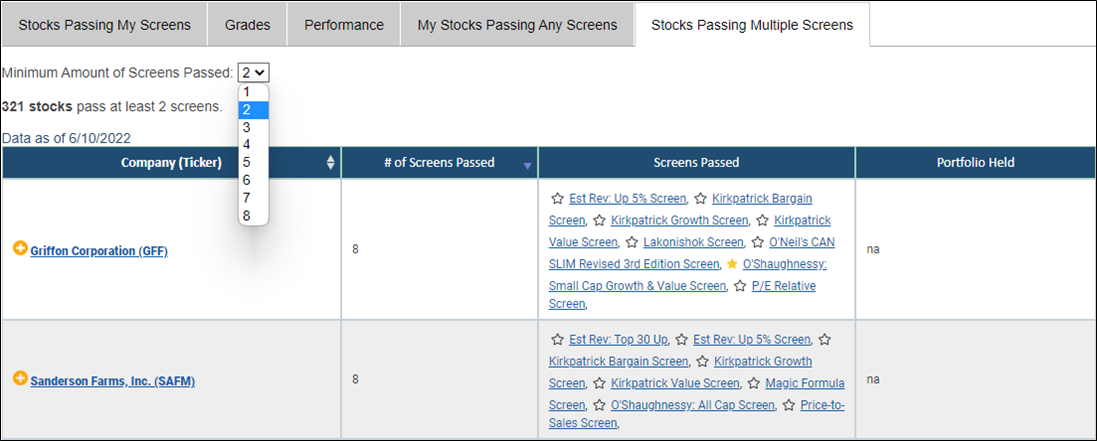
To narrow down the list, you can change the minimum number of screens using the drop-down box at the top left on the tab. Note that some screens periodically do not have any companies passing at the time of the analysis (screens are refreshed after the close of each trading day).
As of June 10, 2022, 1,031 stocks passed at least one of the screens AAII tracks (partial listing in the image above). Of those, 321 passed multiple AAII stock screens (two or more), 111 passed at least three AAII stock screens and 35 stocks passed four or more screens.
Griffon Corp. (GFF) and Sanderson Farms Inc. (SAFM) passed the most screens as of June 10 at eight.
By default, the Stocks Passing Multiple Screens tab is ranked by those stocks that pass the most screens to those that pass the fewest. The tab also lists all the screens that a given stock passes. You can find additional information on each of the screening strategies by clicking on the screen name in the tab or by selecting Guru Screens or Factor Screens from the dashboard of the Screening area at AAII.com.
The Stocks Passing Multiple Screens tab also shows if a stock is held in any of the portfolios you created using My Portfolio. If you wish to add a stock on the list to an existing portfolio or a new portfolio, click on the yellow “+” to the left of the company name. The pop-up box will show if you have already added the stock to one of your portfolios.

