VMQ StocksFor the value investor looking to harness academic research in
an actively managed portfolio
Bits and BipsNewsletter delivering insights on linking traditional finance, macro trends and cryptocurrency opportunities to help investors build stronger, more diversified portfolios.
All premium products come with free basic membership.
Unlocking the Potential of A+ Investor's Enhanced Mutual Fund & ETF Screeners
By Wayne A. Thorp | May 06, 2024
Welcome (back) to A+ Investor’s Making the Grade email series. This reenvisioned monthly feature is your essential guide to navigating the exciting world of the A+ Investor investment discovery, analysis and tracking platform. Each issue aims to empower you with cutting-edge insights and user-friendly tools to enhance your investing journey and maximize your A+ Investor subscription. In the future, you will receive this email on the first Monday of each month.
This month, we highlight the newly revamped Mutual Fund and ETF Screeners. These enhanced tools are designed to offer A+ Investor subscribers a more intuitive and efficient way to explore investment options, enabling subscribers to navigate the complexities of fund selection easily. This overhaul enhances the functionality of A+ Investor’s fund screeners and makes finding and comparing mutual funds and exchange-traded funds (ETFs) more efficient and effective. With industry-leading data from Morningstar, these tools are designed to provide you with the comprehensive data needed to make informed investing decisions. Please note that both the mutual fund and ETF data are updated monthly, usually by the fifth or sixth business day of the month.
Here’s everything you need to know to maximize your use of these powerful tools.
Accessing the Screeners
The redesigned screeners are available exclusively to A+ Investor and Platinum subscribers of AAII. Subscribers can access the tools directly through the Funds and ETFs tabs of the A+ Investor area of the AAII website.
Screening Enhancements
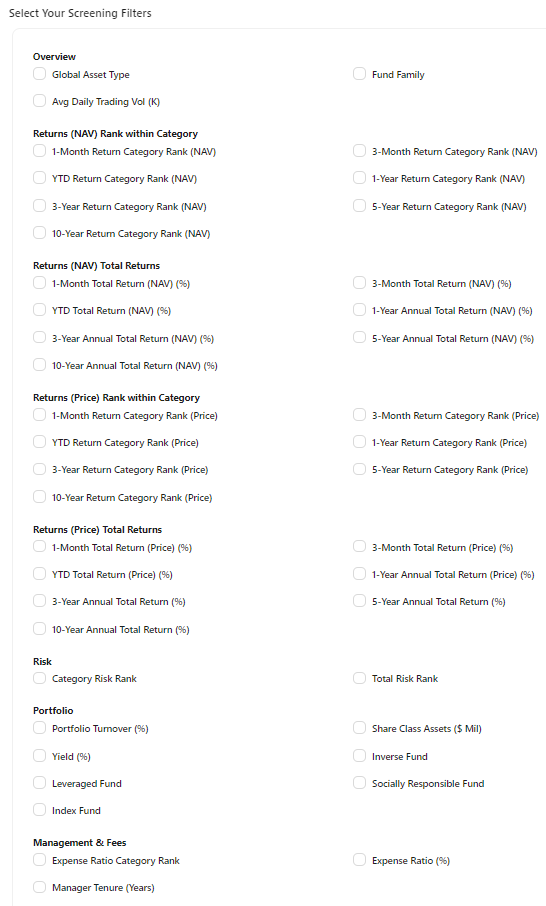
The screening interface itself has been significantly enhanced. Filters are now displayed simultaneously, allowing for quicker adjustments and more precise filtering. Users can screen based on specific return values or category ranks and can now search by share classes, which is particularly useful for identifying suitable investment options quickly.
We have simplified the process of saving and managing screening filters, making it easier for you to access both saved and predefined screens. We have also introduced an improved search function that lets you search funds by their tickers directly from the interface, enhancing the user experience.
Features of the Screeners
Filter Options: 35 variables to sift through over 23,000 mutual funds and 40 variables to explore over 3,400 ETFs.
Predefined Screens: Access 22 predefined ETF screens and 32 mutual fund screens tailored to various investing strategies.
Personalization: You can save and customize your screening criteria for future use and edit and save predefined screens for individualized analysis.
Fund Comparison: Evaluate and compare mutual funds and ETFs directly within the screeners.
Tracking: Add individual mutual funds and ETFs to personal portfolios in My Portfolio.
Layout and Design
Both screeners feature a user-friendly interface with data presented in a clear, tabular format, making comparing funds at a glance simple. Both screeners are organized into several categories, including:
Overview: This section provides essential information about each fund, including its global asset class, group and specific investment category. This area details whether a fund is passively managed or tracks a particular index. Critical data such as recent performance metrics (returns and A+ Investor Grades), yield, expense ratio and the fund’s inception date are prominently displayed to give a comprehensive snapshot of the fund’s characteristics and historical context.
Performance (NAV): Absolute and annualized returns, along with the A+ Investor Grades for these returns, are displayed for periods varying from one month to 10 years. The A+ Grades are based on quintile rankings, where a grade of A is given to funds that perform in the top 20% of their category for a specific period. Conversely, a grade of F is assigned to funds that fall in the bottom 20% of their category during the same timeframe.
Performance (Price): This tab is exclusive to the ETF guide and screener. It evaluates the return based on fluctuations in the ETF’s share price rather than changes in the value of its underlying assets. A new metric, the year-to-date tracking error, has been introduced. This metric assesses the volatility of the fund’s performance relative to its benchmark index and is displayed alongside the YTD Grade (Price) column.
Risk: Fund risk is assessed primarily through category risk and total risk. Category risk measures a fund’s volatility relative to its peers. A value greater than 1.00 indicates that a fund has been more volatile than its peers over the past three years, while a value less than 1.00 denotes below-average volatility. Funds with the lowest volatility relative to their peers receive an A+ Investor Grade of A, and those with the highest volatility receive a grade of F. Total risk compares a fund’s volatility to its peers and the entire spectrum of mutual funds or ETFs. This broader comparison helps investors understand a fund’s volatility in the broader market context. Additionally, recent enhancements to the risk assessment include the introduction of standard deviation—which provides an absolute measure of volatility—and alpha—which quantifies the impact a fund’s manager has had on its returns, whether positive or negative.
Portfolio: Here, you can find detailed information about the fund’s portfolio, including the total asset size, allocation breakdown, the proportion of assets held in the fund’s largest investments, turnover rate and whether the fund is recognized for its social responsibility. Recently added features include the total assets for each share class and an indicator for enhanced index funds. The share class assets represent the dollar amount assigned to a specific fund’s share class. This figure may be equal to or less than the fund’s total assets, depending on the fund type or specific cases like Vanguard ETFs. Enhanced index funds are designated with a check mark to signify their strategy to either increase returns or decrease volatility compared to their benchmark index.
Management & Fees: This tab displays vital management and financial metrics, including the tenure of the current manager, the fund’s expense ratio and its tax-cost ratio. The expense ratio is also graded: funds with expense ratios in the lowest 20% of their category receive an A grade, while those in the highest 20% receive an F grade. Another feature is the identification of the lead manager. For funds managed by a team rather than an individual, “Management Team” is noted in this column.
Step-by-Step Guide
1. Select Filters: Start by choosing your initial filters. You can select criteria across different categories, such as performance—total return and returns within the category—risk, portfolio focus and statistics along with management tenure and fees.
2. Refine Your Search: Adjust the filters to meet specific investment needs. For instance, you might look for funds with no-load options, specific asset classes or funds that maintain low expense ratios.
3. Apply Filters: Click the “Apply” button to see the funds that match your criteria.
4. Analyze Screening Results: Review the fund data in the new tabular format to understand each fund’s potential advantages and drawbacks.
5. Save and Customize Screens: You can save your screens for later use or use predefined screens as a starting point and modify them as needed.
6. Compare and Analyze: Select funds and use the Compare Funds tool to compare different funds directly and make informed decisions based on comprehensive data.
7. Export Data: Use the “Export to Excel” button to download your search results for more detailed offline analysis.
Optimizing Your Use of the Screeners
Leverage Predefined Screens: These can provide a quick starting point and inspiration for custom screens.
Monitor and Regularly Update Filters: As market conditions change, revisit your filters and criteria to ensure they align with your investing goals.
Focus on Cost Efficiency: Use the tools to find funds with lower expense ratios to enhance potential net returns.
Check Manager Tenure: Consider the tenure of fund managers as an indicator of stability and experience.
Effectively Utilize New Metrics: Use enhanced metrics like standard deviation and alpha to better understand fund performance and risk.
Conclusion
The redesigned mutual fund and ETF screeners from AAII provide a robust platform for A+ Investor subscribers to effectively manage and analyze their investment options. By following this guide, you can confidently navigate the platform and make more informed investing choices that align with your financial objectives.
Unlocking the Potential of A+ Investor’s Enhanced Mutual Fund & ETF Screeners Video
We think you’d like this related webinar! Revolutionize Your Portfolio: A Peek Into AAII’s Enhanced A+ Investor Experience