According to the Investment Company Institute (ICI), there were more than 140,000 regulated funds worldwide in 2023. According to Statista data, more than 40% of U.S. households have owned mutual funds since 2000.
While there is a nearly endless supply of mutual funds to choose from, we may be limited to investing in only one or a handful of fund families by choice or necessity.
As an A+ Investor and AAII Platinum subscriber, you have access to the Mutual Fund Screener, which allows you to run a variety of filters on a universe of over 22,000 mutual funds. The data comes from industry leader Morningstar and is updated monthly, usually by the fifth or sixth business day of the month.
The screener offers 35 screening variables across return within fund category, total return, risk, portfolio statistics, management and fees. To begin building a custom mutual fund screen, click the Add Filters button at the top-middle section of the page.
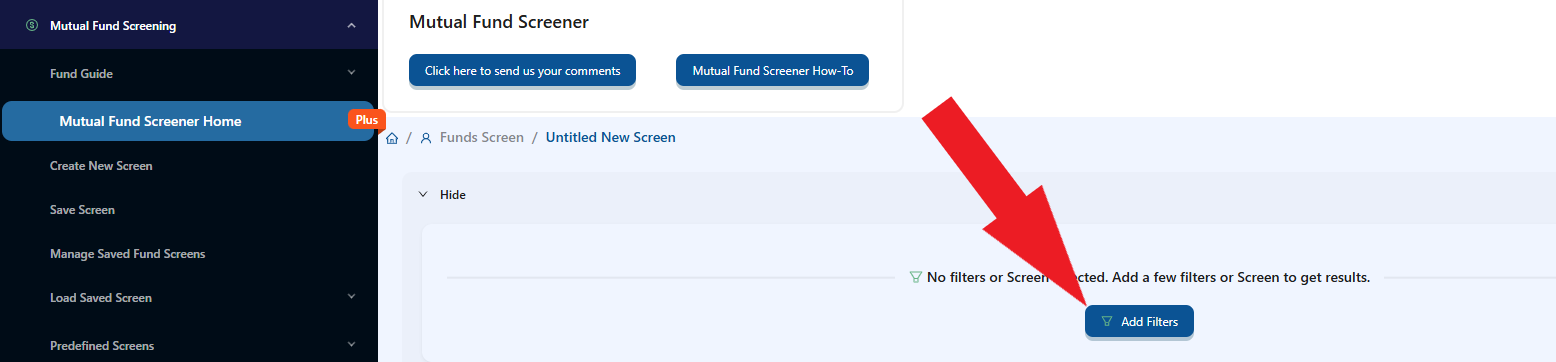
Then, select the screening filters you wish to use by checking the boxes and adjust them to meet your objectives.
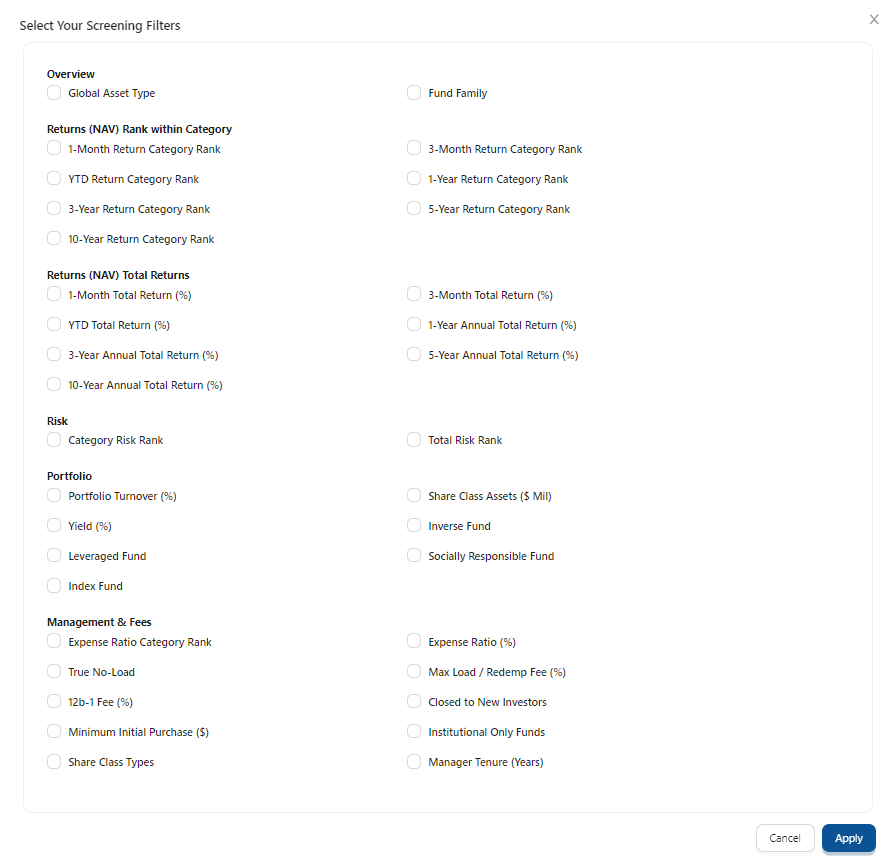
One filter you can run is based on fund family.
After clicking the Add Filters button, select Fund Family in the Overview category and click Apply.
In the Select Fund Family search box, you can start typing in the mutual fund family name or use the scroll bar to browse the families. For this example, I am focusing on State Street Global Advisors funds.
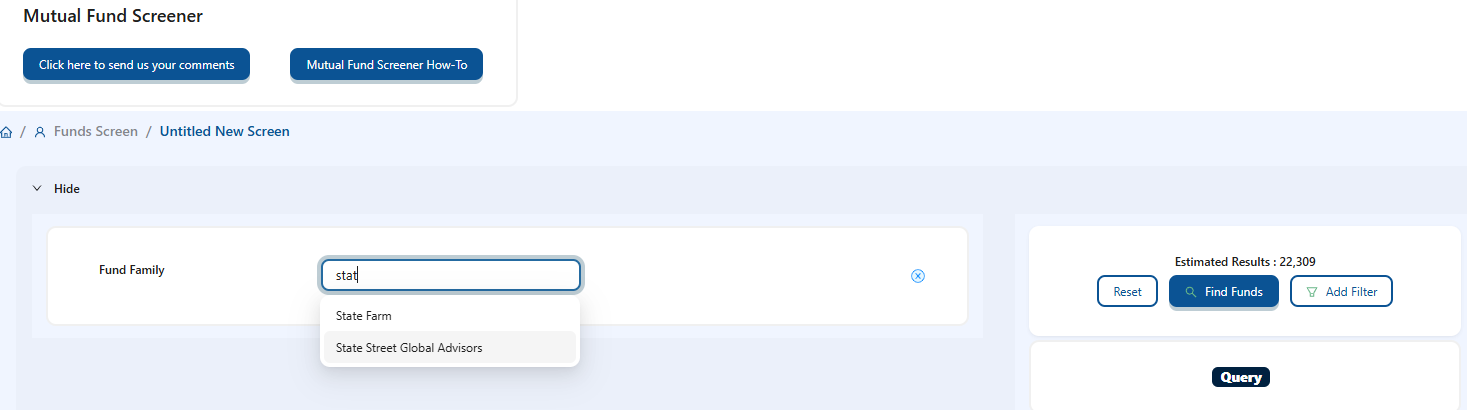
When your desired fund family appears in the search box, click on it. You can repeat the process to add multiple fund families to your search. When you are done, click the blue Find Funds button on the right side of the page.
While I narrowed the universe of mutual funds down considerably (more than 99%), there are 70 State Street funds from which to choose. To go back to the list of variables, click on Add Filter at the right. Choose any additional filters and click Apply at the bottom.
When deciding what type of funds to look for, you have three levels to choose from under Global Asset Type: Global Asset Class, Fund Group and Category. For the sake of this screen, which will look for State Street funds invested in U.S. value stocks, I made the following selections:
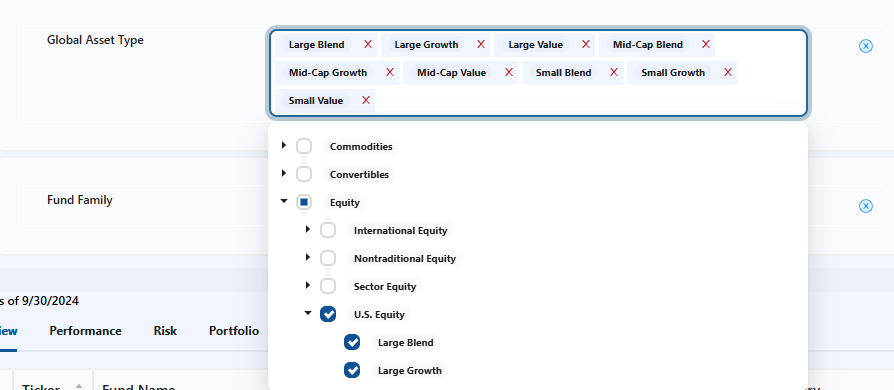
Click the arrow to the left of Equity to expand the list so that you can choose U.S. Equity group.
At this point, I am not concerned about drilling down to specific categories such as company size (large-, mid- or small-cap) or investment style (blend, growth or value).
As of September 30, 2024, there are 18 State Street funds focused on U.S. equities.
The net asset value (NAV) return of a fund is calculated based on the daily NAV of the fund reported after the stock market’s close each trading day. The NAV is calculated by subtracting total liabilities from total assets and then dividing by outstanding shares. The value changes daily, with the fluctuation of assets based on market value. Mutual fund NAVs are calculated daily after the market close. Exchange-traded funds (ETFs) report NAV, but they also trade intraday and their trading price may deviate from the NAV value. In this example, I am looking at traditional open-end mutual funds.
It is important to point out that the percentile rankings for performance look at the funds’ returns within the same category (large blend, mid-cap growth, small value, etc.). This comparison is not against the stock market or the entire universe of funds.
Here I focused on trailing three-, five- and 10-year returns, seeking performance in the upper 30% within the fund’s category for each period (70th to 100th percentile for 3-Year, 5-Year and 10-Year Category Rank).
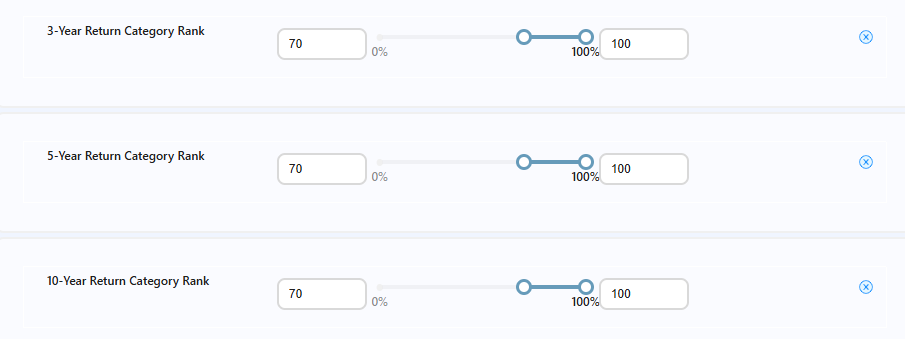
To arrive at the desired range for the various period ranks, I positioned the blue sliders as shown above. You can also type 70 into the lower-range text boxes on the left side.
These performance filters reduced the number of State Street funds from 70 to eight as of September 30, 2024.
Risk figures are given as category risk and total risk. Total risk is volatility relative to all funds—stock, bond, domestic, international, etc. It is helpful to understand how the risk of a bond fund compares to that of an equity fund, but since I am looking for funds within a specific fund category, the category risk is my primary focus.
As I age, risk becomes more of a consideration. I am not interested in taking on excessive risk, so I choose Category Risk Rank and ensure that the funds passing my filters rank in the bottom 50%.

This lowered the number of potential State Street funds to three.
Under Portfolio, you can choose from several data fields: Yield, Share Class Assets, Portfolio Turnover, Leveraged Fund, Inverse Fund, Socially Responsible Fund and Index Fund.
Leverage doesn’t interest me as an investor, given the volatility and risk, and I don’t want funds designed to perform as the inverse of whatever benchmark or index they are designed to track. So, I slide the toggle over to No under both Inverse Fund and Leveraged Fund.

This doesn’t change the number of State Street funds passing my filters, so I am still left with three.
I am especially cost-conscious and recognize the impact fees can have on my long-term performance. Therefore, I check the box next to Expense Ratio Category Rank under the Management & Fees category and look for funds in the bottom 30% of their category in terms of expense ratio.

This requirement did not remove any additional funds, leaving me with three.
I also narrowed my focus to include only the following Share Class Types:

This filter lowered the number of funds down to two.
I also want to ensure that the funds I have to choose from are open to new investors. Again, two State Street funds are passing my filters.

Lastly, Manager Tenure allows you to specify how long the lead manager has been with the fund. Tenure is more of an issue with actively managed funds than passive (index) funds, but I required a manager tenure of at least one year as an example.

The number of State Street funds that meet my criteria remains the same.
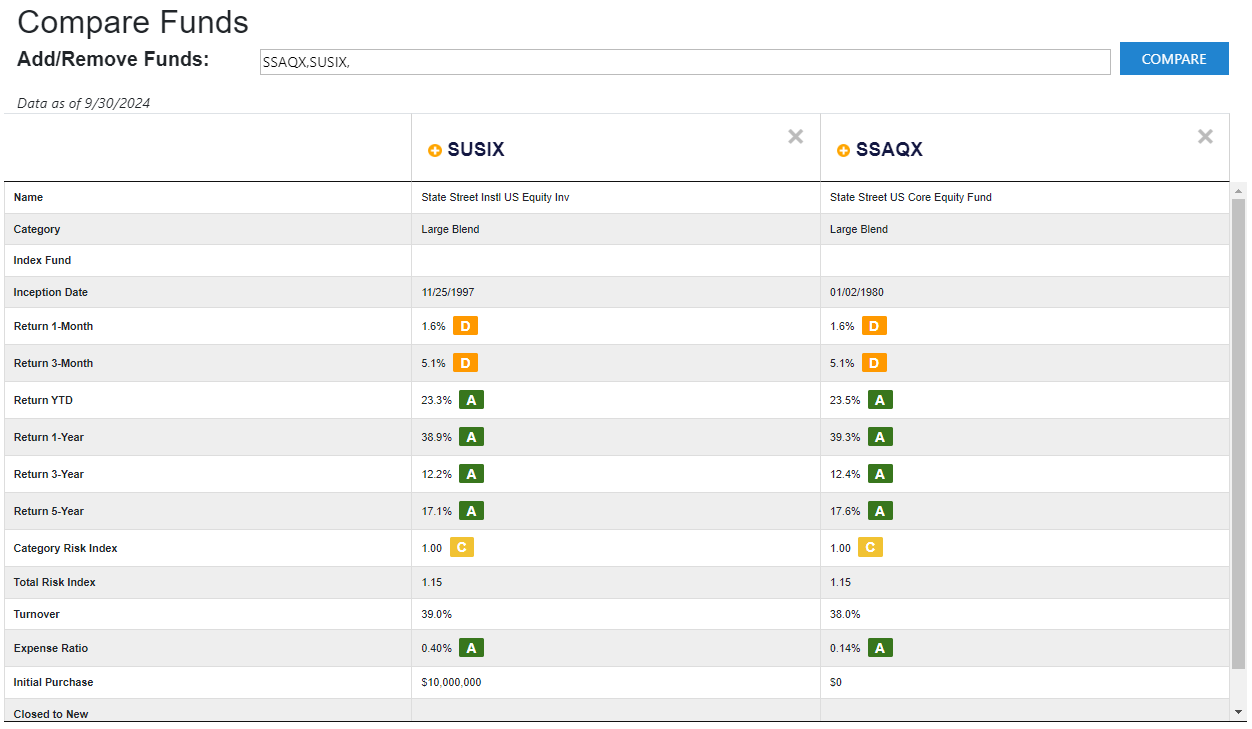
In all, two funds passed my screen, displayed below.

Your desired asset allocation and style preferences will determine your choices from a screen like this.
You can save the mutual fund (and ETF) screens created by clicking Save Screen from the left side navigation bar. You can access screens you have saved from the Load Saved Screen menu on the left navigation bar. Once you have loaded a screen (from the predefined list or your saved screens), you can modify it and resave it. With predefined screens, you can save them under a different name, but you cannot overwrite a predefined screen. With one of your own screens, you can either overwrite it or save it under another name.
The table below the screening criteria displaying the passing funds has four subtabs with data specific to those categories: Overview, Performance, Risk, Portfolio, and Management & Fees. The data presented in each subtab can be sorted in ascending and descending order by clicking on the column header.
If you wish to make a side-by-side comparison of funds that passed a screen, click on the boxes in the far left column for those funds. As you select funds to compare, their ticker symbols will appear in a pop-up window. Once you have selected the funds to compare, click the Compare button in that window. This will open a new browser tab with various return, risk and expense data to allow you to compare the funds you selected.
Navigating the vast landscape of mutual funds requires a targeted approach to identify funds that align with your financial goals and risk tolerance. Leveraging AAII’s A+ Investor tools, such as the Mutual Fund Screener, empowers you to filter options based on criteria like performance, risk and cost. By narrowing down your choices through precise filters, you can focus on the funds that best fit your strategy and preferences.
Ready to take the next step? Log in to your A+ Investor account today to access the Mutual Fund Screener and build a portfolio tailored to your investing goals.

