Since we launched A+ Investor almost two months ago, we have been making a lot of changes and enhancements behind the scenes to offer a better user experience. We have also been processing the feedback we have been getting from users such as yourself.
One enhancement our users have been asking for is an overall review of their portfolio holdings. The result is the new Portfolio Insights email that will be hitting your mailboxes this coming Saturday.
Each week the Portfolio Insights email will offer a combined snapshot of all the portfolios you have set up in My Portfolio. The email will highlight strong and weak stock, mutual fund and exchange-traded fund (ETF) performers in your portfolios. It will also report on stocks that had been added to or fallen off the passing company lists of any AAII stock screening strategies you track.
For stock investors, the Portfolio Insights email will highlight:
For mutual fund and ETF investors, the Insights email will provide information on:
In order to get the most of the new Portfolio Insights email, you will need to create at least one portfolio using the My Portfolio tool. If you haven’t done so, you can use these instructions to create your first portfolio.
Here is a sample portion of a Portfolio Insights email for a user tracking stocks, mutual funds and ETFs using My Portfolio:
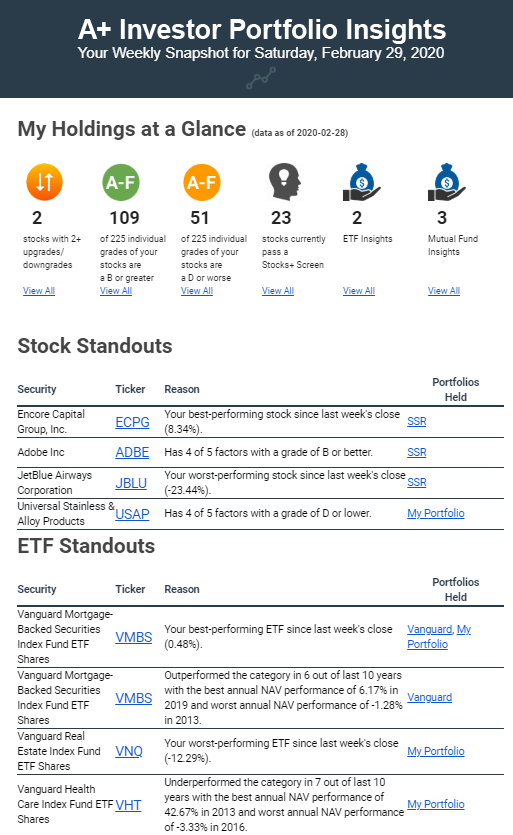
The My Holdings at a Glance section at the top of the email shows you those stocks you track in any of your portfolios that have seen two or more upgrades or downgrades to any of their A+ Stock Grades compared to where they were at the end of the previous week. Clicking the View All link will take you to a table with all of the stocks you track along with their current A+ Stock Grades.
The Insights email also tells you how many of the individual Stock Grades for Value, Growth, Momentum, EPS Revisions or Quality for the stocks you track are “B” or better or “D” or worse. In this example, there are 45 stocks in all the portfolios this user created, meaning there are 225 total grades (45 × 5 = 225). One hundred nine (48%) of the Stock Grades for the 45 stocks tracked are “B” or better, while 51 (23%) are “D” or worse.
The Insights email identifies any stocks that you track in a portfolio that meet the criteria of any of AAII’s stock screening strategies. Also, if you have favorited any of AAII’s stock screening strategies, the My Stock Strategies section of the Insights email lists stocks that have been added to or dropped from the passing company lists of those favorited screens since the end of last week. These sections will be the topic of next week’s Making the Grade email.
Lastly, the My Holdings at a Glance section indicates if any of the mutual funds or ETFs you track stand out in terms of performance, volatility or expenses. Clicking the View All links for these two items will show you the Fund/ETF Insights for those mutual funds or ETFs held in your “favorite” portfolio:
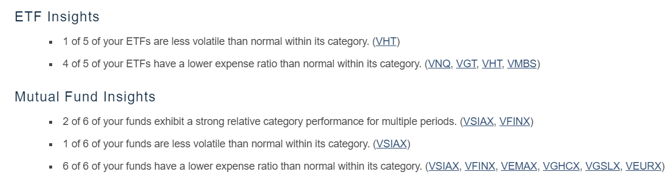
In those instances where a mutual fund or ETF is lagging its category based on long-term performance, has expenses that are higher than the typical fund in its category or is more volatile than the typical fund in its category, you may wish to dig deeper into the fund and comparable alternatives to see whether a change is warranted.
Farther down the Portfolio Insights email, the Stock, ETF and Mutual Fund Standouts sections highlight individual tickers you track in your portfolios. For stocks, you see the best- and worst-performing stock since the close of the previous week as well as the stock that is the best- and worst-rated among all those you track.
For ETFs and mutual funds, you also see tickers that have been the strongest and weakest performers over the last week, and funds and ETFs that have the strongest and weakest performance relative to their category averages over the last 10 years.
Lastly, the Portfolio Comparison section of the Portfolio Insights email shows you the asset allocation of all of the portfolios you have created with My Portfolio and then compares your allocation to the average allocation of all AAII members (A+ Investor asset allocation) as well as the to the AAII asset allocation models:
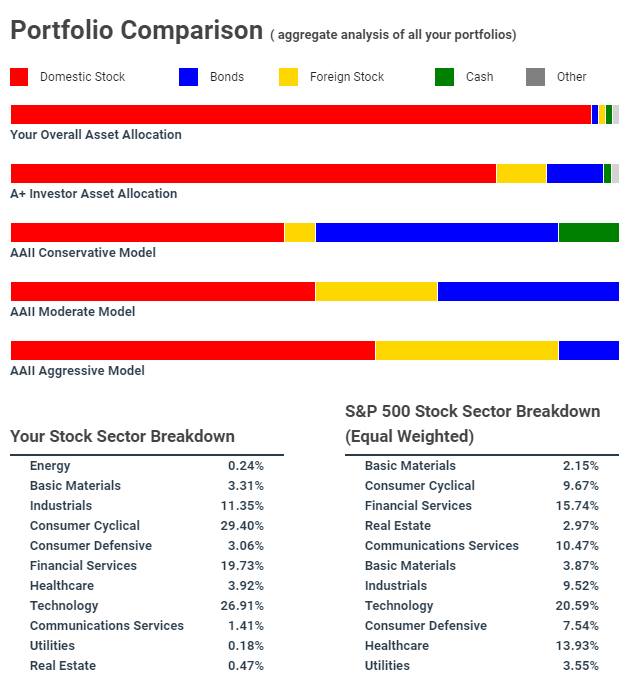
This section also computes the sector breakdown of all the individual stocks and equity mutual funds and ETFs you have in your portfolios and compares it to that of the equal-weighted S&P 500 index.
The email concludes with a Did You Know? section, where you can find useful “hacks” that help you get the most out of your A+ Investor subscription.
We designed My Portfolio to be more than just a tool for monitoring the price changes of your investments. We included features designed to help you make better decisions. My Portfolio’s analytical tools will help you identify whether you are taking on too little or too much risk as well as whether you have too much or too little exposure to certain types of investments. You can use this information to determine whether you need to adjust your allocations or are on the right path. The Portfolio Insights email is meant to be an extension of My Portfolio, providing a weekly overview of your portfolio(s) to help you monitor your holdings and make informed portfolio decisions.
If you have any questions or comments about this week’s topic, or have anything to say about A+ Investor, reach out to us directly at aplus@aaii.com.

