Recently, we added new features to My Portfolio for AAII members and A+ Investor and Platinum subscribers. A+ Investor users can now set up alerts for price activity and changes to A+ Stock Grades. For a comprehensive discussion of these new alerts, see the My Portfolio User’s Guide.
I am always interested in learning how we can make our tools and services more useful. Feel free to drop me a line at wayne@aaii.com to tell me what you think about these new alerts and how we can make them better.
With the new price alerts, you can track daily price changes for stocks, mutual funds and exchange-traded funds (ETFs) that you follow in My Portfolio. If the holdings in a selected portfolio rise or fall by the amount you specify, an alert will appear in the new My Alerts section of the My Portfolio area.
Currently, these alerts are based on close-to-close price changes and are updated daily around 6:00 p.m. (Central), Monday through Friday. Furthermore, the alerts are only displayed online, although we are working on a daily email alert to notify users of price and stock grade changes.
If you already have a portfolio of stocks, mutual funds and ETFs set up in My Portfolio, then you are ready to use the price alerts tool. If you do not have a portfolio set up in My Portfolio and want to receive price alerts, then the first step is to create a portfolio of investments to track in My Portfolio. You can learn how to set up a portfolio by clicking here.
The Manage Alerts screen is where AAII members go to manage notifications about their portfolio.
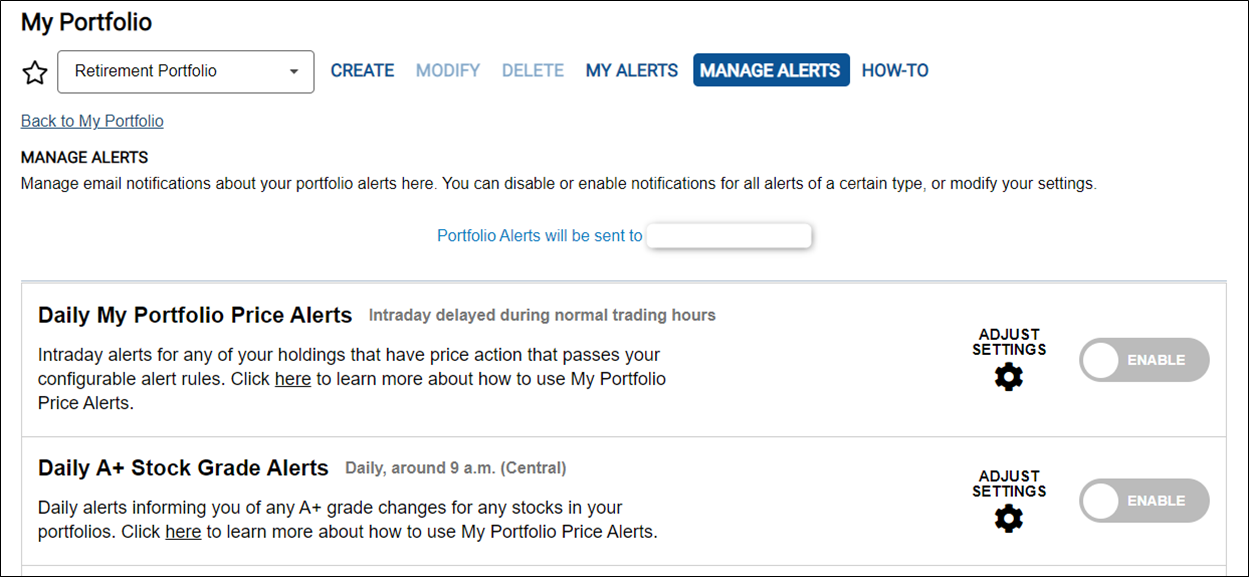
You can disable or enable notifications for all alerts (Price and A+ Stock Grade) of a certain type or modify your settings. First, you need to enable the alerts. You do this by clicking the Enable toggle for the Daily My Portfolio Price Alerts. Then you need to click Adjust Settings to manage your price alert rules. These settings are universal for all of the holdings in the portfolios that you select.
After clicking Adjust Settings, you can select the price actions you’d like to receive alerts on. The screen below shows the options you have to choose from.
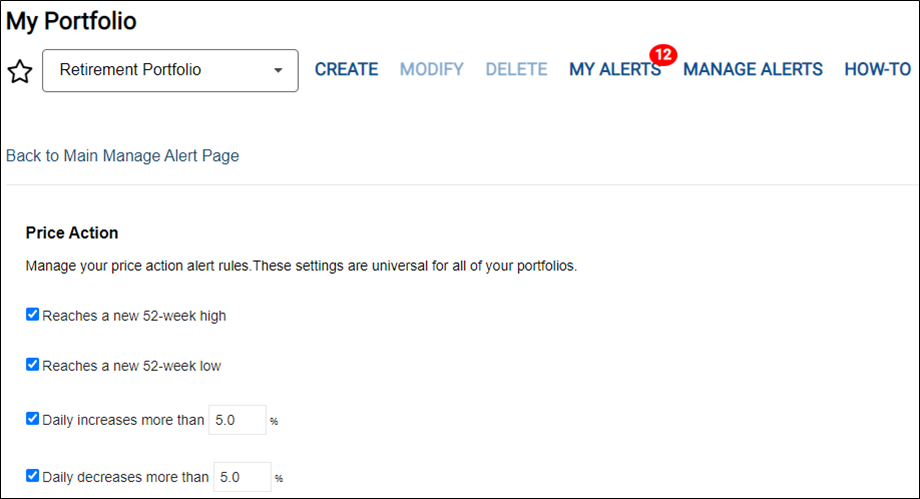
You can receive alerts for stocks, mutual funds and ETFs that hit a new intraday 52-week high or low and specify the daily percentage price increase or decrease that will trigger a price-change alert. By default, price changes of 5% or more (up or down) will trigger an alert, but you can change them to specify the percentage that is significant to you. You can define any daily increase or decrease by using any combination of whole numbers and decimals. For example, you can specify daily price changes of more than 1%, 1.5%, 2.0%, 5% or 10%, etc.
AAII members and A+ Investor subscribers also have the option under the Portfolio List on the My Alerts page to specify the portfolios that you would like to get price alerts on. The price action settings are universal for all the portfolios you select. A universal setting means that alerts are set for all of the holdings in a particular portfolio and cannot be set for individual holdings at this time.
When you add or remove a checkmark from these lists, your action is automatically saved. Also, when you change the percentage for the daily increases or decreases, your settings are automatically saved.
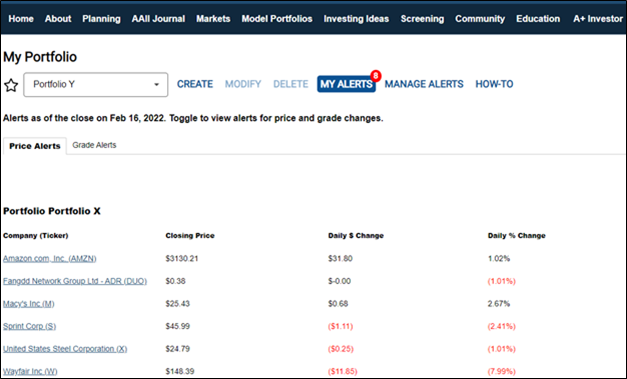
With the price alert settings selected, you can view a summary of your holdings that meet your price alert settings by clicking on My Alerts. The screen below shows the holdings that meet my selected criteria—new 52-week high and low and at least a 1% daily increase or decrease for one of my portfolios:
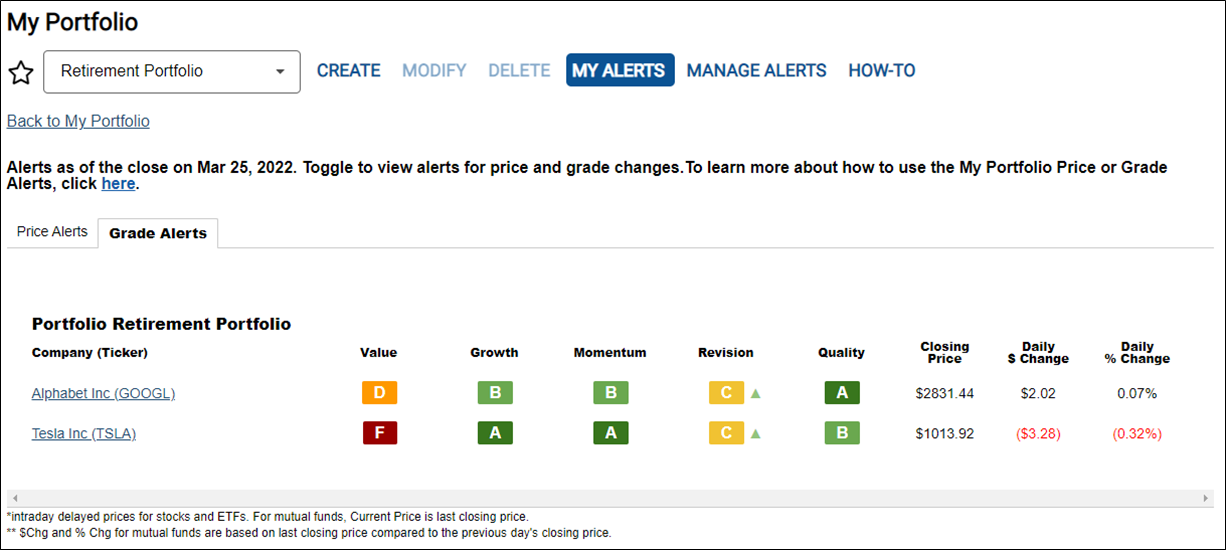
A new feature that is exclusive to A+ Investor and Platinum subscribers is an alert for changes in A+ Stock Grades.
The Grade Alerts tool allows A+ Investor and Platinum subscribers to track daily grade changes for stocks that you follow in portfolios you created with My Portfolio. These grades are only for stocks in the A+ Investor stock universe. There are no grade alerts for funds or ETFs.
The Grade Alerts are triggered if stocks in the portfolio(s) you specify meet the grade-change criteria you set up. Just like with the price alerts, these alerts are posted online at the My Portfolio area of the AAII website by going to the My Alerts section and selecting the Grade Alerts tab. We are working on a daily email that will alert you if any of your stock holdings have grade actions that pass your custom alert rules. My Portfolio grade changes are updated daily around 9:00 a.m. (Central), Tuesday through Saturday.
A+ Investor and Platinum subscribers can receive grade alerts for stocks that meet user-defined grade change movements up or down for the following grade investment factors: value, growth, momentum, earnings estimate revisions and quality. There are also settings for stocks with newly initiated grades and dropped grades.
If you already have a portfolio with stocks, you are ready to use the grade alerts tool. If you do not have a portfolio set up in My Portfolio and want to receive grade alerts, then the first step is to create a portfolio of investments to track in My Portfolio. You can learn how to set up a portfolio by clicking here.
The Manage Alerts screen is where AAII members go to manage notifications about their portfolio.
You can disable or enable notifications for all alerts (Price and A+ Stock Grade) of a certain type or modify your settings. First, you need to enable the alerts. You do this by clicking the Enable toggle for the Daily A+ Stock Grade Alerts. Then you need to click Adjust Settings to manage your grade alert rules. These settings are universal for all of the holdings in the portfolios that you select.
After clicking Adjust Settings, you can select the grade changes you’d like to receive alerts on. The screen below shows the options you have to choose from.
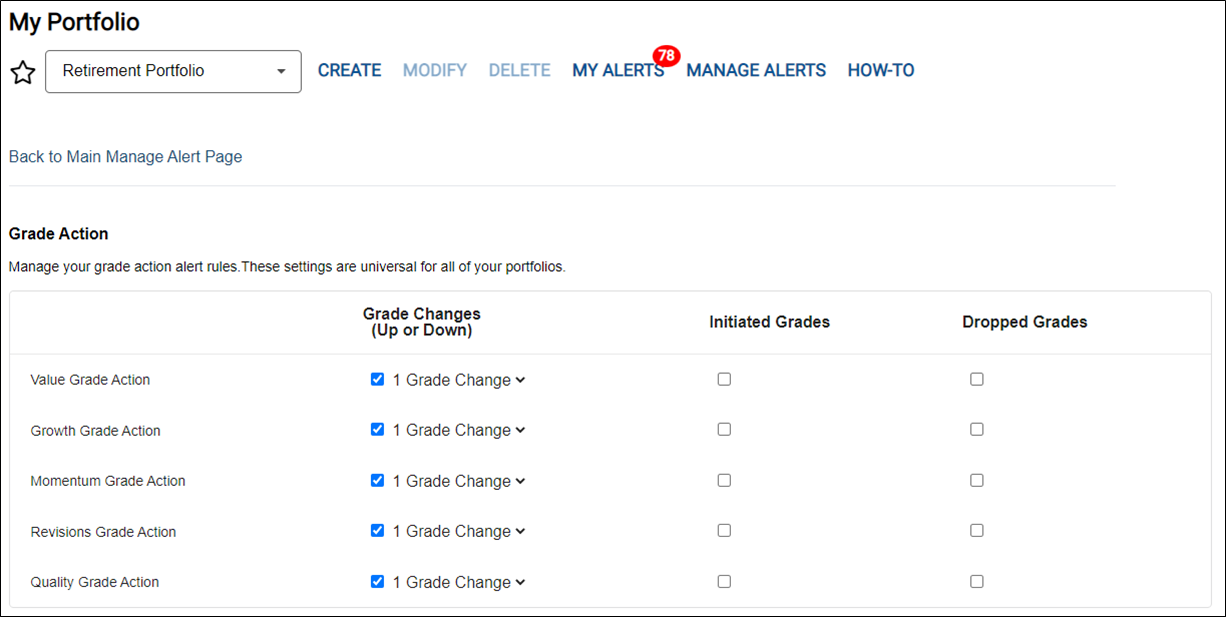
A+ Investor and Platinum subscribers can choose to receive grade alerts for all of the portfolios set up in My Portfolio or for select portfolios. The grade action settings are universal for all of the portfolios you select. A universal setting means that alerts are set for all of the holdings in a particular portfolio and cannot be set for individual holdings at this time.
Subscribers can define custom grade alert settings for stocks added to My Portfolio. The user can define grade changes (up or down) for the five grade investment factors (value, growth, momentum, earnings estimate revisions and quality). For each of these five investment factors, A+ Investor subscribers can select to view grade changes (up or down) for one grade change, two grade changes, three grade changes and four grade changes.
A+ Investor subscribers can also choose to view stocks with newly initiated grades by checking the box under Initiated Grades for each factor. For example, some stocks may not presently have a grade for a certain factor because they don’t meet the minimum number of valid (non-null) ratios and corresponding ranking to be assigned a grade. When they do meet the criteria for generating a grade, you can be notified.
A+ Investor subscribers can also choose to view stocks with newly dropped grades by checking the box under Dropped Grades. Similar to newly initiated grades, there are some stocks that had a grade for a certain factor because they met the minimum number of valid (non-null) ratios and corresponding ranking to be assigned a grade, but now they do not.
With the desired grade alert settings selected, you can view a summary of your stocks that meet your grade alert settings by clicking on My Alerts at the top of the page, then choosing the Grade Alerts tab. The up or down arrow next to the grade letter shows you the direction of the change in grade.